Visit Counter

Showing posts with label Oracle 12c RAC. Show all posts

Sunday, January 1, 2017

12c Grid Infrastructure diskmon Will be Offline by Default in Non-Exadata Environment


As Grid Infrastructure daemon diskmon.bin is used for Exadata fencing, started from 11.2.0.3, resource ora.diskmon will be offline in non-Exadata environment. This is expected behaviour change.


$ crsctl stat res -t -init
--------------------------------------------------------------------------------
NAME           TARGET  STATE        SERVER                   STATE_DETAILS       
--------------------------------------------------------------------------------
Cluster Resources
--------------------------------------------------------------------------------
ora.asm
      1        ONLINE  ONLINE       pricedev1-lnx            Started             
ora.cluster_interconnect.haip
      1        ONLINE  ONLINE       pricedev1-lnx                                
ora.crf
      1        ONLINE  ONLINE       pricedev1-lnx                                
ora.crsd
      1        ONLINE  ONLINE       pricedev1-lnx                                
ora.cssd
      1        ONLINE  ONLINE       pricedev1-lnx                                
ora.cssdmonitor
      1        ONLINE  ONLINE       pricedev1-lnx                                
ora.ctssd
      1        ONLINE  ONLINE       pricedev1-lnx            OBSERVER            
ora.diskmon
      1        OFFLINE OFFLINE                                                   
ora.drivers.acfs
      1        ONLINE  ONLINE       pricedev1-lnx                                
ora.evmd
      1        ONLINE  ONLINE       pricedev1-lnx                                
ora.gipcd
      1        ONLINE  ONLINE       pricedev1-lnx                                
ora.gpnpd
      1        ONLINE  ONLINE       pricedev1-lnx                                
ora.mdnsd
      1        ONLINE  ONLINE       pricedev1-lnx  


Refer:
11.2.0.3 Grid Infrastructure diskmon Will be Offline by Default in Non-Exadata Environment (Doc ID 1346881.1)

Monday, December 26, 2016

Convert non-RAC database to RAC database using rconfig


In $ORACLE_HOME/assistants/rconfig/sampleXMLs directory, there are two templates ConvertToRAC_AdminManaged.xml and ConvertToRAC_PolicyManaged.xml that are used to convert a single instance database to RAC admin managed or policy managed database respectively.
In this article we will convert the single instance database to an admin managed RAC database.

Source Server:

$ORACLE_HOME/assistants/rconfig/sampleXMLs


Change the following parameters according to your environment


Convert verify="ONLY">
<SourceDBHome>/ora/oracle/oracle12/product/12.1.0/dbhome_12</n:SourceDBHome>
<TargetDBHome>/ora/oracle/product/12.1.0/dbhome_1</n:TargetDBHome>
 <SourceDBInfo SID="oratech">
 <Password>afi123</n:Password>
 <Node name="rac01"/>
 <Node name="rac02"/>
 <InstancePrefix>oratech</n:InstancePrefix>
  <SharedStorage type="ASM">
  <TargetFlashRecoveryArea>+DATA</n:TargetFlashRecoveryArea>


[oracle@rac01 bin]$ cat contorac.xml

<?xml version="1.0" encoding="UTF-8"?>
<n:RConfig xmlns:n="http://www.oracle.com/rconfig"
           xmlns:xsi="http://www.w3.org/2001/XMLSchema-instance"
           xsi:schemaLocation="http://www.oracle.com/rconfig rconfig.xsd">
    <n:ConvertToRAC>
<!-- Verify does a precheck to ensure all pre-requisites are met, before the conversion is attempted. Allowable values are: YES|NO|ONLY -->
        <n:Convert verify="ONLY">
<!--Specify current OracleHome of non-rac database for SourceDBHome -->
              <n:SourceDBHome>/ora/oracle/oracle12/product/12.1.0/dbhome_12</n:SourceDBHome>
<!--Specify OracleHome where the rac database should be configured. It can be same as SourceDBHome -->
              <n:TargetDBHome>/ora/oracle/product/12.1.0/dbhome_1</n:TargetDBHome>
<!--Specify SID of non-rac database and credential. User with sysdba role is required to perform conversion -->
              <n:SourceDBInfo SID="oratech">
                <n:Credentials>
                  <n:User>sys</n:User>
                  <n:Password>xyz</n:Password>
                  <n:Role>sysdba</n:Role>
                </n:Credentials>
<!--Specify Windows Secure Oracle Home Credentials if the Oracle Home was installed with Secure User option  -->
<!--
                <n:Credentials>
                  <n:User>UserDomain\SecureHomeUserName</n:User>
                  <n:Password>oracle</n:Password>
                  <n:Role>windows_svc</n:Role>
                </n:Credentials>
-->
              </n:SourceDBInfo>
<!--Specify the list of nodes that should have rac instances running for the Admin Managed Cluster Database. LocalNode should be the first node in this nodelist. -->
              <n:NodeList>
                <n:Node name="rac01"/>
                <n:Node name="rac02"/>
              </n:NodeList>
<!--Specify RacOneNode along with servicename to convert database to RACOne Node -->
              <!--n:RacOneNode  servicename="salesrac1service"/-->
<!--Instance Prefix tag is optional starting with 11.2. If left empty, it is derived from db_unique_name.-->
              <n:InstancePrefix>oratech</n:InstancePrefix>
<!-- Listener details are no longer needed starting 11.2. Database is registered with default listener and SCAN listener running from Oracle Grid Infrastructure home. -->
<!--Specify the type of storage to be used by rac database. Allowable values are CFS|ASM. The non-rac database should have same storage type. ASM credentials are no needed for conversion. -->
              <n:SharedStorage type="ASM">
<!--Specify Database Area Location to be configured for rac database.If this field is left empty, current storage will be used for rac database. For CFS, this field will have directory path. -->
                <n:TargetDatabaseArea>+DATA</n:TargetDatabaseArea>
<!--Specify Fast Recovery Area to be configured for rac database. If this field is left empty, current recovery area of non-rac database will be configured for rac database. If current database is not using recovery Area, the resulting rac database will not have a recovery area. -->
                <n:TargetFlashRecoveryArea>+DATA</n:TargetFlashRecoveryArea>
              </n:SharedStorage>
        </n:Convert>
    </n:ConvertToRAC>
</n:RConfig>
[oracle@rac01 bin]$


[oracle@rac01 bin]$ ps -eaf|grep smon

oracle    3858  2537  0 13:47 pts/13   00:00:00 grep smon
oracle    4695     1  0 Dec21 ?        00:00:38 ora_smon_orasoft1
oracle   16287     1  0 Dec21 ?        00:00:14 asm_smon_+ASM1
oracle   17562     1  0 Dec22 ?        00:00:16 ora_smon_test

[oracle@rac01 bin]$ pwd


[oracle@rac01 bin]$ ./rconfig /ora/oracle/oracle12/product/12.1.0/dbhome_12/assistants/contorac.xml
<?xml version="1.0" ?>
<RConfig>
      <Response>
        <Result code="1" >
          Got Exception
        </Result>
       <ErrorDetails>
Error oracle.sysman.assistants.rconfig.parser.ParserException:File Not Found
       </ErrorDetails>
      </Response>
</RConfig>


I got above error while run the contorac.xml file then I copy the controrac.xml under bin directory and then run the rconfig contorac.xml

$ cd /ora/oracle/oracle12/product/12.1.0/dbhome_12/assistants/rconfig/sampleXMLs

$ cp contrac.xml /ora/oracle/oracle12/product/12.1.0/dbhome_12/bin


[oracle@rac01 bin]$ ./rconfig contorac.xml
<?xml version="1.0" ?>
<RConfig version="1.1" >
<ConvertToRAC>
    <Convert>
      <Response>
        <Result code="0" >
          Operation Succeeded
        </Result>
      </Response>
      <ReturnValue type="object">
There is no return value for this step     </ReturnValue>
    </Convert>
  </ConvertToRAC></RConfig>

[oracle@rac01 bin]$


• Logs to monitor
– Single instance database alert log file.
– RAC database alert log file.
– /u01/app/oracle/cfgtoollogs/rconfig [records entire operation step-by-step]
– For RMAN log and SQL log, check the respective directories under /u01/app/oracle/cfgtoollogs/rconfig/db


Monday, June 27, 2016

Log Files in Oracle RAC


The Cluster Ready Services Daemon (crsd) Log Files


Log files for the CRSD process (crsd) can be found in the following directories:
ORA_CRS_HOME/log/hostname/crsd
the crsd.log file is archived every 10MB as crsd.101, crsd.102 ...
ORACLE_CRS_HOME/log//alert.log

Oracle Cluster Registry (OCR) Log Files

The Oracle Cluster Registry (OCR) records log information in the following location:
ORA_CRS_HOME/log/hostname/client

Cluster Synchronization Services (CSS) Log Files

You can find CSS information that the OCSSD generates in log files in the following locations:
ORA_CRS_HOME/log/hostname/cssd
OCSSD responsible for inter node health monitoring and instance endpoint recovery.
It runs as oracle user.  
The cssd.log file is archived every 20MB as cssd.101, cssd.102....

Event Manager (EVM) Log Files

Event Manager (EVM) information generated by evmd is recorded in log files in the following locations:
ORA_CRS_HOME/log/hostname/evmd

RACG Log Files

The Oracle RAC high availability trace files are located in the following two locations:
ORA_CRS_HOME/log/hostname/racg
$ORACLE_HOME/log/hostname/racg
Core files are in the sub-directories of the log directories. Each RACG executable has a sub-directory assigned exclusively for that executable. The name of the RACG executable sub-directory is the same as the name of the executable.

VIP Log Files

You can find VIP related log files under following location :
ORA_CRS_HOME/log/nodename/racg

OCR logs 
OCR logs (ocrdump, ocrconfig, ocrcheck) log files are stored in $ORA_CRS_HOME/log//client/ directory. 

SRVCTL logs

srvctl logs are stored in two locations, $ORA_CRS_HOME/log//client/ and in $ORACLE_HOME/log//client/ directories.

Monday, June 6, 2016

CLSRSC-117: Failed to start Oracle Clusterware stack Oracle 12c clusterware


Install Grid software on RAC01 was sucessfully but Second RAC02 having a problem while running the root.sh script.


RAC02:


#/ora/grid/root.sh


[INS-35423]The installer has detected that Oracle Clusterware is not running on the local Node.

I am running the runinstaller as oracle user and it can see the cluster fine.

$ crsctl check crs
CRS-4638: Oracle High Availability Services is online
CRS-4537: Can not Cluster Ready Services is offline
CRS-4529: Cluster Synchronization Services is online
CRS-4533: Event Manager is offline


/ora/grid/log/rac02/agent/ohasd/oraagent_oracle/oraagent_oracle.log


status msg [CRS-5017: The resource action "ora.asm start" encountered the following error:
ORA-00443: background process "MMNL" did not start
. For details refer to "(:CLSN00107:)" in "/ora/grid/log/rac02/agent/ohasd/oraagent_oracle/oraagent_oracle.log".
] for start for resource: ora.asm 1 1
2016-06-06 23:03:49.377: [    AGFW][3043145488] {0:9:5} Agent sending reply for: RESOURCE_START[ora.asm 1 1] ID 4098:584
2016-06-06 23:03:49.449: [ora.asm][3045246736] {0:9:5} [start] (:CLSN00107:) clsn_agent::start }


Solution:


Rac installation  on Virtual Machine

I increased the memory of rac02 server.

[root@rac02 grid]# ./root.sh
Performing root user operation for Oracle 12c 

The following environment variables are set as:
    ORACLE_OWNER= oracle
    ORACLE_HOME=  /ora/grid

Enter the full pathname of the local bin directory: [/usr/local/bin]: 
The contents of "dbhome" have not changed. No need to overwrite.
The contents of "oraenv" have not changed. No need to overwrite.
The contents of "coraenv" have not changed. No need to overwrite.

Entries will be added to the /etc/oratab file as needed by
Database Configuration Assistant when a database is created
Finished running generic part of root script.
Now product-specific root actions will be performed.
Using configuration parameter file: /ora/grid/crs/install/crsconfig_params
2016/06/07 00:00:02 CLSRSC-363: User ignored prerequisites during installation

CRS-2791: Starting shutdown of Oracle High Availability Services-managed resources on 'rac02'
CRS-2673: Attempting to stop 'ora.crsd' on 'rac02'
CRS-2790: Starting shutdown of Cluster Ready Services-managed resources on 'rac02'
CRS-2673: Attempting to stop 'ora.asm' on 'rac02'
CRS-2673: Attempting to stop 'ora.LISTENER_SCAN1.lsnr' on 'rac02'
CRS-2677: Stop of 'ora.LISTENER_SCAN1.lsnr' on 'rac02' succeeded
CRS-2673: Attempting to stop 'ora.scan1.vip' on 'rac02'
CRS-2677: Stop of 'ora.asm' on 'rac02' succeeded
CRS-2677: Stop of 'ora.scan1.vip' on 'rac02' succeeded
CRS-2672: Attempting to start 'ora.scan1.vip' on 'rac01'
CRS-2676: Start of 'ora.scan1.vip' on 'rac01' succeeded
CRS-2672: Attempting to start 'ora.LISTENER_SCAN1.lsnr' on 'rac01'
CRS-2676: Start of 'ora.LISTENER_SCAN1.lsnr' on 'rac01' succeeded
CRS-2673: Attempting to stop 'ora.ons' on 'rac02'
CRS-2677: Stop of 'ora.ons' on 'rac02' succeeded
CRS-2673: Attempting to stop 'ora.net1.network' on 'rac02'
CRS-2677: Stop of 'ora.net1.network' on 'rac02' succeeded
CRS-2792: Shutdown of Cluster Ready Services-managed resources on 'rac02' has completed
CRS-2677: Stop of 'ora.crsd' on 'rac02' succeeded
CRS-2673: Attempting to stop 'ora.ctssd' on 'rac02'
CRS-2673: Attempting to stop 'ora.mdnsd' on 'rac02'
CRS-2673: Attempting to stop 'ora.gpnpd' on 'rac02'
CRS-2677: Stop of 'ora.gpnpd' on 'rac02' succeeded
CRS-2677: Stop of 'ora.mdnsd' on 'rac02' succeeded
CRS-2677: Stop of 'ora.ctssd' on 'rac02' succeeded
CRS-2673: Attempting to stop 'ora.evmd' on 'rac02'
CRS-2673: Attempting to stop 'ora.storage' on 'rac02'
CRS-2677: Stop of 'ora.storage' on 'rac02' succeeded
CRS-2673: Attempting to stop 'ora.asm' on 'rac02'
CRS-2677: Stop of 'ora.evmd' on 'rac02' succeeded
CRS-2677: Stop of 'ora.asm' on 'rac02' succeeded
CRS-2673: Attempting to stop 'ora.cluster_interconnect.haip' on 'rac02'
CRS-2677: Stop of 'ora.cluster_interconnect.haip' on 'rac02' succeeded
CRS-2673: Attempting to stop 'ora.cssd' on 'rac02'
CRS-2677: Stop of 'ora.cssd' on 'rac02' succeeded
CRS-2673: Attempting to stop 'ora.gipcd' on 'rac02'
CRS-2677: Stop of 'ora.gipcd' on 'rac02' succeeded
CRS-2793: Shutdown of Oracle High Availability Services-managed resources on 'rac02' has completed
CRS-4133: Oracle High Availability Services has been stopped.
CRS-4123: Starting Oracle High Availability Services-managed resources
CRS-2672: Attempting to start 'ora.mdnsd' on 'rac02'
CRS-2672: Attempting to start 'ora.evmd' on 'rac02'
CRS-2676: Start of 'ora.mdnsd' on 'rac02' succeeded
CRS-2676: Start of 'ora.evmd' on 'rac02' succeeded
CRS-2672: Attempting to start 'ora.gpnpd' on 'rac02'
CRS-2676: Start of 'ora.gpnpd' on 'rac02' succeeded
CRS-2672: Attempting to start 'ora.gipcd' on 'rac02'
CRS-2676: Start of 'ora.gipcd' on 'rac02' succeeded
CRS-2672: Attempting to start 'ora.cssdmonitor' on 'rac02'
CRS-2676: Start of 'ora.cssdmonitor' on 'rac02' succeeded
CRS-2672: Attempting to start 'ora.cssd' on 'rac02'
CRS-2672: Attempting to start 'ora.diskmon' on 'rac02'
CRS-2676: Start of 'ora.diskmon' on 'rac02' succeeded
CRS-2789: Cannot stop resource 'ora.diskmon' as it is not running on server 'rac02'
CRS-2676: Start of 'ora.cssd' on 'rac02' succeeded
CRS-2672: Attempting to start 'ora.cluster_interconnect.haip' on 'rac02'
CRS-2672: Attempting to start 'ora.ctssd' on 'rac02'
CRS-2676: Start of 'ora.ctssd' on 'rac02' succeeded
CRS-2676: Start of 'ora.cluster_interconnect.haip' on 'rac02' succeeded
CRS-2672: Attempting to start 'ora.asm' on 'rac02'
CRS-2676: Start of 'ora.asm' on 'rac02' succeeded
CRS-2672: Attempting to start 'ora.storage' on 'rac02'
CRS-2676: Start of 'ora.storage' on 'rac02' succeeded
CRS-2672: Attempting to start 'ora.crsd' on 'rac02'
CRS-2676: Start of 'ora.crsd' on 'rac02' succeeded
CRS-6017: Processing resource auto-start for servers: rac02
CRS-2673: Attempting to stop 'ora.LISTENER_SCAN1.lsnr' on 'rac01'
CRS-2672: Attempting to start 'ora.ons' on 'rac02'
CRS-2677: Stop of 'ora.LISTENER_SCAN1.lsnr' on 'rac01' succeeded
CRS-2673: Attempting to stop 'ora.scan1.vip' on 'rac01'
CRS-2677: Stop of 'ora.scan1.vip' on 'rac01' succeeded
CRS-2672: Attempting to start 'ora.scan1.vip' on 'rac02'
CRS-2676: Start of 'ora.scan1.vip' on 'rac02' succeeded
CRS-2672: Attempting to start 'ora.LISTENER_SCAN1.lsnr' on 'rac02'
CRS-2676: Start of 'ora.ons' on 'rac02' succeeded
CRS-2676: Start of 'ora.LISTENER_SCAN1.lsnr' on 'rac02' succeeded
CRS-6016: Resource auto-start has completed for server rac02
CRS-6024: Completed start of Oracle Cluster Ready Services-managed resources
CRS-4123: Oracle High Availability Services has been started.
2016/06/07 00:04:38 CLSRSC-343: Successfully started Oracle clusterware stack

2016/06/07 00:05:22 CLSRSC-325: Configure Oracle Grid Infrastructure for a Cluster ... succeeded

[root@rac02 grid]# 

Wednesday, April 15, 2015

Oracle Basic RAC Administration Commands


Oracle RAC Basic Administration Commands.

1. Startup / Download database (all nodes)


/ora/12/grid/bin

[oracle@rac1 bin]$ ./srvctl status database -d racora1
Instance racora11 is running on node rac1
Instance racora12 is running on node rac2
Instance racora13 is running on node rac3
[oracle@rac1 bin]$

[oracle@rac1 bin]$ ./srvctl stop database -d racora1

[oracle@rac1 bin]$ ./srvctl status database -d racora1
Instance racora11 is not running on node rac1
Instance racora12 is not running on node rac2
Instance racora13 is not running on node rac3

[oracle@rac1 bin]$ ./srvctl start  database -d racora1

[oracle@rac1 bin]$ ./srvctl status database -d racora1
Instance racora11 is running on node rac1
Instance racora12 is running on node rac2
Instance racora13 is running on node rac3
[oracle@rac1 bin]$


[oracle@rac1 bin]$ ./sqlplus /nolog

SQL*Plus: Release 12.1.0.1.0 Production on Tue Apr 14 21:43:23 2015

Copyright (c) 1982, 2013, Oracle.  All rights reserved.

SQL> conn sys/afi123@racora1 as sysdba
Connected.
SQL> select inst_name from v$active_instances;

INST_NAME
------------------------------------------------------------
rac1.localdomain:racora11
rac2.localdomain:racora12
rac3.localdomain:racora13


SQL> !cat /etc/oratab
#Backup file is  /ora/oracle/app/oracle/product/12.1.0/dbhome_1/srvm/admin/oratab.bak.rac1 line added by Agent
#


# This file is used by ORACLE utilities.  It is created by root.sh
# and updated by either Database Configuration Assistant while creating
# a database or ASM Configuration Assistant while creating ASM instance.

# A colon, ':', is used as the field terminator.  A new line terminates
# the entry.  Lines beginning with a pound sign, '#', are comments.
#
# Entries are of the form:
#   $ORACLE_SID:$ORACLE_HOME:<N|Y>:
#
# The first and second fields are the system identifier and home
# directory of the database respectively.  The third field indicates
# to the dbstart utility that the database should , "Y", or should not,
# "N", be brought up at system boot time.
#
# Multiple entries with the same $ORACLE_SID are not allowed.
#
#
+ASM1:/ora/12/grid:N: # line added by Agent
racora1:/ora/oracle/app/oracle/product/12.1.0/dbhome_1:N: # line added by Agent

SQL>

SQL> startup
ORACLE instance started.

Total System Global Area  705662976 bytes
Fixed Size    2292384 bytes
Variable Size  360711520 bytes
Database Buffers  339738624 bytes
Redo Buffers    2920448 bytes
Database mounted.
Database opened.
SQL>


SQL> select instance_name,status from gv$instance;

INSTANCE_NAME STATUS
---------------- ------------
racora12 OPEN
racora11 OPEN
racora13 OPEN


2. Start / Stop & check CRS (Cluster Ready Service)


[oracle@rac1 bin]$ ./crsctl check crs
CRS-4638: Oracle High Availability Services is online
CRS-4537: Cluster Ready Services is online
CRS-4529: Cluster Synchronization Services is online
CRS-4533: Event Manager is online


[oracle@rac1 bin]$ ./crs_stat -t
Name           Type           Target    State     Host      
------------------------------------------------------------
ora.DATA.dg    ora....up.type ONLINE    ONLINE    rac1      
ora....ER.lsnr ora....er.type ONLINE    ONLINE    rac1      
ora....N1.lsnr ora....er.type ONLINE    ONLINE    rac1      
ora....N2.lsnr ora....er.type ONLINE    ONLINE    rac3      
ora....N3.lsnr ora....er.type ONLINE    ONLINE    rac2      
ora.asm        ora.asm.type   ONLINE    ONLINE    rac1      
ora.cvu        ora.cvu.type   ONLINE    ONLINE    rac2      
ora....network ora....rk.type ONLINE    ONLINE    rac1      
ora.oc4j       ora.oc4j.type  OFFLINE   OFFLINE              
ora.ons        ora.ons.type   ONLINE    ONLINE    rac1      
ora....SM1.asm application    ONLINE    ONLINE    rac1      
ora....C1.lsnr application    ONLINE    ONLINE    rac1      
ora.rac1.ons   application    ONLINE    ONLINE    rac1      
ora.rac1.vip   ora....t1.type ONLINE    ONLINE    rac1      
ora....SM2.asm application    ONLINE    ONLINE    rac2      
ora....C2.lsnr application    ONLINE    ONLINE    rac2      
ora.rac2.ons   application    ONLINE    ONLINE    rac2      
ora.rac2.vip   ora....t1.type ONLINE    ONLINE    rac2      
ora....SM3.asm application    ONLINE    ONLINE    rac3      
ora....C3.lsnr application    ONLINE    ONLINE    rac3      
ora.rac3.ons   application    ONLINE    ONLINE    rac3      
ora.rac3.vip   ora....t1.type ONLINE    ONLINE    rac3      
ora.racdb.db   ora....se.type ONLINE    OFFLINE              
ora.racora1.db ora....se.type ONLINE    ONLINE    rac1      
ora.scan1.vip  ora....ip.type ONLINE    ONLINE    rac1      
ora.scan2.vip  ora....ip.type ONLINE    ONLINE    rac3      
ora.scan3.vip  ora....ip.type ONLINE    ONLINE    rac2      


[oracle@rac1 bin]$ ./crsctl check cluster -all
**************************************************************
rac1:
CRS-4537: Cluster Ready Services is online
CRS-4529: Cluster Synchronization Services is online
CRS-4533: Event Manager is online
**************************************************************
rac2:
CRS-4537: Cluster Ready Services is online
CRS-4529: Cluster Synchronization Services is online
CRS-4533: Event Manager is online
**************************************************************
rac3:
CRS-4537: Cluster Ready Services is online
CRS-4529: Cluster Synchronization Services is online
CRS-4533: Event Manager is online
**************************************************************


3. Start /Stop an individual instance

[oracle@rac1 bin]$ ./srvctl stop instance -d racora1 -i racora13
[oracle@rac1 bin]$ ./srvctl start instance -d racora1 -i racora13

4. Locate the voting Disk


[oracle@rac1 bin]$ ./crsctl query css votedisk

##  STATE    File Universal Id                File Name Disk group
--  -----    -----------------                --------- ---------
 1. ONLINE   825b153bbbc84fa7bf3f735175abf312 (/dev/oracleasm/disks/DISK1) [DATA]
Located 1 voting disk(s).

[oracle@rac1 bin]$ ocrcheck
bash: ocrcheck: command not found
[oracle@rac1 bin]$ ./ocrcheck
Status of Oracle Cluster Registry is as follows :
Version                  :          4
Total space (kbytes)     :     409568
Used space (kbytes)      :       1628
Available space (kbytes) :     407940
ID                       : 1066761921
Device/File Name         :      +DATA
                                    Device/File integrity check succeeded

                                    Device/File not configured

                                    Device/File not configured

                                    Device/File not configured

                                    Device/File not configured

Cluster registry integrity check succeeded

Logical corruption check bypassed due to non-privileged user


5. To prevent a database starting at boot time.

[oracle@rac1 bin]$ ./srvctl disable database -d racora1


Wednesday, April 8, 2015

[INS-30160] Installer has detected the nodes specified for add node operation have uncleaned Inventory


I encountered this error while extending   2 node 12c cluster to 3 nodes.


Cause:
In /ora/oracle/app/oraInventory directory there was an oraInventory directory exists. Though the directory is emptly oui still assuming that there is some content in this directory.
Action:
Delete/Remove oraInventory directory from nodes3 on which you are facing Issues. OUI will create this directory after successful addition of nodes.

Tuesday, April 7, 2015

Adding new node to 12c RAC Cluster


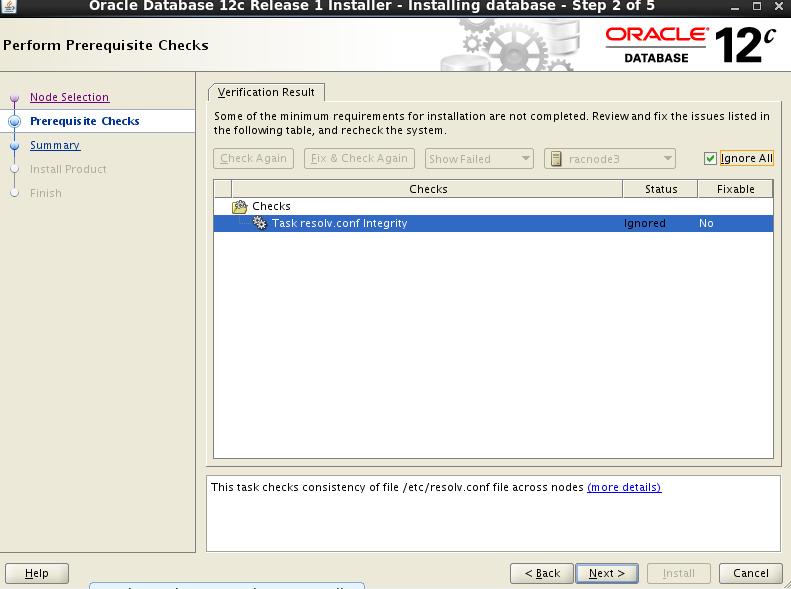
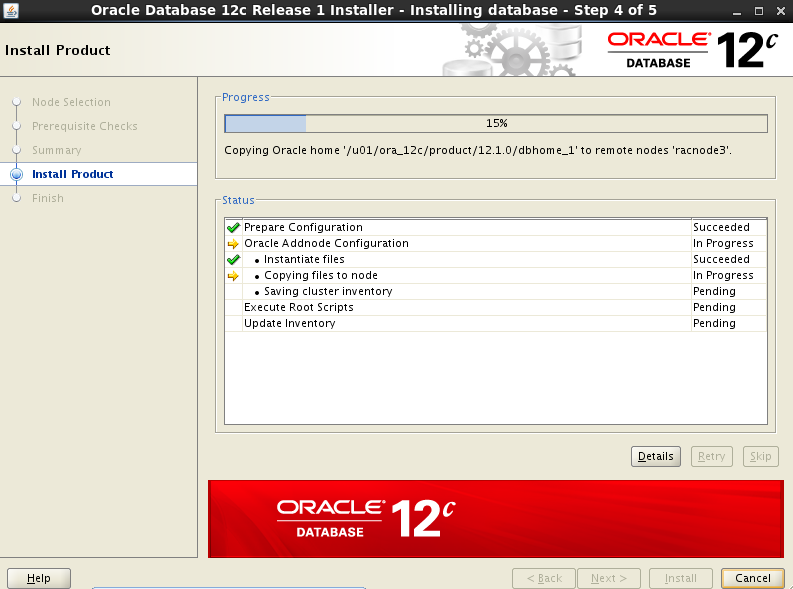
This is a step by step article for adding a new node to an existing 2  node 12c Grid Infrastructure cluster. I've demonstrated this post on virtual box. This post will be helpful for those who wants to practice adding of nodes for TESTING/DEMONSTRATION purpose and it will be also helpful for those who wants to add a node in a real production environment.


1) Install OS same as other surviving cluster nodes
2) Configure shared Storage
3) Configure network (public, private and virtual)
4) Configure all OS pre-requisites (users, groups, directories, kernel parameters etc)
5) Run cluvfy to verify addition of node
6) Add node to an existing 12c cluster
7) Verify Services on all cluster nodes
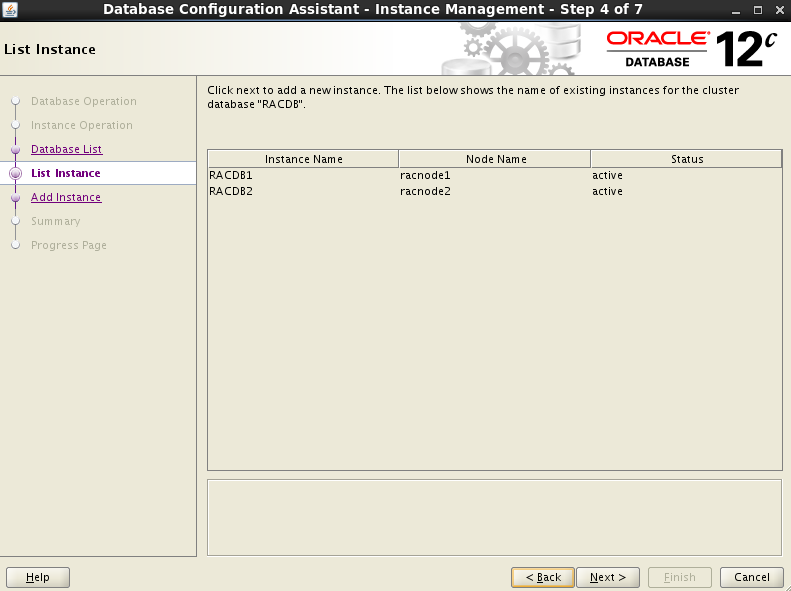
8) Add Instance to a third node


 Configure SSH Setup for racnode1 racnode2 racnode3


$ mkdir .ssh  (Under /ora/oracle/.ssh) if directory not exists.
$ chmod 700 .ssh
$ /usr/bin/ssh-keygen -t  dsa

At the prompts, accept the default location for the key file (press Enter).


Same steps you have to do in rac2,rac3
Then, add the DSA key to the authorized_keys file using the following commands:
$ ls
$ cat id_dsa.pub >> authorized_keys
$ scp authorized_keys rac2:/ora/oracle/.ssh/


RAC3 


$cat id_dsa.pub >> authorized_keys


All racnodes having authorized_keys file including each racnode id_dsa.pub content as well.

Here u can see the authorized_keys file rac1.localdomain,rac2.localdomain,rac3.localdomain entries.


Verify ssh setup from all cluster nodes:


RAC1
-----------------------------------------------

$ssh rac2 date

return date

$ ssh rac3 date

retrun date

-------------------------------------------------


RAC2
-------------------------------------------------

$ssh rac1 date
return date
$ssh rac3 date
return date

RAC3
---------------------------------------------------

$ssh rac1 date
$ssh rac2 date


- Run cluvfy to verify all pre-requisites are in place and node is ready to be added in an existing cluster.

[oracle@rac1] cd /ora/12/grid/bin/
[oracle@rac1] cluvfy stage -pre nodeadd -n rac3 -verbose


6) Add node to an existing 12c cluster:

[oracle@rac1] cd /ora/12/grid/bin/
[oracle@rac1] ./addnode.sh


running root.sh script:


[root@racnode3 ~]# /u01/oraInventory/orainstRoot.sh
Changing permissions of /u01/oraInventory.
Adding read,write permissions for group.
Removing read,write,execute permissions for world.

Changing groupname of /u01/oraInventory to dbarac.
The execution of the script is complete.
[root@racnode3 ~]# 


------------------


[root@racnode3 ~]# sh /u01/grid_12c/root.sh
Performing root user operation for Oracle 12c 

The following environment variables are set as:
    ORACLE_OWNER= oracle
    ORACLE_HOME=  /ora/12/grid/

Enter the full pathname of the local bin directory: [/usr/local/bin]: 
   Copying dbhome to /usr/local/bin ...
   Copying oraenv to /usr/local/bin ...
   Copying coraenv to /usr/local/bin ...


Creating /etc/oratab file...
Entries will be added to the /etc/oratab file as needed by
Database Configuration Assistant when a database is created
Finished running generic part of root script.
Now product-specific root actions will be performed.
Relinking oracle with rac_on option
Using configuration parameter file: /u01/grid_12c/crs/install/crsconfig_params
2014/05/13 10:58:57 CLSRSC-363: User ignored prerequisites during installation

OLR initialization - successful
2014/05/13 10:59:39 CLSRSC-330: Adding Clusterware entries to file 'oracle-ohasd.conf'

CRS-4133: Oracle High Availability Services has been stopped.
CRS-4123: Oracle High Availability Services has been started.
CRS-4133: Oracle High Availability Services has been stopped.
CRS-4123: Oracle High Availability Services has been started.
CRS-2791: Starting shutdown of Oracle High Availability Services-managed resources on 'racnode3'
CRS-2673: Attempting to stop 'ora.drivers.acfs' on 'racnode3'
CRS-2677: Stop of 'ora.drivers.acfs' on 'racnode3' succeeded
CRS-2793: Shutdown of Oracle High Availability Services-managed resources on 'racnode3' has completed
CRS-4133: Oracle High Availability Services has been stopped.
CRS-4123: Starting Oracle High Availability Services-managed resources
CRS-2672: Attempting to start 'ora.mdnsd' on 'rac3'
CRS-2672: Attempting to start 'ora.evmd' on 'rac3'
CRS-2676: Start of 'ora.mdnsd' on 'racnode3' succeeded
CRS-2676: Start of 'ora.evmd' on 'racnode3' succeeded
CRS-2672: Attempting to start 'ora.gpnpd' on 'rac3'
CRS-2676: Start of 'ora.gpnpd' on 'racnode3' succeeded
CRS-2672: Attempting to start 'ora.gipcd' on 'racnode3'
CRS-2676: Start of 'ora.gipcd' on 'racnode3' succeeded
CRS-2672: Attempting to start 'ora.cssdmonitor' on 'rac3'
CRS-2676: Start of 'ora.cssdmonitor' on 'racnode3' succeeded
CRS-2672: Attempting to start 'ora.cssd' on 'rac3'
CRS-2672: Attempting to start 'ora.diskmon' on 'rac3'
CRS-2676: Start of 'ora.diskmon' on 'racnode3' succeeded
CRS-2789: Cannot stop resource 'ora.diskmon' as it is not running on server 'racnode3'
CRS-2676: Start of 'ora.cssd' on 'racnode3' succeeded
CRS-2672: Attempting to start 'ora.cluster_interconnect.haip' on 'racnode3'
CRS-2672: Attempting to start 'ora.ctssd' on 'racnode3'
CRS-2676: Start of 'ora.ctssd' on 'racnode3' succeeded
CRS-2676: Start of 'ora.cluster_interconnect.haip' on 'racnode3' succeeded
CRS-2672: Attempting to start 'ora.asm' on 'rac3'
CRS-2676: Start of 'ora.asm' on 'racnode3' succeeded
CRS-2672: Attempting to start 'ora.storage' on 'rac3'
CRS-2676: Start of 'ora.storage' on 'racnode3' succeeded
CRS-2672: Attempting to start 'ora.crsd' on 'rac3'
CRS-2676: Start of 'ora.crsd' on 'racnode3' succeeded
CRS-6017: Processing resource auto-start for servers: racnode3
CRS-2673: Attempting to stop 'ora.LISTENER_SCAN2.lsnr' on 'racnode2'
CRS-2672: Attempting to start 'ora.ons' on 'rac3'
CRS-2672: Attempting to start 'ora.DATA.dg' on 'rac3'
CRS-2677: Stop of 'ora.LISTENER_SCAN2.lsnr' on 'rac2' succeeded
CRS-2673: Attempting to stop 'ora.scan2.vip' on 'rac2'
CRS-2677: Stop of 'ora.scan2.vip' on 'racnode2' succeeded
CRS-2672: Attempting to start 'ora.scan2.vip' on 'rac3'
CRS-2676: Start of 'ora.scan2.vip' on 'racnode3' succeeded
CRS-2672: Attempting to start 'ora.LISTENER_SCAN2.lsnr' on 'racnode3'
CRS-2676: Start of 'ora.ons' on 'racnode3' succeeded
CRS-2676: Start of 'ora.DATA.dg' on 'racnode3' succeeded
CRS-2676: Start of 'ora.LISTENER_SCAN2.lsnr' on 'racnode3' succeeded
CRS-6016: Resource auto-start has completed for server racnode3
CRS-6024: Completed start of Oracle Cluster Ready Services-managed resources
CRS-4123: Oracle High Availability Services has been started.
2014/05/13 11:06:04 CLSRSC-343: Successfully started Oracle clusterware stack

clscfg: EXISTING configuration version 5 detected.
clscfg: version 5 is 12c Release 1.
Successfully accumulated necessary OCR keys.
Creating OCR keys for user 'root', privgrp 'root'..
Operation successful.
2014/05/13 11:06:32 CLSRSC-325: Configure Oracle Grid Infrastructure for a Cluster ... suceeded