Visit Counter

Thursday, February 12, 2015

2nd level import failing with error: The image information is not complete


We Are doing a import. The 1st level import happens successfully, but whenever I try t do the 2nd level imoprt it shows the error that " The image information is not complete".
I am doing the import through a solaris serevr with netbackup 7.5.0.6 version.

01/13/2013 11:28:47 - begin Import
01/13/2013 11:28:49 - Info bpbrm (pid=25262) backupserver-baan is the host to restore to
01/13/2013 11:28:49 - Info bpbrm (pid=25262) reading file list from client
001/13/2013 11:28:49 - Info bpbrm (pid=25262) starting tar on client
001/13/2013 11:28:49 - Info tar (pid=25271) Restore started
001/13/2013 11:28:49 - Info bpbrm (pid=25262) bptm pid: 25272
01/13/2013 11:28:50 - Info bptm (pid=25272) start
01/13/201311:28:50 - started process bptm (pid=25272)
01/13/2013 11:28:50 - Info bpdm (pid=25272) reading backup image
01/13/2013 11:28:51 - Info bptm (pid=25272) using 30 data buffers
01/13/201311:28:51 - Info bptm (pid=25272) spawning a child process
01/13/2013 11:28:51 - Info bptm (pid=25272) child pid: 25275
01/13/2013 11:28:51 - Info bptm (pid=25272) Waiting for mount of media id G011L3 (copy 1) on server backupserver-baan.
02/12/2015 11:28:51 - started process bptm (pid=25272)
02/12/2015 11:28:51 - mounting G011L3
02/12/2015 11:28:51 - Info bptm (pid=25272) INF - Waiting for mount of media id G011L3 on server backupserver-baan for reading.
01/13/2013 11:28:51 - requesting resource G011L3
01/13/201311:28:51 - granted resource  G011L3
01/13/2013 11:28:51 - granted resource  HP.ULTRIUM4-SCSI.000
01/13/2013 11:29:55 - mounted G011L3; mount time: 0:01:04
01/13/2013 11:29:55 - Info bptm (pid=25272) G011L3
01/13/2013 11:29:56 - Info bptm (pid=25272) INF - Waiting for positioning of media id G011L3 on server backupserver-baan for reading.
01/13/201311:29:56 - positioning G011L3 to file 12
01/13/201311:31:30 - positioned G011L3; position time: 0:01:34
01/13/201311:31:30 - begin reading
01/13/2013 11:33:53 - Info bptm (pid=25272) waited for empty buffer 4644 times, delayed 4646 times
01/13/201311:33:53 - end reading; read time: 0:02:23
01/13/201311:33:53 - current media G011L3 complete, requesting next media HP.ULTRIUM4-SCSI.000:0012L4
01/13/2013 11:35:06 - Info bptm (pid=25272) Waiting for mount of media id 0012L4 (copy 1) on server backupserver-baan.
01/13/201311:35:06 - started process bptm (pid=25272)
01/13/201311:35:06 - mounting 0012L4
01/13/201311:35:06 - Info bptm (pid=25272) INF - Waiting for mount of media id 0012L4 on server backupserver-baan for reading.
01/13/201311:35:06 - granted resource  0012L4
01/13/2013 11:35:06 - granted resource  HP.ULTRIUM4-SCSI.000
01/13/201311:36:08 - mounted 0012L4; mount time: 0:01:02
01/13/2013 11:36:08 - Info bptm (pid=25272) 0012L4
01/13/2013 11:36:08 - Info bptm (pid=25272) INF - Waiting for positioning of media id 0012L4 on server backupserver-baan for reading.
01/13/2013 11:36:08 - positioning 0012L4 to file 1
01/13/2013 11:36:08 - positioned 0012L4; position time: 0:00:00
01/13/201311:36:08 - begin reading
01/13/201315:17:51 - Info tar (pid=25271) 4997 entries sent to bpdbm
01/13/201315:18:34 - Info tar (pid=25271) 9997 entries sent to bpdbm
01/13/201315:19:16 - Info tar (pid=25271) 14997 entries sent to bpdbm
01/13/2013 15:19:58 - Info tar (pid=25271) 19997 entries sent to bpdbm
001/13/2013 15:20:47 - Info tar (pid=25271) 24997 entries sent to bpdbm
01/13/201315:21:28 - Info tar (pid=25271) 29997 entries sent to bpdbm
01/13/201315:22:12 - Info tar (pid=25271) 34997 entries sent to bpdbm
01/13/2013 15:22:54 - Info tar (pid=25271) 39997 entries sent to bpdbm
01/13/2013 15:23:31 - Info tar (pid=25271) 44997 entries sent to bpdbm
01/13/2013 15:24:11 - Info tar (pid=25271) 49997 entries sent to bpdbm
01/13/2013 15:24:43 - Info bptm (pid=25272) waited for empty buffer 449378 times, delayed 449536 times
01/13/201315:24:43 - end reading; read time: 3:48:35
01/13/2013 15:24:45 - Error bpbrm (pid=25262) from client backupserver-baan: ERR - Unexpected EOF on archive file
 01/13/201301/13/2013 15:24:45 - Error bpbrm (pid=25262) ERR - Unexpected EOF reading image. The image information is not complete.
02/12/2015 15:24:45 - Info bptm (pid=25272) completed reading backup image
01/13/2013 15:24:46 - Info bptm (pid=25272) EXITING with status 0 <----------
01/13/2013 15:24:46 - Info tar (pid=25271) done. status: 1: the requested operation was partially successful
01/13/2013 15:24:46 - Error bpimport (pid=25250) Imported 0 of 1 images successfully.
01/13/201315:24:47 - Error bpimport (pid=25250) Imported 1 of 1 images partially successfully.
01/13/2013 15:24:47 - Error bpimport (pid=25250) Status = the requested operation was partially successful.
01/13/2013 15:24:50 - end Import; elapsed time 3:56:03
the requested operation was partially successful  (1)


01/13/2013 20:10:09 - begin reading
01/13/2013 21:41:37 - Info bptm (pid=24209) waited for empty buffer 146601 times, delayed 149717 times
01/13/2013 21:41:37 - end reading; read time: 1:31:28
01/13/2013 21:41:37 - Error bpbrm (pid=24206) from client SF440: ERR - Unexpected EOF on archive file
01/13/2013 21:41:37 - Info tar (pid=24208) done. status: 3
01/13/2013 21:41:37 - Error bpbrm (pid=24206) ERR - Unexpected EOF reading image. The image information is not complete.
01/13/2013 21:41:37 - Info bptm (pid=24209) completed reading backup image
01/13/2013 21:41:37 - Info bptm (pid=24209) EXITING with status 0 <----------
01/13/2013 21:41:37 - Info tar (pid=24208) done. status: 1: the requested operation was partially successful
01/13/2013 21:41:37 - Error bpimport (pid=24199) Imported 0 of 1 images successfully.
01/13/2013 21:41:37 - Error bpimport (pid=24199) Imported 1 of 1 images partially successfully.
01/13/2013 21:41:37 - Error bpimport (pid=24199) Status = the requested operation was partially successful.
01/13/2013 21:41:38 - end Import; elapsed time 5:47:45
the requested operation was partially successful  (1)
kindly tell me how to do the second level import.
Thanks.


Solution

It looks like backup image is spanned to multiple medias..
have you done the first phase of Import to the all the tapes that are having the backup image?
if not perform first phase of Import to all the tapes before procced to the 2nd phase of import.

How to restore data from tape which catalog information expired


(i) On the NetBackup Administration Console GUI, go to  NetBackup Management        
    (highlight)Catalog 


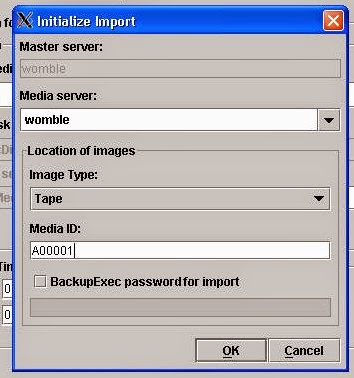
(ii) On the menu bar go to Actions > Initiate Import, and an "Initialize Import" window 
     should appear.


 Step 2:

In the "Initialize Import" window, enter the details as required, such as Media Server name, Image type and Media Id (see Figure 2).

Figure 2 - Showing the details being entered


Step 3:

The Tape will now be read to allow NetBackup to find the details of the backup headers.  This is the Phase 1 import. Go to the Activity Monitor to see the details of the Phase 1 import job (see Figure 3).

NOTE:  If any backup images span more than one tape, Phase 1 imports must be performed on all spanned tapes (before proceeding to Phase 2 import).

Figure 3 - Starting the Phase 1 Import


Step 4:


(i) Go to NetBackup Management > Catalog 

(ii) On the right hand side of the screen, go to Actions > select Import in the drop-down menu.


See Figure 4


Figure 4 - Setting up to search for imported images 


Step 5:

Now we search for the images that are in a state that can be imported.  The easiest way to do this is to leave the settings to "All", for example, All Media ID, All Media Hosts, All Policies, etc. In theDate/Time Range, specify a set of dates which comfortably covers the dates on which the images were backed up (see Figure 5).

Figure 5 - Searching for imported images on which to run Phase 2 import


Step 6:

Now that Step 5 has been carried out, eligible images for Phase 2 import should appear in the Search Results section (see Figure 6). To perform the Phase 2 import:

(i) Highlight the images of interest
(ii) Go to the menu bar, select Actions > Import 

Figure 6 - Starting the Phase 2 Import


Import finished


Now you can find the information of history windows


Try to restore specific file.


File restored.


Monday, January 26, 2015

How to drop a database from SQL*PLUS


We need to remove database created only fr test purpose using RMAN duplicate command.


SQL> shutdown immediate;
ORA-01109: database not open


Database dismounted.

ORACLE instance shut down.
SQL>
SQL>


SQL> startup mount exclusive restrict;
ORACLE instance started.

Total System Global Area 7348420608 bytes
Fixed Size                  2150272 bytes
Variable Size            1201614976 bytes
Database Buffers         6006243328 bytes
Redo Buffers              138412032 bytes
Database mounted.


SQL>
SQL> drop database;

Database dropped.

Disconnected from Oracle Database 10g Enterprise Edition Release 10.2.0.4.0 - 64bit Production
With the Partitioning, OLAP, Data Mining and Real Application Testing options
SQL>


Drop database command remove data files and control files from OS level.


Sunday, January 25, 2015

ORA-19573: cannot obtain exclusive enqueue for datafile 8

$ ./rman target / nocatalog

Recovery Manager: Release 10.2.0.4.0 - Production on Sun Oct 06 13:55:43 2013

Copyright (c) 1982, 2007, Oracle.  All rights reserved.

connected to target database: SSAERP (DBID=3389811866, not open)
using target database control file instead of recovery catalog

RMAN>  RECOVER DATABASE NOREDO;

Starting recover at 06-Oct-13
allocated channel: ORA_SBT_TAPE_1
channel ORA_SBT_TAPE_1: sid=1982 devtype=SBT_TAPE
channel ORA_SBT_TAPE_1: Veritas NetBackup for Oracle - Release 6.5 (2007072323)
allocated channel: ORA_DISK_1
channel ORA_DISK_1: sid=982 devtype=DISK
channel ORA_DISK_1: starting incremental datafile backupset restore
channel ORA_DISK_1: specifying datafile(s) to restore from backup set
destination for restore of datafile 00008: /ora_dat/drssaerp/xdb_SSAERP02.dbf
destination for restore of datafile 00019: /ora_idx/drssaerp/idb_SSAERP02.dbf
channel ORA_DISK_1: reading from backup piece /ora_idx/drssaerp/bk/forstandby_l ptes4o_1_1
RMAN-00571: ===========================================================
RMAN-00569: =============== ERROR MESSAGE STACK FOLLOWS ===============
RMAN-00571: ===========================================================
RMAN-03002: failure of recover command at 06/10/2013 13:57:11
ORA-19870: error reading backup piece /ora_idx/drssaerp/bk/forstandby_lvptes4o_1 _1
ORA-19573: cannot obtain exclusive enqueue for datafile 8


Solution:

It seems database is open mode for which performing restore
Shutdown database and put the mount stage and start recovery.


Restore Database from Incremental Backup


$ ./rman target / nocatalog

Recovery Manager: Release 10.2.0.4.0 - Production on Sun Jan 25 10:43:52 2015

Copyright (c) 1982, 2007, Oracle.  All rights reserved.

connected to target database: SSAERP (DBID=3389811866, not open)
using target database control file instead of recovery catalog

RMAN> catalog start with '/ora_idx/drssaerp/bk';

searching for all files that match the pattern /ora_idx/drssaerp/bk

List of Files Unknown to the Database
=====================================
File Name: /ora_idx/drssaerp/bk/forstandby_lvptes4o_1_1
File Name: /ora_idx/drssaerp/bk/forstandby_m0ptesea_1_1
File Name: /ora_idx/drssaerp/bk/forstandby_m1ptesnr_1_1
File Name: /ora_idx/drssaerp/bk/forstandby_m2ptet1n_1_1
File Name: /ora_idx/drssaerp/bk/forstandby_m3ptetb8_1_1
File Name: /ora_idx/drssaerp/bk/forstandby_m4ptetl3_1_1
File Name: /ora_idx/drssaerp/bk/forstandby_m5ptetuv_1_1
File Name: /ora_idx/drssaerp/bk/forstandby_m6pteu8q_1_1
File Name: /ora_idx/drssaerp/bk/forstandby_m7pteuja_1_1
File Name: /ora_idx/drssaerp/bk/forstandby_m8pteuun_1_1
File Name: /ora_idx/drssaerp/bk/forstandby_m9ptevap_1_1
File Name: /ora_idx/drssaerp/bk/forstandby_maptevo3_1_1
File Name: /ora_idx/drssaerp/bk/forstandby_mbptf028_1_1
File Name: /ora_idx/drssaerp/bk/forstandby_mcptf0b6_1_1
File Name: /ora_idx/drssaerp/bk/forstandby_mdptf0ir_1_1
File Name: /ora_idx/drssaerp/bk/forstandby_meptf0me_1_1
File Name: /ora_idx/drssaerp/bk/forstandby_mfptf0q2_1_1
File Name: /ora_idx/drssaerp/bk/forstandby_lupterr7_1_1

Do you really want to catalog the above files (enter YES or NO)? yes
cataloging files...
cataloging done

List of Cataloged Files
=======================
File Name: /ora_idx/drssaerp/bk/forstandby_lvptes4o_1_1
File Name: /ora_idx/drssaerp/bk/forstandby_m0ptesea_1_1
File Name: /ora_idx/drssaerp/bk/forstandby_m1ptesnr_1_1
File Name: /ora_idx/drssaerp/bk/forstandby_m2ptet1n_1_1
File Name: /ora_idx/drssaerp/bk/forstandby_m3ptetb8_1_1
File Name: /ora_idx/drssaerp/bk/forstandby_m4ptetl3_1_1
File Name: /ora_idx/drssaerp/bk/forstandby_m5ptetuv_1_1
File Name: /ora_idx/drssaerp/bk/forstandby_m6pteu8q_1_1
File Name: /ora_idx/drssaerp/bk/forstandby_m7pteuja_1_1
File Name: /ora_idx/drssaerp/bk/forstandby_m8pteuun_1_1
File Name: /ora_idx/drssaerp/bk/forstandby_m9ptevap_1_1
File Name: /ora_idx/drssaerp/bk/forstandby_maptevo3_1_1
File Name: /ora_idx/drssaerp/bk/forstandby_mbptf028_1_1
File Name: /ora_idx/drssaerp/bk/forstandby_mcptf0b6_1_1
File Name: /ora_idx/drssaerp/bk/forstandby_mdptf0ir_1_1
File Name: /ora_idx/drssaerp/bk/forstandby_meptf0me_1_1
File Name: /ora_idx/drssaerp/bk/forstandby_mfptf0q2_1_1
File Name: /ora_idx/drssaerp/bk/forstandby_lupterr7_1_1

RMAN>

Friday, January 23, 2015

ORA-19506: failed to create sequential file name="/ora_idx/ssaerp/backup/forstandby_ltpteqk7_1_1", parms=""


RMAN> backup incremental from scn 95670 database FORMAT '/ora_idx/ssaerp/backup/forstandby_%U' tag 'FORSTANDBY';

Starting backup at 01/23/2013
using channel ORA_SBT_TAPE_1
channel ORA_SBT_TAPE_1: starting full datafile backupset
channel ORA_SBT_TAPE_1: specifying datafile(s) in backupset
input datafile fno=00006 name=/ora_dat/ssaerp/xdb_SSAERP01.dbf
input datafile fno=00007 name=/ora_idx/ssaerp/xdb_SSAERP01.dbf
channel ORA_SBT_TAPE_1: starting piece 1 at 01/23/2013
RMAN-00571: ===========================================================
RMAN-00569: =============== ERROR MESSAGE STACK FOLLOWS ===============
RMAN-00571: ===========================================================
RMAN-03009: failure of backup command on ORA_SBT_TAPE_1 channel at 01/23/2013 14:45:42
ORA-19506: failed to create sequential file, name="/ora_idx/ssaerp/backup/forstandby_ltpteqk7_1_1", parms=""
ORA-27028: skgfqcre: sbtbackup returned error
ORA-19511: Error received from media manager layer, error text:
   VxBSACreateObject: Failed with error:
   Server Status:  the specified policy is not of the correct client type


RMAN> run {
2> allocate channel t1 type disk;
3> backup incremental from scn 95670 database FORMAT '/ora_idx/ssaerp/backup/forstandby_%U' tag 'FORSTANDBY';
4> release channel t1;
5> }


Starting backup at 01/23/2013
channel t1: starting full datafile backupset
channel t1: specifying datafile(s) in backupset
input datafile fno=00006 name=/ora_dat/ssaerp/xdb_SSAERP01.dbf
input datafile fno=00007 name=/ora_idx/ssaerp/xdb_SSAERP01.dbf
channel t1: starting piece 1 at 01/23/2013
channel t1: finished piece 1 at 01/23/2013
piece handle=/ora_idx/ssaerp/backup/forstandby_lupterr7_1_1 tag=FORSTANDBY comment=NONE
channel t1: backup set complete, elapsed time: 00:05:05
channel t1: starting full datafile backupset
channel t1: specifying datafile(s) in backupset
input datafile fno=00008 name=/ora_dat/ssaerp/xdb_SSAERP02.dbf
input datafile fno=00019 name=/ora_idx/ssaerp/idb_SSAERP02.dbf
channel t1: starting piece 1 at 01/23/2013
channel t1: finished piece 1 at 01/23/2013
piece handle=/ora_idx/ssaerp/backup/forstandby_lvptes4o_1_1 tag=FORSTANDBY comment=NONE
channel t1: backup set complete, elapsed time: 00:05:06
channel t1: starting full datafile backupset
channel t1: specifying datafile(s) in backupset
input datafile fno=00009 name=/ora_dat/ssaerp/xdb_SSAERP03.dbf
input datafile fno=00020 name=/ora_idx/ssaerp/idx_SSAERP03.dbf
channel t1: starting piece 1 at 01/23/2013
channel t1: finished piece 1 at 01/23/2013
piece handle=/ora_idx/ssaerp/backup/forstandby_m0ptesea_1_1 tag=FORSTANDBY comment=NONE
channel t1: backup set complete, elapsed time: 00:05:05
channel t1: starting full datafile backupset
channel t1: specifying datafile(s) in backupset
input datafile fno=00010 name=/ora_dat/ssaerp/xdb_SSAERP04.dbf
input datafile fno=00021 name=/ora_idx/ssaerp/idx_SSAERP04.dbf
channel t1: starting piece 1 at 01/23/2013
channel t1: finished piece 1 at01/23/2013
piece handle=/ora_idx/ssaerp/backup/forstandby_m1ptesnr_1_1 tag=FORSTANDBY comment=NONE
channel t1: backup set complete, elapsed time: 00:05:15
channel t1: starting full datafile backupset
channel t1: specifying datafile(s) in backupset
input datafile fno=00011 name=/ora_dat/ssaerp/xdb_SSAERP05.dbf
input datafile fno=00022 name=/ora_idx/ssaerp/idx_SSAERP05.dbf
channel t1: starting piece 1 at 01/23/2013
channel t1: finished piece 1 at 01/23/2013
piece handle=/ora_idx/ssaerp/backup/forstandby_m2ptet1n_1_1 tag=FORSTANDBY comment=NONE
channel t1: backup set complete, elapsed time: 00:05:05
channel t1: starting full datafile backupset
channel t1: specifying datafile(s) in backupset
input datafile fno=00012 name=/ora_dat/ssaerp/xdb_SSAERP06.dbf
input datafile fno=00023 name=/ora_idx/ssaerp/idx_SSAERP06.dbf
channel t1: starting piece 1 at 01/23/2013
channel t1: finished piece 1 at 01/23/2013
piece handle=/ora_idx/ssaerp/backup/forstandby_m3ptetb8_1_1 tag=FORSTANDBY comment=NONE
channel t1: backup set complete, elapsed time: 00:05:15
channel t1: starting full datafile backupset
channel t1: specifying datafile(s) in backupset
input datafile fno=00013 name=/ora_dat/ssaerp/xdb_SSAERP07.dbf
input datafile fno=00024 name=/ora_idx/ssaerp/idx_SSAERP07.dbf

.........


input datafile fno=00002 name=/ora_dat/ssaerp/undotbs01.dbf
channel t1: starting piece 1 at 01/23/2013
channel t1: finished piece 1 at 01/23/2013
piece handle=/ora_idx/ssaerp/backup/forstandby_meptf0me_1_1 tag=FORSTANDBY comment=NONE
channel t1: backup set complete, elapsed time: 00:01:55
channel t1: starting full datafile backupset
channel t1: specifying datafile(s) in backupset
input datafile fno=00005 name=/ora_dat/ssaerp/system02.dbf
input datafile fno=00004 name=/ora_dat/ssaerp/users01.dbf
input datafile fno=00003 name=/ora_dat/ssaerp/sysaux01.dbf
input datafile fno=00001 name=/ora_dat/ssaerp/system01.dbf
channel t1: starting piece 1 at 01/23/2013
channel t1: finished piece 1 at01/23/2013
piece handle=/ora_idx/ssaerp/backup/forstandby_mfptf0q2_1_1 tag=FORSTANDBY comment=NONE
channel t1: backup set complete, elapsed time: 00:00:55
Finished backup at 01/23/2013

Starting Control File and SPFILE Autobackup at 01/23/2013
piece handle=/ora/app/oracle/bkcont/c-3389811866-20150123-00 comment=NONE
Finished Control File and SPFILE Autobackup at 01/23/2013

released channel: t1

RMAN>

Monday, January 5, 2015

Enable / Disable Flash Back Database Option


Flashback in Oracle Database


Flashback technology is a set of features in Oracle database that make your work easier to view past states of data or to move your database objects to a previous state without using point in time media recovery.


View past states of data or move database objects to previous state means you have performed some operations like  DML + COMMIT and now you want to rollback that operation, this can be done easily through FLASHBACK technology without using point in time media recovery.


[oracle@orapri bin]$ ./sqlplus /nolog

SQL*Plus: Release 11.2.0.1.0 Production on Sat Jan 6 02:37:02 2014

Copyright (c) 1982, 2009, Oracle.  All rights reserved.

SQL> conn / as sysdba
Connected.
SQL> show recyclebin
SQL> show parameter recyclebin

NAME                         TYPE   VALUE
------------------------------------ ----------- ------------------------------
recyclebin                   string on
SQL> show parameter db_recovery_file_dest

NAME                         TYPE   VALUE
------------------------------------ ----------- ------------------------------
db_recovery_file_dest              string /ora/oracle/app/oracle/flash_r
                                     ecovery_area
db_recovery_file_dest_size         big integer 3882M


SQL> alter system set db_recovery_file_dest_size=2g;

System altered.

SQL> alter system set db_recovery_file_dest='/ora/oracle/flashback';

System altered.

SQL> show parameter db_recovery

NAME                         TYPE   VALUE
------------------------------------ ----------- ------------------------------
db_recovery_file_dest              string /ora/oracle/flashback
db_recovery_file_dest_size         big integer 2G

SQL>


SQL> show parameter undo_management

NAME                         TYPE   VALUE
------------------------------------ ----------- ------------------------------
undo_management              string AUTO
SQL> shutdown immediate;
Database closed.
Database dismounted.
ORACLE instance shut down.
SQL> startup mount
ORACLE instance started.

Total System Global Area 1152450560 bytes
Fixed Size            2212696 bytes
Variable Size             872418472 bytes
Database Buffers    268435456 bytes
Redo Buffers                9383936 bytes
Database mounted.
SQL> select flashback_on from v$database;

FLASHBACK_ON
------------------
NO

SQL> alter database flashback on;

Database altered.

SQL> select flashback_on from v$database;

FLASHBACK_ON
------------------
YES

SQL> alter database open;

Database altered.


How to disable FLASHBACK in Oracle Database 11G R1 and below versions

SQL> shutdown immediate;
Database closed.
Database dismounted.
ORACLE instance shut down.
SQL> startup mount
ORACLE instance started.

Total System Global Area 1152450560 bytes
Fixed Size            2212696 bytes
Variable Size             872418472 bytes
Database Buffers    268435456 bytes
Redo Buffers                9383936 bytes
Database mounted.

SQL> alter database flashback off;

Database altered.

SQL> select flashback_on from v$database;

FLASHBACK_ON
------------------
off
SQL> alter database open;

Database altered.