Visit Counter

Wednesday, July 13, 2016

Error with a file name containing parentheses


Solaris 11


When I tried to change file name from abc.file(1).zip to xyz.zip
It's says syntax error I am using Solaris 11.3 Sparc


# mv abc.file(1).zip xyz.zip

bash: syntax error near unexpected token '('


Solution:


The entire file name does not need quoting () do.


# mv 'abc.file(1).zip'  xyz.zip


The file just loaded does not appear to be executable


Solaris 11 installation on Sparc T4-2 Server getting below error after (init 0) OK Prompt


OK> boot cdrom

SPARC Enterprise T4-2 Server, using Domain console
Copyright (c) 1998, 2012, Oracle and/or its affiliates. All rights reserved.
Copyright (c) 2012, Oracle and/or its affiliates and Fujitsu Limited. All rights reserved.
OpenBoot 4.24.15, 49152 MB memory installed, Serial #94022600.
Ethernet address 0:41:28:2:15:9v, Host ID: 10202155z.


Rebooting with command: boot kernel/sparcv9/unix
Boot device: /pci@0,600000/pci@0/pci@8/pci@0/scsi@1/disk@0  File and args: kernel/sparcv9/unix

Can't open kernel/sparcv9/unix
ERROR: FCode Aborted.

Warning: Fcode sequence resulted in a net stack depth change of 1
Evaluating:

Evaluating:
The file just loaded does not appear to be executable.


{0} ok


Solution:


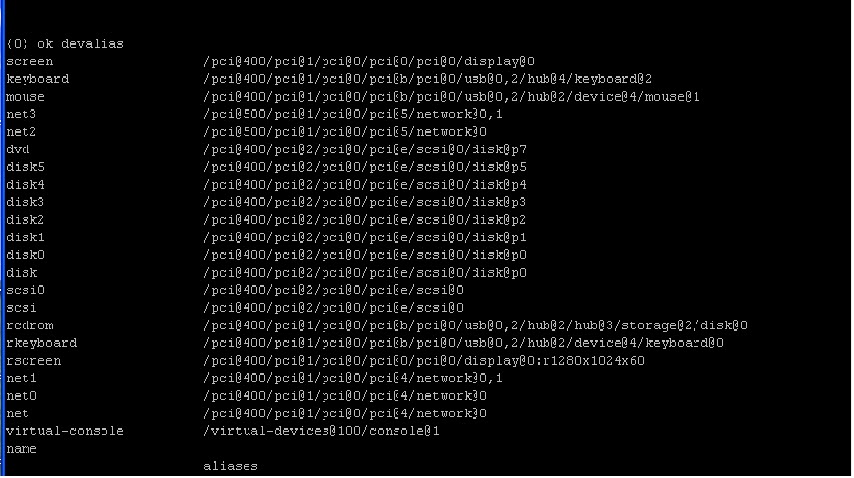
OK>  devalias

Select DVD option


OK> boot dvd


Oracle Solaris Installation on Sparc T4-2 Server


Solaris 11.3 Installation on Sparc T4-2 Server


I getting error while booting from Solaris 11 CD..

# init 0  (Get OK prompt)

OK> boot cdrom

Boot device: /pci@1e,600000/ide@d/disk@0,0:a File and args: device 
can't open device 
Warning: Fcode sequence resulted in a net stack depth change of 1 Evaluating: 
Evaluating: 
the file just loaded does not appear to be executable.


Solution:


OK devalias

Select dvd option


OK> boot dvd


Please enter a number (1) 1


Create Raid 5 for data


zpool create poolname raidz disk1 disk2 disk3

Example


# zpool create datapool raidz c0t0d0 c0t1d0 c0t2d0 c0t3d0


Create file systems

/ora_dat
/ora_idx
/ora
/ssaerp
/ora_temp


#   root@afi-drsvr:/ora_temp# zfs create datapool/backup2

#   root@afi-drsvr:/ora_temp# zfs set mountpoint=/backup2  datapool/backup2
 

  #  root@afi-drsvr:/ora_temp# zfs list

  NAME                              USED  AVAIL  REFER  MOUNTPOINT
  datapool                               467K  1.60T  46.4K  /datapool
  datapool/backup2                 44.9K  1.60T  44.9K  /backup2
  datapool/ora                         44.9K  1.60T  44.9K  /ora
  datapool/ora_dat                 44.9K  1.60T  44.9K  /ora_dat
  datapool/ora_idx                 44.9K  1.60T  44.9K  /ora_idx
  datapool/ora_temp                44.9K  1.60T  44.9K  /ora_temp
  datapool/ssaerp                   44.9K  1.60T  44.9K  /ssaerp
  rpool                                    73.0G   474G  73.5K  /rpool
  rpool/ROOT                        3.11G   474G    31K  legacy
  rpool/ROOT/solaris               3.11G   474G  2.89G  /
  rpool/ROOT/solaris/var            224M   474G   221M  /var
  rpool/VARSHARE                   2.53M   474G  2.44M  /var/share
  rpool/VARSHARE/pkg                 63K   474G    32K  /var/share/pkg
  rpool/VARSHARE/pkg/repositories    31K   474G    31K  /var/share/pkg/repo                             sitories
   35  rpool/VARSHARE/zones               31K   474G    31K  /system/zones
   36  rpool/dump                                     65.8G   476G  63.8G  -
   37  rpool/export                                    97.5K   474G    32K  /export
   38  rpool/export/home                          65.5K   474G    32K  /export/home
   39  rpool/export/home/admin              33.5K   474G  33.5K  /export/home/admin
   40  rpool/swap                                     4.13G   474G  4.00G  -
 

  root@afi-drsvr:/ora_temp#


Download from Oracle site Repository

https://www.oracle.com/solaris/solaris11/downloads/local-repository-downloads.html

Create folder....repo1


# root@afi-drsvr:/repo# ls

   COPYRIGHT                         sol-11_3-repo_1of5.zip
   install-repo.ksh                       sol-11_3-repo_2of5.zip
   NOTICES                               sol-11_3-repo_3of5.zip
   pkg5.repository                       sol-11_3-repo_4of5.zip
   README-repo-iso.txt            sol-11_3-repo_5of5.zip
   README-zipped-repo.txt      sol-11_3-repo_md5sums.txt
   readme.txt


  106  root@afi-drsvr:/repo# ls -l

  107  total 16478173
  108  -rw-r--r--   1 admin    staff       3440 Jul 13 14:52 COPYRIGHT
  109  -rw-r--r--   1 admin    staff      11612 Jul 13 14:52 install-.zip
  110  -rw-r--r--   1 admin    staff    1717187368 Jul 13 14:54 sol-11_3-repo_3of5.zip
  111  -rw-r--r--   1 admin    staff    1871913207 Jul 13 14:55 sol-11_3-repo_4of5.zip
  112  -rw-r--r--   1 admin    staff    1570373423 Jul 13 14:56 sol-11_3-repo_5of5.zip
  113  -rw-r--r--   1 admin    staff        285 Jul 13 14:56 sol-11_3-repo_md5sums.txt


Extracting Repository  of Solaris 11.3


root@afi-drsvr:/repo# ./install-repo.ksh -d /repo1/ -v

Using sol-11_3-repo download.
Uncompressing sol-11_3-repo_1of5.zip...done.
Uncompressing sol-11_3-repo_2of5.zip...done.
Uncompressing sol-11_3-repo_3of5.zip...done.
Uncompressing sol-11_3-repo_4of5.zip...done.
Uncompressing sol-11_3-repo_5of5.zip...done.
Repository can be found in /repo1/.
Initiating repository verification.
pkg://solaris/group/prerequisite/oracle/oracle-rdbms-server-12-1-preinstall 1442                                   pkg://solaris/system/domain-service-processor-protocol/sparc-enterprise 1774/548                               pkg://solaris/consolidation/instantclient/instantclient-incorporation 3066/5480                                     pkg://solaris/group/prerequisite/oracle/oracle-ebs-server-R12-preinstall 3383/54                                   pkg://solaris/system/kernel/dynamic-reconfiguration/ultra-enterprise-10000 3911/                                 pkg://solaris/group/prerequisite/oracle/oracle-rdbms-server-12cR1-preinstall 416


Publish Repository on repo1 folder

Installing Repository

# pkg install solaris-desktop


For Xmanager Configuration to access solaris 11

# vi  /etc/gdm/custom.conf

[xdmcp]
Enable=true   (By default false)


# inetadm -e xvnc-inetd

# svcadm restart svc:/application/graphical-login/gdm:default


Root Access by default in Solaris 11

# vi /etc/ssh/sshd_config

PermitRootLgin Yes


# vi /etc/default/login

CONSOLE=/dev/Console

# svcadm restart svc:/network/ssh:default


Oracle Packages for installation oracle software


 # pkg install pkg://solaris/developer/build/make


  # pkg install pkg://solaris/developer/assembler


Tuesday, July 12, 2016

ORA-27046 file size is not a multiple of logical block size


While creating pfile from spfile getting below error.


SQL> create pfile from spfile

create pfile from spfile
*
ERROR at line 1:

ORA-27046: file size is not a multiple of logical block size
Additional information 1


Solution:

As per metalink serach it seems the SPFILE has previously been manually edited when the instance was opened and the spfile has gone corrupted.


If all the parameter are same then, yes copy the pfile from production to the DR and then as the database is opened using the spfile, you need to shut it down, and open it with the new pfile. After opening the database successfully, create the spfile from it.

Sunday, July 10, 2016

STATUS CODE: 6 " the backup failed to back up the requested files


07/10/2016 16:09:51 - Info bpbrm (pid=14370) starting bphdb on client
07/10/2016 16:09:51 - Info bphdb (pid=3378) Backup started
07/10/2016 16:09:51 - Info bphdb (pid=3378) Processing /ora/app/oracle/product/11.2.0/dbhome_1/ hot_database_backup.sh
07/10/2016 16:09:51 - Info bphdb (pid=3378) Waiting for the child status
07/10/2016 16:09:51 - connected; connect time: 0:00:00
07/10/2016 16:09:52 - Error bpbrm (pid=14370) from client lh-ora-rs: ERR - Script exited with status = 29 <failed trying to exec a command>
07/10/2016 16:09:52 - Error bpbrm (pid=14370) from client lh-ora-rs: ERR - bphdb exit status = 6: the backup failed to back up the requested files
07/10/2016 16:09:53 - Info bphdb (pid=3378) done. status: 6: the backup failed to back up the requested files
07/10/2016 16:09:53 - end writing
the backup failed to back up the requested files  (6)


Solution:


I copied the default script of Oracle hot backup from default location. I edited it according to environment and then run the backup was successfully done.

I linked between library & software using oracle_link


Tuesday, July 5, 2016

Upgrading the Recovery Catalog Schema OR Database


The catalog schema must support the highest target version it supports.  Therefore, when a target database is upgraded, you need to also upgrade the RMAN catalog schema.  Connect to RMAN from the target database (with highest version) and connect to the catalog schema to upgrade the schema version.  


Oracle Production DB Version  11.2.0.4
Oracle Catalog DB Version      10.2.0.4


Upgrade Catalog Schema

Production DB:


bash-4.1$ ./rman target / catalog rman/xxxxxxxx@catsserp


Recovery Manager: Release 11.2.0.4.0 - Production on Sat Jul 9 17:02:43 2016

Copyright (c) 1982, 2011, Oracle and/or its affiliates.  All rights reserved.

connected to target database: SSAERP (DBID=3389811866)
connected to recovery catalog database
PL/SQL package RMAN.DBMS_RCVCAT version 10.02.00.04 in RCVCAT database is too old

RMAN> upgrade catalog;

recovery catalog owner is RMAN

enter UPGRADE CATALOG command again to confirm catalog upgrade


RMAN> upgrade catalog;

recovery catalog upgraded to version 11.02.00.04
DBMS_RCVMAN package upgraded to version 11.02.00.04
DBMS_RCVCAT package upgraded to version 11.02.00.04


Catalog DB


SQL> conn rman/xxxxxxx
Connected.


SQL> select * from rcver;

VERSION
------------
11.02.00.04


SQL> conn / as sysdba
Connected.


SQL> grant create type to rman;

Grant succeeded.


Relocate of Baan to Other Server


Restore Baan Folder ssaerp to new server


#/ssaerp/bse/lib/

#gedit tabledef6.2

Replace of Oracle old home to new home

Check the listener


Slowness of Baan 514 port Rexec

 Add Comments of name server 

/etc/resolv.conf