Visit Counter

Sunday, July 19, 2020

Unexpected error while executing the action at state: ‘supportedOSCheck’ 19c on Oracle Linux 8

[WARNING] [INS-08101] Unexpected error while executing the action at state: ‘supported check’ 19c on Oracle Linux 8


Solution:

========

[oracle@localhost admin]$ pwd
/home/oracle/oracle19c/cv/admin

[oracle@localhost admin]$ ls
cvu_config  cvusys.sql

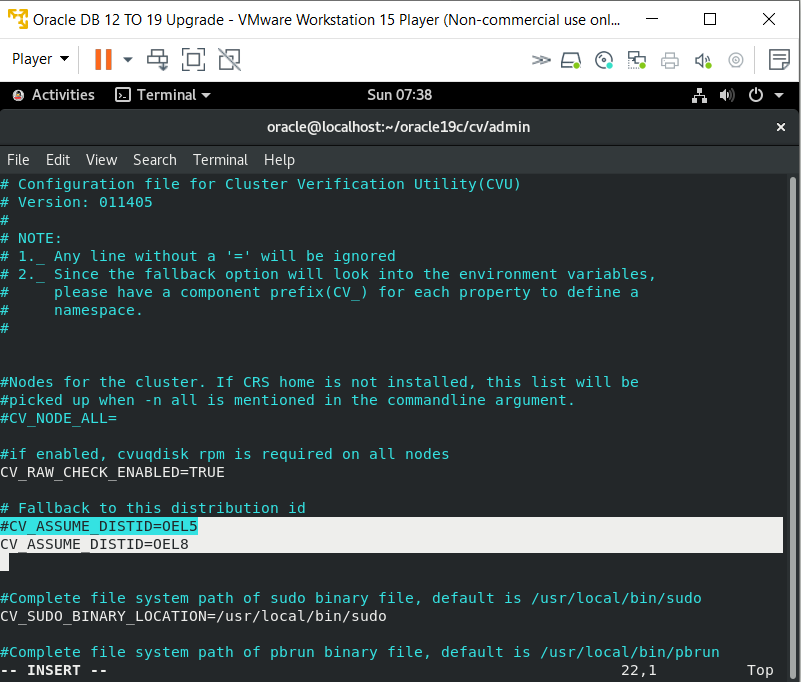
[oracle@localhost admin]$ vi cvu_config


Old Value
-------------
#CV_ASSUME)DISTID=OLE5


New Value
--------------
CV_ASSUME)DISTID=OLE8


[oracle@localhost oracle19c]$ ./runInstaller

ERROR: Unable to verify the graphical display setup. This application requires X display. Make sure that xdpyinfo exist under PATH variable.

No X11 DISPLAY variable was set, but this program performed an operation which requires it.


[oracle@localhost oracle19c]$ export DISPLAY=:0.0


[oracle@localhost oracle19c]$ ./runInstaller


Saturday, July 18, 2020

VMware Sharing Folder not showing Under Directory Troubleshooting


Installed Oracle Linux 8 on Vmware Workstation Player 15. I shared folder (Software) which not showing under /mnt/ directory...already installed VMware tool.


[oracle@localhost ~]$ cd /mnt
[oracle@localhost mnt]$ ls
hgfs
[oracle@localhost mnt]$ cd hgfs/
[oracle@localhost hgfs]$ ls
[oracle@localhost hgfs]$ ls -la
total 8
drwxr-xr-x. 2 root root 4096 Jul 18 14:50 .
drwxr-xr-x. 3 root root 4096 Jul 18 14:50 ..


Run both commands on terminal

[root@localhost ~]# /usr/bin/vmhgfs-fuse --enabled
/usr/bin/vmhgfs-fuse: 0 - HGFS FUSE client enabled


[root@localhost ~]# /usr/bin/vmhgfs-fuse .host:/ /mnt/hgfs -o subtype=vmhgfs-fuse,allow_other


[root@localhost mnt]# ls
hgfs
[root@localhost mnt]# cd hgfs/
[root@localhost hgfs]# ls
Software

[root@localhost hgfs]# ls
Software
[root@localhost hgfs]# ls -l
total 8
drwxrwxrwx. 1 root root 8192 Jul 18 09:58 Software
[root@localhost hgfs]# cd so
-bash: cd: so: No such file or directory
[root@localhost hgfs]# ls -l
total 8
drwxrwxrwx. 1 root root 8192 Jul 18 09:58 Software
[root@localhost hgfs]# cd Software/
[root@localhost Software]# ls

oracle-database-ee-19c-1.0-1.x86_64.rpm
OracleLinux-R8-U0-x86_64-dvd.iso
PDFCreator-4_1_0-Setup.exe
[root@localhost Software]#


[root@localhost Software]# pwd
/mnt/hgfs/Software
[root@localhost Software]#


Refer:


Monday, June 1, 2020

Can't connect to local MySQL server through socket

Oracle VM
Mysql 8
=======

I installed MySQL server 8 using yum...but I start MySQL server getting below error.


Can't connect to local MySQL server through socket


root@rac01 ~]# mysql
ERROR 2002 (HY000): Can't connect to local MySQL server through socket '/var/lib/mysql/mysql.sock' (2)
[root@rac01 ~]# service mysqld start
Initializing MySQL database:                               [  OK  ]
Starting mysqld:                                                    [  OK  ]
[root@rac01 ~]#
[root@rac01 ~]# mysql
ERROR 1045 (28000): Access denied for user 'root'@'localhost' (using password: NO)

[root@rac01 ~]# mysql -u root -p
passwd:


mysql>


Refer:

https://tableplus.com/blog/2018/08/solved-cant-connect-to-local-mysql-server-through-socket.html

Tuesday, May 5, 2020

GoldenGate Replication in Oracle Implementation


------------------------------------------------------
Oracle: 12.1 DB
Golden Gate: 12c
Linux 6.5
Oracle VM 2 Machines (Source / Target)
------------------------------------------------------

Download Golden Gate:

https://www.oracle.com/middleware/technologies/goldengate-downloads.htmlOracle GoldenGate 19.1.0.0.4 for Oracle on Linux x86-64(530 MB)

191004_fbo_ggs_Linux_x64_shiphome (While Installing It's asking Golden Gate version)


Enviroment Variables:

bash-4.1$ export ORACLE_HOME=/ora/oracle/app/oracle/product/12.1.0/dbhome_1
bash-4.1$ export PATH=$ORACLE_HOME/bin:$PATH
bash-4.1$ export ORACLE_SID=orasap
bash-4.1$ export PATH=/ora/oracle/ggs12:$PATH
bash-4.1$ export LD_LIBRARY_PATH=/ora/oracle/ggs12:$ORACLE_HOME/lib
bash-4.1$ pwd
/ora/oracle/ggs12

bash-4.1$ sqlplus / as sysdba

SQL*Plus: Release 12.1.0.1.0 Production on Sat May 2 02:52:47 2020

Copyright (c) 1982, 2013, Oracle.  All rights reserved.


Connected to:
Oracle Database 12c Enterprise Edition Release 12.1.0.1.0 - 64bit Production
With the Partitioning, OLAP, Advanced Analytics and Real Application Testing options

SQL> !pwd
/ora/oracle/ggs12

SQL> @marker_setup.sql

Marker setup script

You will be prompted for the name of a schema for the Oracle GoldenGate database objects.
NOTE: The schema must be created prior to running this script.
NOTE: Stop all DDL replication before starting this installation.

Enter Oracle GoldenGate schema name:gguser


Marker setup table script complete, running verification script...
Please enter the name of a schema for the GoldenGate database objects:
Setting schema name to GGUSER

MARKER TABLE
-------------------------------
OK

MARKER SEQUENCE
-------------------------------
OK

Script complete.
SQL> @ddl_setup.sql

Oracle GoldenGate DDL Replication setup script

Verifying that current user has privileges to install DDL Replication...

You will be prompted for the name of a schema for the Oracle GoldenGate database objects.
NOTE: For an Oracle 10g source, the system recycle bin must be disabled. For Oracle 11g and later, it can be enabled.
NOTE: The schema must be created prior to running this script.
NOTE: Stop all DDL replication before starting this installation.

Enter Oracle GoldenGate schema name:gguser

Working, please wait ...
Spooling to file ddl_setup_spool.txt

Checking for sessions that are holding locks on Oracle Golden Gate metadata tables ...

Check complete.


SQL> @ddl_setup.sql

Oracle GoldenGate DDL Replication setup script

Verifying that current user has privileges to install DDL Replication...

You will be prompted for the name of a schema for the Oracle GoldenGate database objects.
NOTE: For an Oracle 10g source, the system recycle bin must be disabled. For Oracle 11g and later, it can be enabled.
NOTE: The schema must be created prior to running this script.
NOTE: Stop all DDL replication before starting this installation.

Enter Oracle GoldenGate schema name:gguser

Working, please wait ...
Spooling to file ddl_setup_spool.txt

Checking for sessions that are holding locks on Oracle Golden Gate metadata tables ...

Check complete.


Using GGUSER as a Oracle GoldenGate schema name.

Working, please wait ...

DDL replication setup script complete, running verification script...
Please enter the name of a schema for the GoldenGate database objects:
Setting schema name to GGUSER

CLEAR_TRACE STATUS:

Line/pos   Error
---------- -----------------------------------------------------------------
No errors  No errors

CREATE_TRACE STATUS:

Line/pos   Error
---------- -----------------------------------------------------------------
No errors  No errors

TRACE_PUT_LINE STATUS:

Line/pos   Error
---------- -----------------------------------------------------------------
No errors  No errors

INITIAL_SETUP STATUS:

Line/pos   Error
---------- -----------------------------------------------------------------
No errors  No errors

DDLVERSIONSPECIFIC PACKAGE STATUS:

Line/pos   Error
---------- -----------------------------------------------------------------
No errors  No errors

DDLREPLICATION PACKAGE STATUS:

Line/pos   Error
---------- -----------------------------------------------------------------
No errors  No errors

DDLREPLICATION PACKAGE BODY STATUS:

Line/pos   Error
---------- -----------------------------------------------------------------
No errors  No errors

DDL IGNORE TABLE
-----------------------------------
OK

DDL IGNORE LOG TABLE
-----------------------------------
OK

DDLAUX PACKAGE STATUS:

Line/pos   Error
---------- -----------------------------------------------------------------
No errors  No errors

DDLAUX PACKAGE BODY STATUS:

Line/pos   Error
---------- -----------------------------------------------------------------
No errors  No errors

SYS.DDLCTXINFO PACKAGE STATUS:

Line/pos   Error
---------- -----------------------------------------------------------------
No errors  No errors

SYS.DDLCTXINFO PACKAGE BODY STATUS:

Line/pos   Error
---------- -----------------------------------------------------------------
No errors  No errors

DDL HISTORY TABLE
-----------------------------------
OK

DDL HISTORY TABLE(1)
-----------------------------------
OK

DDL DUMP TABLES
-----------------------------------
OK

DDL DUMP COLUMNS
-----------------------------------
OK

DDL DUMP LOG GROUPS
-----------------------------------
OK

DDL DUMP PARTITIONS
-----------------------------------
OK

DDL DUMP PRIMARY KEYS
-----------------------------------
OK

DDL SEQUENCE
-----------------------------------
OK

GGS_TEMP_COLS
-----------------------------------
OK

GGS_TEMP_UK
-----------------------------------
OK

DDL TRIGGER CODE STATUS:

Line/pos   Error
---------- -----------------------------------------------------------------
No errors  No errors

DDL TRIGGER INSTALL STATUS
-----------------------------------
OK

DDL TRIGGER RUNNING STATUS
-----------------------------------
ENABLED

STAYMETADATA IN TRIGGER
-----------------------------------
OFF

DDL TRIGGER SQL TRACING
-----------------------------------
0

DDL TRIGGER TRACE LEVEL
-----------------------------------
NONE

LOCATION OF DDL TRACE FILE
------------------------------------------------------------------------------------------------------------------------
/ora/oracle/app/oracle/diag/rdbms/orasap/orasap/trace/ggs_ddl_trace.log

Analyzing installation status...


VERSION OF DDL REPLICATION
------------------------------------------------------------------------------------------------------------------------
OGGCORE_19.1.0.0.0_PLATFORMS_191017.1054

STATUS OF DDL REPLICATION
------------------------------------------------------------------------------------------------------------------------
SUCCESSFUL installation of DDL Replication software components

Script complete.
SQL> @role_setup.sql

GGS Role setup script

This script will drop and recreate the role GGS_GGSUSER_ROLE
To use a different role name, quit this script and then edit the params.sql script to change the gg_role parameter to the preferred name. (Do not run the script.)

You will be prompted for the name of a schema for the GoldenGate database objects.
NOTE: The schema must be created prior to running this script.
NOTE: Stop all DDL replication before starting this installation.

Enter GoldenGate schema name:gguser
Wrote file role_setup_set.txt

PL/SQL procedure successfully completed.


Role setup script complete

Grant this role to each user assigned to the Extract, GGSCI, and Manager processes, by using the following SQL command:

GRANT GGS_GGSUSER_ROLE TO <loggedUser>

where <loggedUser> is the user assigned to the GoldenGate processes.
SQL> GRANT GGS_GGSUSER_ROLE TO gguser;

Grant succeeded.

SQL> @ddl_enable.sql

Trigger altered.

SQL>

Friday, May 1, 2020

SP2-0310: unable to open file "marker_status.sql"


While running below script...getting it's stuck up....so I export the below parameters for the environment.

This below script should run under golden gate directory


SQL>conn / as sysdba
SQL>@/ora/oracle/ggs12/marker_setup.sql

Marker setup script

You will be prompted for the name of a schema for the Oracle GoldenGate database objects.
NOTE: The schema must be created prior to running this script.
NOTE: Stop all DDL replication before starting this installation.

Enter Oracle GoldenGate schema name:gguser
....
....
....
....
....

NOTE: The schema must be created prior to running this script.
NOTE: Stop all DDL replication before starting this installation.
Enter Oracle GoldenGate schema name:ggate
Marker setup table script complete, running verification script...
SP2-0310: unable to open file "marker_status.sql"
Script complete.


bash-4.1$ echo $ORACLE_HOME
/ora/oracle/app/oracle/product/12.1.0/dbhome_1
bash-4.1$ export ORACLE_HOME=/ora/oracle/app/oracle/product/12.1.0/dbhome_1
bash-4.1$ export PATH=$ORACLE_HOME/bin:$PATH
bash-4.1$ export ORACLE_SID=orasap
bash-4.1$ export PATH=/ora/oracle/ggs12:$PATH
bash-4.1$ export LD_LIBRARY_PATH=/ora/oracle/ggs12:$ORACLE_HOME/lib
bash-4.1$ pwd
/ora/oracle/ggs12
bash-4.1$ sqlplus / as sysdba

SQL*Plus: Release 12.1.0.1.0 Production on Sat May 2 02:52:47 2020

Copyright (c) 1982, 2013, Oracle.  All rights reserved.


Connected to:
Oracle Database 12c Enterprise Edition Release 12.1.0.1.0 - 64bit Production
With the Partitioning, OLAP, Advanced Analytics and Real Application Testing options

SQL> !pwd
/ora/oracle/ggs12

SQL> @marker_setup.sql

Marker setup script

You will be prompted for the name of a schema for the Oracle GoldenGate database objects.
NOTE: The schema must be created prior to running this script.
NOTE: Stop all DDL replication before starting this installation.

Enter Oracle GoldenGate schema name:gguser


Marker setup table script complete, running verification script...
Please enter the name of a schema for the GoldenGate database objects:
Setting schema name to GGUSER

MARKER TABLE
-------------------------------
OK

MARKER SEQUENCE
-------------------------------
OK

Script complete.

Oracle GoldenGate DDL Replication setup: *** Please move GGUSER to its own tablespace ORA-06512: at line 34


This Error getting while...running below script.....because I two user in Golden Gate tablesapce.

So I removed user then I re-run script....now it's fine.


SQL> @ddl_setup.sql

Oracle GoldenGate DDL Replication setup script

Verifying that current user has privileges to install DDL Replication...

You will be prompted for the name of a schema for the Oracle GoldenGate database objects.
NOTE: For an Oracle 10g source, the system recycle bin must be disabled. For Oracle 11g and later, it can be enabled.
NOTE: The schema must be created prior to running this script.
NOTE: Stop all DDL replication before starting this installation.

Enter Oracle GoldenGate schema name:gguser

Working, please wait ...
Spooling to file ddl_setup_spool.txt

Checking for sessions that are holding locks on Oracle Golden Gate metadata tables ...

Check complete.


declare
*
ERROR at line 1:
ORA-20783:
ORA-20783:
Oracle GoldenGate DDL Replication setup:
*** Please move GGUSER to its own tablespace
ORA-06512: at line 34

Solution:
======


SQL> select USERNAME from dba_users where default_tablespace='GOLDENGATE';

USERNAME
--------------------------------------------------------------------------------
GGUSER
GGUSER1


SQL> drop user gguser1;

User dropped.

SQL> select USERNAME from dba_users where default_tablespace='GOLDENGATE';

USERNAME
--------------------------------------------------------------------------------
GGUSER


SQL> @ddl_setup.sql

Oracle GoldenGate DDL Replication setup script

Verifying that current user has privileges to install DDL Replication...

You will be prompted for the name of a schema for the Oracle GoldenGate database objects.
NOTE: For an Oracle 10g source, the system recycle bin must be disabled. For Oracle 11g and later, it can be enabled.
NOTE: The schema must be created prior to running this script.
NOTE: Stop all DDL replication before starting this installation.

Enter Oracle GoldenGate schema name:gguser

Working, please wait ...
Spooling to file ddl_setup_spool.txt

Checking for sessions that are holding locks on Oracle Golden Gate metadata tables ...

Check complete.


Using GGUSER as a Oracle GoldenGate schema name.

Working, please wait ...

DDL replication setup script complete, running verification script...
Please enter the name of a schema for the GoldenGate database objects:
Setting schema name to GGUSER

CLEAR_TRACE STATUS:

Line/pos   Error
---------- -----------------------------------------------------------------
No errors  No errors

CREATE_TRACE STATUS:

Line/pos   Error
---------- -----------------------------------------------------------------
No errors  No errors

TRACE_PUT_LINE STATUS:

Line/pos   Error
---------- -----------------------------------------------------------------
No errors  No errors

INITIAL_SETUP STATUS:

Line/pos   Error
---------- -----------------------------------------------------------------
No errors  No errors

DDLVERSIONSPECIFIC PACKAGE STATUS:

Line/pos   Error
---------- -----------------------------------------------------------------
No errors  No errors

DDLREPLICATION PACKAGE STATUS:

Line/pos   Error
---------- -----------------------------------------------------------------
No errors  No errors

DDLREPLICATION PACKAGE BODY STATUS:

Line/pos   Error
---------- -----------------------------------------------------------------
No errors  No errors

DDL IGNORE TABLE
-----------------------------------
OK

DDL IGNORE LOG TABLE
-----------------------------------
OK

DDLAUX PACKAGE STATUS:

Line/pos   Error
---------- -----------------------------------------------------------------
No errors  No errors

DDLAUX PACKAGE BODY STATUS:

Line/pos   Error
---------- -----------------------------------------------------------------
No errors  No errors

SYS.DDLCTXINFO PACKAGE STATUS:

Line/pos   Error
---------- -----------------------------------------------------------------
No errors  No errors

SYS.DDLCTXINFO PACKAGE BODY STATUS:

Line/pos   Error
---------- -----------------------------------------------------------------
No errors  No errors

DDL HISTORY TABLE
-----------------------------------
OK

DDL HISTORY TABLE(1)
-----------------------------------
OK

DDL DUMP TABLES
-----------------------------------
OK

DDL DUMP COLUMNS
-----------------------------------
OK

DDL DUMP LOG GROUPS
-----------------------------------
OK

DDL DUMP PARTITIONS
-----------------------------------
OK

DDL DUMP PRIMARY KEYS
-----------------------------------
OK

DDL SEQUENCE
-----------------------------------
OK

GGS_TEMP_COLS
-----------------------------------
OK

GGS_TEMP_UK
-----------------------------------
OK

DDL TRIGGER CODE STATUS:

Line/pos   Error
---------- -----------------------------------------------------------------
No errors  No errors

DDL TRIGGER INSTALL STATUS
-----------------------------------
OK

DDL TRIGGER RUNNING STATUS
-----------------------------------
ENABLED

STAYMETADATA IN TRIGGER
-----------------------------------
OFF

DDL TRIGGER SQL TRACING
-----------------------------------
0

DDL TRIGGER TRACE LEVEL
-----------------------------------
NONE

LOCATION OF DDL TRACE FILE
------------------------------------------------------------------------------------------------------------------------
/ora/oracle/app/oracle/diag/rdbms/orasap/orasap/trace/ggs_ddl_trace.log

Analyzing installation status...


VERSION OF DDL REPLICATION
------------------------------------------------------------------------------------------------------------------------
OGGCORE_19.1.0.0.0_PLATFORMS_191017.1054

STATUS OF DDL REPLICATION
------------------------------------------------------------------------------------------------------------------------
SUCCESSFUL installation of DDL Replication software components

Script complete.
SQL> @role_setup.sql

GGS Role setup script

This script will drop and recreate the role GGS_GGSUSER_ROLE
To use a different role name, quit this script and then edit the params.sql script to change the gg_role parameter to the preferred name. (Do not run the script.)

You will be prompted for the name of a schema for the GoldenGate database objects.
NOTE: The schema must be created prior to running this script.
NOTE: Stop all DDL replication before starting this installation.

Enter GoldenGate schema name:gguser
Wrote file role_setup_set.txt

PL/SQL procedure successfully completed.


Role setup script complete

Grant this role to each user assigned to the Extract, GGSCI, and Manager processes, by using the following SQL command:

GRANT GGS_GGSUSER_ROLE TO <loggedUser>

where <loggedUser> is the user assigned to the GoldenGate processes.
SQL> GRANT GGS_GGSUSER_ROLE TO gguser;

Grant succeeded.

SQL> @ddl_enable.sql

Trigger altered.

SQL>