Visit Counter
Tuesday, December 17, 2013
Tuesday, December 10, 2013
Upgrade Oracle11g Patch Set 11.2.0.3.0
11.2.0.3.0 Patch Set For Oracle Database Server
Download from below site.
https://updates.oracle.com/Orion/PatchDetails/process_form?patch_num=10404530&aru=14125322&plat_lang=226P&release=80112030&no_header=1
ORA-00845: MEMORY_TARGET not supported on this system
This error comes up because you tried to use the Automatic Memory Management (AMM) feature of Oracle 11g R2. Well done, but it seems that your shared memory filesystem (shmfs) is not big enough. So let’s look at the steps necessary to enlarge your shared memory filesystem to avoid the error below.
[oracle@oracle12c bin]$ ./sqlplus /nolog
SQL*Plus: Release 12.1.0.1.0 Production on Tue Aug 06 12:51:43 2013
Copyright (c) 1982, 2013, Oracle. All rights reserved.
SQL> conn / as sysdba
Connected to an idle instance.
SQL> startup
ORA-00845: MEMORY_TARGET not supported on this system
$ exit
[root@oracle12c ~]# df -h
Filesystem Size Used Avail Use% Mounted on
/dev/mapper/vg_oracle12c-lv_root
50G 18G 30G 37% /
tmpfs 1002M 480M 522M 48% /dev/shm
/dev/sda1 485M 48M 412M 11% /boot
/dev/mapper/vg_oracle12c-lv_home
39G 36G 1.2G 97% /ora
ora 173G 15G 159G 9% /media/sf_ora
p1 293G 84G 210G 29% /media/sf_p1
/dev/sr0 55M 55M 0 100% /media/VBOXADDITIONS_4.2.10_84104
[root@oracle12c ~]# mount -t tmpfs shmfs -o size=1g /dev/shm
[root@oracle12c ~]# df -h
Filesystem Size Used Avail Use% Mounted on
/dev/mapper/vg_oracle12c-lv_root
50G 18G 30G 37% /
tmpfs 1.0G 0 1.0G 0% /dev/shm
/dev/sda1 485M 48M 412M 11% /boot
/dev/mapper/vg_oracle12c-lv_home
39G 36G 1.2G 97% /ora
ora 173G 15G 159G 9% /media/sf_ora
p1 293G 84G 210G 29% /media/sf_p1
/dev/sr0 55M 55M 0 100% /media/VBOXADDITIONS_4.2.10_84104
shmfs 1.0G 0 1.0G 0% /dev/shm
To make the change presistent edit yout /etc/fstab file to include the option you specified.
[root@oracle12c ~]# cat /etc/fstab
[..]
tmpfs /dev/shm tmpfs size 1g 0 0
[..]
[oracle@oracle12c bin]$ ./sqlplus /nolog
SQL*Plus: Release 12.1.0.1.0 Production on Tue Aug 06 13:01:19 2013
Copyright (c) 1982, 2013, Oracle. All rights reserved.
SQL> conn / as sysdba
Connected to an idle instance.
SQL> startup
ORACLE instance started.
Total System Global Area 835104768 bytes
Fixed Size 2293880 bytes
Variable Size 562040712 bytes
Database Buffers 268435456 bytes
Redo Buffers 2334720 bytes
Database mounted.
Database opened.
SQL>
Monday, December 9, 2013
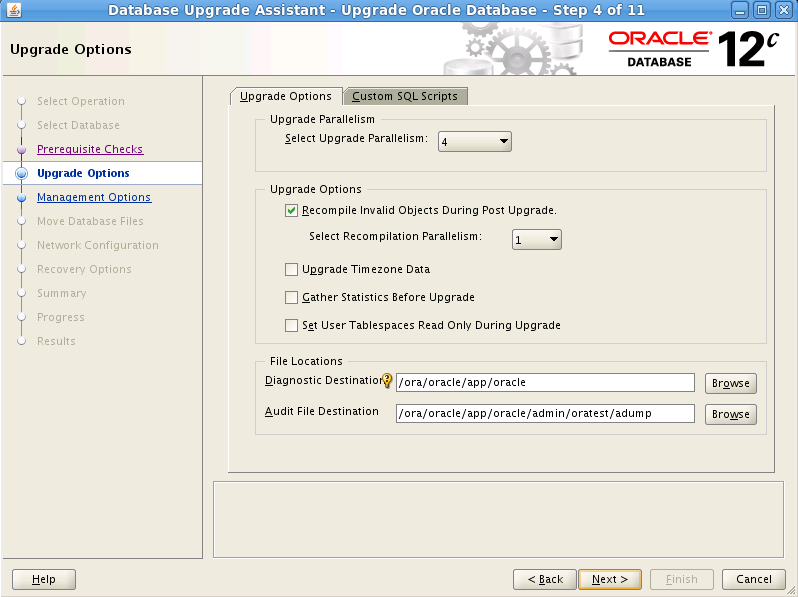
Upgrade Oracle 11g to 12c Database
Environment:
-------------
Oracle VM Box 4.2
Oracle Linux 6.2 64-bit
Oracle 11.2.0.3.0 Database
Oracle 12.1.0.1.0 Database
Two ways to upgrade Oracle Databsae
1. Database Upgrade Assistant (DBUA).
2. Manual
- The
utlu121s.sqlscript has been replaced with thepreupgrd.sql script. The new Pre-Upgrade Information Tool provides fix-up scripts with the ability to fix and address any issues identified by the pre-upgrade check script
- The previous upgrade script
catupgrd.sqlhas been replaced with the newcatctl.plParallel Upgrade Utility script which provides the ability to run upgrade scripts in parallel taking advantage of spare CPU capacity which can potentially reduce upgrade times
- If Flashback database is enabled, DBUA creates a guaranteed restore point which can be used in case we have a failure in the upgrade process. We can also restart DBUA to recover from any failures during the upgrade.
- We can now use an existing RMAN backup which DBUA is aware of in case we need to restore the database to the pre-12c upgrade state
- Oracle XML DB is now a mandatory component of the Oracle 12c database and is automatically installed as part of the upgrade process if not found
- If Database Control from earlier release exists, we need to drop the same before upgrading the database. We can do this via DBUA or reduce the upgrade downtime by performing this task in advance by copying a new script emremove.sql from the 12c Oracle Hone and running it against the 11g database.
Saturday, December 7, 2013
Wednesday, December 4, 2013
Oracle 12c: Control,Data,Redo log and Temp files in CDB and PDB
[oracle@oracle12c bin]$ ./sqlplus /nolog
SQL*Plus: Release 12.1.0.1.0 Production on Fri Oct 4 01:36:08 2013
Copyright (c) 1982, 2013, Oracle. All rights reserved.
SQL> conn / as sysdba
Connected.
SQL>
SQL>
SQL> show con_name
CON_NAME
------------------------------
CDB$ROOT
SQL>
SQL>
SQL> show con_id
CON_ID
------------------------------
1
SQL>
SQL>
SQL> select name from v$datafile;
NAME
--------------------------------------------------------------------------------
/ora/oracle/app/oracle/oradata/cdb1/system01.dbf
/ora/oracle/app/oracle/oradata/cdb1/sysaux01.dbf
/ora/oracle/app/oracle/oradata/cdb1/undotbs01.dbf
/ora/oracle/app/oracle/oradata/cdb1/pdbseed/system01.dbf
/ora/oracle/app/oracle/oradata/cdb1/users01.dbf
/ora/oracle/app/oracle/oradata/cdb1/pdbseed/sysaux01.dbf
/ora/oracle/app/oracle/oradata/cdb1/pdb2/system01.dbf
/ora/oracle/app/oracle/oradata/cdb1/pdb2/sysaux01.dbf
/ora/oracle/app/oracle/oradata/cdb1/pdb2/pdb2_users01.dbf
/ora/oracle/app/oracle/oradata/cdb1/pdb1/system01.dbf
/ora/oracle/app/oracle/oradata/cdb1/pdb1/sysaux01.dbf
NAME
--------------------------------------------------------------------------------
/ora/oracle/app/oracle/oradata/cdb1/pdb1/pdb1_users01.dbf
/ora/oracle/app/oracle/oradata/cdb1/pdb3/system01.dbf
/ora/oracle/app/oracle/oradata/cdb1/pdb3/sysaux01.dbf
/ora/oracle/app/oracle/oradata/cdb1/pdb3/pdb3_users01.dbf
/ora/oracle/app/oracle/oradata/cdb1/movefile/userdat.dbf
/ora/oracle/app/oracle/oradata/cdb1/pdb1copy/system01.dbf.clone
/ora/oracle/app/oracle/oradata/cdb1/pdb1copy/sysaux01.dbf.clone
/ora/oracle/app/oracle/oradata/cdb1/pdb1copy/pdb1_users01.dbf.clone
/ora/oracle/app/oracle/oradata/cdb1/pdb1copy/userdat.dbf.Clone
20 rows selected.
SQL>
SQL>
SQL> select con_id,name from v$tempfile;
CON_ID NAME
--------------------------------------------------------------------------------
1 /ora/oracle/app/oracle/oradata/cdb1/temp01.dbf
2 /ora/oracle/app/oracle/oradata/cdb1/pdbseed/pdbseed_temp01.dbf
3 /ora/oracle/app/oracle/oradata/cdb1/pdb1/temp01.dbf
4 /ora/oracle/app/oracle/oradata/cdb1/pdb2/temp01.dbf
5 /ora/oracle/app/oracle/oradata/cdb1/pdb3/temp01.dbf
6 /ora/oracle/app/oracle/oradata/cdb1/pdb1copy/temp01.dbf.Clone
6 rows selected.
SQL>
SQL>
SQL> select * from v$controlfile;
STATUS
-------
NAME
--------------------------------------------------------------------------------
IS_ BLOCK_SIZE FILE_SIZE_BLKS CON_ID
--- ---------- -------------- ----------
/ora/oracle/app/oracle/oradata/cdb1/control01.ctl
NO 16384 1096 0
/ora/oracle/app/oracle/fast_recovery_area/cdb1/control02.ctl
NO 16384 1096 0
STATUS
-------
NAME
--------------------------------------------------------------------------------
IS_ BLOCK_SIZE FILE_SIZE_BLKS CON_ID
--- ---------- -------------- ----------
SQL> select member from v$logfile;
MEMBER
--------------------------------------------------------------------------------
/ora/oracle/app/oracle/oradata/cdb1/redo03.log
/ora/oracle/app/oracle/oradata/cdb1/redo02.log
/ora/oracle/app/oracle/oradata/cdb1/redo01.log
SQL> alter session set container = pdb1;
Session altered.
SQL> show con_name
CON_NAME
------------------------------
PDB1
SQL> show con_id
CON_ID
------------------------------
3
SQL>
SQL> select name from v$datafile;
NAME
--------------------------------------------------------------------------------
/ora/oracle/app/oracle/oradata/cdb1/undotbs01.dbf
/ora/oracle/app/oracle/oradata/cdb1/pdb1/system01.dbf
/ora/oracle/app/oracle/oradata/cdb1/pdb1/sysaux01.dbf
/ora/oracle/app/oracle/oradata/cdb1/pdb1/pdb1_users01.dbf
/ora/oracle/app/oracle/oradata/cdb1/movefile/userdat.dbf
SQL> select con_id,name from v$tempfile;
CON_ID
----------
NAME
--------------------------------------------------------------------------------
3
/ora/oracle/app/oracle/oradata/cdb1/pdb1/temp01.dbf
SQL> select * from v$controlfile;
STATUS
-------
NAME
--------------------------------------------------------------------------------
IS_ BLOCK_SIZE FILE_SIZE_BLKS CON_ID
--- ---------- -------------- ----------
/ora/oracle/app/oracle/oradata/cdb1/control01.ctl
NO 16384 1096 0
/ora/oracle/app/oracle/fast_recovery_area/cdb1/control02.ctl
NO 16384 1096 0
STATUS
-------
NAME
--------------------------------------------------------------------------------
IS_ BLOCK_SIZE FILE_SIZE_BLKS CON_ID
--- ---------- -------------- ----------
SQL> select member from v$logfile;
MEMBER
--------------------------------------------------------------------------------
/ora/oracle/app/oracle/oradata/cdb1/redo03.log
/ora/oracle/app/oracle/oradata/cdb1/redo02.log
/ora/oracle/app/oracle/oradata/cdb1/redo01.log
SQL>
Subscribe to:
Posts (Atom)