Visit Counter

Sunday, March 15, 2015

Adding Datafiles to the Primary Database

Adding Datafiles to the Primary Database

The control file of the standby database may need to be refreshed (or recreated) when the control file on the primary database is changed. This is generally caused when altering the physical structure of the primary database like when adding datafiles and/or tablespaces. The steps below detail how to refresh the control file and add a datafile to a standby database.

  1. Before you add a datafile to the primary database, you should CANCEL your recovery on standby database.
    SQL> recover managed standby database cancel;
    
    Media recovery complete.
    NOTE: If you don't cancel, you will get an error on the standby when it hits any redo for that datafile. This won't be a big deal because at that point you can cancel and create the new datafile.

  2. Perform a SHUTDOWN IMMEDIATE on the standby database (if needed). It is possible, however, that you have the standby database configured to shutdown the standby database instance when managed recovery is cancelled. In this case, you will not need to perform a SHUTDOWN IMMEDIATE.
    SQL> shutdown immediate
  3. Create the new tablespace -or- add the new datafile on the primary database as usual. For example:
    SQL> alter tablespace users add datafile '/u06/app/oradata/ORA817/users02.dbf' size 10m;
    
    Tablespace altered.
  4. Create a new standby controlfile on the primary database.
    SQL> alter database create standby controlfile as '/ora_dat/ssaerp/control01.ctl';
    
    Database altered.
  5. Archive the current online logs of the primary database. Insure consistency in the backup datafiles, standby controlfile and logfiles. From the primary database:
    SQL> alter system archive log current;
    
    System altered.
  6. Transfer the new standby controlfile and all new archived redo logs to the standy machine.
    % rcp control01.ctl linux4:/u03/app/oradata/ORA817/control01.ctl
    % rcp control01.ctl linux4:/u04/app/oradata/ORA817/control02.ctl
    % rcp control01.ctl linux4:/u05/app/oradata/ORA817/control03.ctl
    
    % rcp /u06/app/oradata/ORA817/archive/* linux4:/u06/app/oradata/ORA817/archive/
  7. Mount the standby database. Keep in mind that after mounting the database with the new control file, the new datafile(s) will be in the new control file. On the standby database, perform the following:
    SQL> connect / as sysdba
    Connected to an idle instance.
    
    SQL> startup nomount
    ORACLE instance started.
    
    Total System Global Area  252777660 bytes
    Fixed Size                   451772 bytes
    Variable Size             218103808 bytes
    Database Buffers           33554432 bytes
    Redo Buffers                 667648 bytes
    
    SQL> alter database mount standby database;
    
    Database altered.
  8. Create the datafile on the standby database. The following command will create the physical OS file on disk. For example, issue:
    SQL> alter database create datafile '/ora_dat/drssaerp/xdb_ssaerp121.dbf'
      2  as '/ora_dat/drssaerp/xdb_ssaerp21.dbf';
    
    Database altered.
  9. On the standby site, continue by applying archived redo logs by issuing the following statement. Keep in mind that when prompted for the first archived redo log, you can type in "auto" to Oracle to automatically apply all required archived redo logs:
    SQL> recover standby database until cancel;
  10. You can now resume the standby database by putting it back into managed recovery mode:
    SQL> recover managed standby database;

Thursday, March 5, 2015

Initializing the Oracle ASMLib driver: [FAILED] on RHEL5.1 asmlib


Error:

Initializing the Oracle ASMLib driver: [FAILED] on Oracle linux 5


[root@rac1 ~]# /etc/init.d/oracleasm configure
Configuring the Oracle ASM library driver.

This will configure the on-boot properties of the Oracle ASM library
driver.  The following questions will determine whether the driver is
loaded on boot and what permissions it will have.  The current values
will be shown in brackets ('[]').  Hitting <ENTER> without typing an
answer will keep that current value.  Ctrl-C will abort.

Default user to own the driver interface [oracle]: oracle
Default group to own the driver interface [dbs]: dba
Start Oracle ASM library driver on boot (y/n) [y]: y
Scan for Oracle ASM disks on boot (y/n) [y]: y
Writing Oracle ASM library driver configuration: done
Initializing the Oracle ASMLib driver:                     [FAILED]
[root@rac1 ~]# /etc/init.d/oracleasm configure
Configuring the Oracle ASM library driver.


Solution

# uname -r

2.6.18-8.el5xen

Download right drive according to above version of O/S.

http://www.oracle.com/technetwork/server-storage/linux/downloads/rhel5-084877.html#oracleasm_rhel5_amd64

oracleasm-2.6.18-8.el5-2.0.4-1.el5.x86_64.rpm
oracleasmlib-2.0.4-1.el5.x86_64.rpm
oracleasm-support-2.1.8-1.el5.x86_64.rpm

# rpm -ivh oracleasm-2.6.18-8.el5-2.0.4-1.el5.x86_64.rpm
# rpm -ivh oracleasmlib-2.0.4-1.el5.x86_64.rpm
# rpm -ivh oracleasm-support-2.1.8-1.el5.x86_64.rpm 


This will configure the on-boot properties of the Oracle ASM library
driver.  The following questions will determine whether the driver is
loaded on boot and what permissions it will have.  The current values
will be shown in brackets ('[]').  Hitting <ENTER> without typing an
answer will keep that current value.  Ctrl-C will abort.

Default user to own the driver interface [oracle]: oracle
Default group to own the driver interface [dba]: dba
Start Oracle ASM library driver on boot (y/n) [y]: y
Scan for Oracle ASM disks on boot (y/n) [y]: y
Writing Oracle ASM library driver configuration: done
Initializing the Oracle ASMLib driver:                     [  OK  ]
Scanning the system for Oracle ASMLib disks:               [  OK  ]
[root@rac1 ~]# pwd
/root
[root@rac1 ~]# /etc/init.d/oracleasm createdisk DISK1 /dev/sdb1
Marking disk "DISK1" as an ASM disk:                       [  OK  ]
[root@rac1 ~]# /etc/init.d/oracleasm createdisk DISK2 /dev/sdc1
Marking disk "DISK2" as an ASM disk:                       [  OK  ]
[root@rac1 ~]# /etc/init.d/oracleasm createdisk DISK3 /dev/sdd1
Marking disk "DISK3" as an ASM disk:                       [  OK  ]
[root@rac1 ~]# /etc/init.d/oracleasm createdisk DISK4 /dev/sde1
Marking disk "DISK4" as an ASM disk:                       [  OK  ]
[root@rac1 ~]# /etc/init.d/oracleasm listdisks
DISK1
DISK2
DISK3
DISK4
[root@rac1 ~]# /etc/init.d/oracleasm scandisks
Scanning the system for Oracle ASMLib disks: DISK1
                                                           [  OK  ]


Sunday, February 22, 2015

ORA-27046: file size is not a multiple of logical block size Additional information: 1


SQL> create pfile from spfile;
create pfile from spfile
*

ERROR at line 1:
ORA-27046: file size is not a multiple of logical block size
Additional information: 1


The SPFILE is corrupted. The corruption could have happened because of the manual editing of the binary SPFILE. There is no way the spfile can be repaired or modified manually because spfile is a binary file.


Solution:


1. Restore from backup (If we have a recent backup of spfile then can restore it)
2. Create pfile from alert log file. We can get the list of non-default parameters from the alert log at startup time and with that can create pfile.
3. Get the parameters from the corrupted spfile using utilities like strings. We can even try using tools like "vi" to open the spfile and get the parameters.
Eg: strings spfile$ORACLE_SID.ora init$ORACLE_SID.ora

Then create spfile from the pfile.

Wednesday, February 18, 2015

Download Oracle 12c OCP Upgrade Exam Guide


Download OCP Upgrade to Oracle Database 12c Exam Guide.


https://www.dropbox.com/s/4wjb5kat5z61lgi/OCP%20Upgrade%20to%20Oracle%20Database%2012c.pdf?dl=0


Thursday, February 12, 2015

2nd level import failing with error: The image information is not complete


We Are doing a import. The 1st level import happens successfully, but whenever I try t do the 2nd level imoprt it shows the error that " The image information is not complete".
I am doing the import through a solaris serevr with netbackup 7.5.0.6 version.

01/13/2013 11:28:47 - begin Import
01/13/2013 11:28:49 - Info bpbrm (pid=25262) backupserver-baan is the host to restore to
01/13/2013 11:28:49 - Info bpbrm (pid=25262) reading file list from client
001/13/2013 11:28:49 - Info bpbrm (pid=25262) starting tar on client
001/13/2013 11:28:49 - Info tar (pid=25271) Restore started
001/13/2013 11:28:49 - Info bpbrm (pid=25262) bptm pid: 25272
01/13/2013 11:28:50 - Info bptm (pid=25272) start
01/13/201311:28:50 - started process bptm (pid=25272)
01/13/2013 11:28:50 - Info bpdm (pid=25272) reading backup image
01/13/2013 11:28:51 - Info bptm (pid=25272) using 30 data buffers
01/13/201311:28:51 - Info bptm (pid=25272) spawning a child process
01/13/2013 11:28:51 - Info bptm (pid=25272) child pid: 25275
01/13/2013 11:28:51 - Info bptm (pid=25272) Waiting for mount of media id G011L3 (copy 1) on server backupserver-baan.
02/12/2015 11:28:51 - started process bptm (pid=25272)
02/12/2015 11:28:51 - mounting G011L3
02/12/2015 11:28:51 - Info bptm (pid=25272) INF - Waiting for mount of media id G011L3 on server backupserver-baan for reading.
01/13/2013 11:28:51 - requesting resource G011L3
01/13/201311:28:51 - granted resource  G011L3
01/13/2013 11:28:51 - granted resource  HP.ULTRIUM4-SCSI.000
01/13/2013 11:29:55 - mounted G011L3; mount time: 0:01:04
01/13/2013 11:29:55 - Info bptm (pid=25272) G011L3
01/13/2013 11:29:56 - Info bptm (pid=25272) INF - Waiting for positioning of media id G011L3 on server backupserver-baan for reading.
01/13/201311:29:56 - positioning G011L3 to file 12
01/13/201311:31:30 - positioned G011L3; position time: 0:01:34
01/13/201311:31:30 - begin reading
01/13/2013 11:33:53 - Info bptm (pid=25272) waited for empty buffer 4644 times, delayed 4646 times
01/13/201311:33:53 - end reading; read time: 0:02:23
01/13/201311:33:53 - current media G011L3 complete, requesting next media HP.ULTRIUM4-SCSI.000:0012L4
01/13/2013 11:35:06 - Info bptm (pid=25272) Waiting for mount of media id 0012L4 (copy 1) on server backupserver-baan.
01/13/201311:35:06 - started process bptm (pid=25272)
01/13/201311:35:06 - mounting 0012L4
01/13/201311:35:06 - Info bptm (pid=25272) INF - Waiting for mount of media id 0012L4 on server backupserver-baan for reading.
01/13/201311:35:06 - granted resource  0012L4
01/13/2013 11:35:06 - granted resource  HP.ULTRIUM4-SCSI.000
01/13/201311:36:08 - mounted 0012L4; mount time: 0:01:02
01/13/2013 11:36:08 - Info bptm (pid=25272) 0012L4
01/13/2013 11:36:08 - Info bptm (pid=25272) INF - Waiting for positioning of media id 0012L4 on server backupserver-baan for reading.
01/13/2013 11:36:08 - positioning 0012L4 to file 1
01/13/2013 11:36:08 - positioned 0012L4; position time: 0:00:00
01/13/201311:36:08 - begin reading
01/13/201315:17:51 - Info tar (pid=25271) 4997 entries sent to bpdbm
01/13/201315:18:34 - Info tar (pid=25271) 9997 entries sent to bpdbm
01/13/201315:19:16 - Info tar (pid=25271) 14997 entries sent to bpdbm
01/13/2013 15:19:58 - Info tar (pid=25271) 19997 entries sent to bpdbm
001/13/2013 15:20:47 - Info tar (pid=25271) 24997 entries sent to bpdbm
01/13/201315:21:28 - Info tar (pid=25271) 29997 entries sent to bpdbm
01/13/201315:22:12 - Info tar (pid=25271) 34997 entries sent to bpdbm
01/13/2013 15:22:54 - Info tar (pid=25271) 39997 entries sent to bpdbm
01/13/2013 15:23:31 - Info tar (pid=25271) 44997 entries sent to bpdbm
01/13/2013 15:24:11 - Info tar (pid=25271) 49997 entries sent to bpdbm
01/13/2013 15:24:43 - Info bptm (pid=25272) waited for empty buffer 449378 times, delayed 449536 times
01/13/201315:24:43 - end reading; read time: 3:48:35
01/13/2013 15:24:45 - Error bpbrm (pid=25262) from client backupserver-baan: ERR - Unexpected EOF on archive file
 01/13/201301/13/2013 15:24:45 - Error bpbrm (pid=25262) ERR - Unexpected EOF reading image. The image information is not complete.
02/12/2015 15:24:45 - Info bptm (pid=25272) completed reading backup image
01/13/2013 15:24:46 - Info bptm (pid=25272) EXITING with status 0 <----------
01/13/2013 15:24:46 - Info tar (pid=25271) done. status: 1: the requested operation was partially successful
01/13/2013 15:24:46 - Error bpimport (pid=25250) Imported 0 of 1 images successfully.
01/13/201315:24:47 - Error bpimport (pid=25250) Imported 1 of 1 images partially successfully.
01/13/2013 15:24:47 - Error bpimport (pid=25250) Status = the requested operation was partially successful.
01/13/2013 15:24:50 - end Import; elapsed time 3:56:03
the requested operation was partially successful  (1)


01/13/2013 20:10:09 - begin reading
01/13/2013 21:41:37 - Info bptm (pid=24209) waited for empty buffer 146601 times, delayed 149717 times
01/13/2013 21:41:37 - end reading; read time: 1:31:28
01/13/2013 21:41:37 - Error bpbrm (pid=24206) from client SF440: ERR - Unexpected EOF on archive file
01/13/2013 21:41:37 - Info tar (pid=24208) done. status: 3
01/13/2013 21:41:37 - Error bpbrm (pid=24206) ERR - Unexpected EOF reading image. The image information is not complete.
01/13/2013 21:41:37 - Info bptm (pid=24209) completed reading backup image
01/13/2013 21:41:37 - Info bptm (pid=24209) EXITING with status 0 <----------
01/13/2013 21:41:37 - Info tar (pid=24208) done. status: 1: the requested operation was partially successful
01/13/2013 21:41:37 - Error bpimport (pid=24199) Imported 0 of 1 images successfully.
01/13/2013 21:41:37 - Error bpimport (pid=24199) Imported 1 of 1 images partially successfully.
01/13/2013 21:41:37 - Error bpimport (pid=24199) Status = the requested operation was partially successful.
01/13/2013 21:41:38 - end Import; elapsed time 5:47:45
the requested operation was partially successful  (1)
kindly tell me how to do the second level import.
Thanks.


Solution

It looks like backup image is spanned to multiple medias..
have you done the first phase of Import to the all the tapes that are having the backup image?
if not perform first phase of Import to all the tapes before procced to the 2nd phase of import.

How to restore data from tape which catalog information expired


(i) On the NetBackup Administration Console GUI, go to  NetBackup Management        
    (highlight)Catalog 


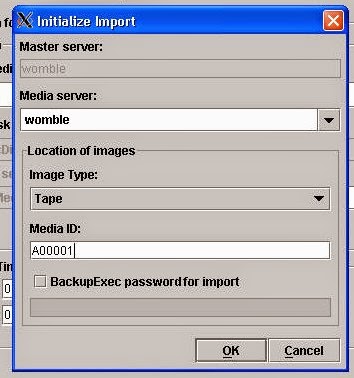
(ii) On the menu bar go to Actions > Initiate Import, and an "Initialize Import" window 
     should appear.


 Step 2:

In the "Initialize Import" window, enter the details as required, such as Media Server nameImage type and Media Id (see Figure 2).

Figure 2 - Showing the details being entered


Step 3:

The Tape will now be read to allow NetBackup to find the details of the backup headers.  This is the Phase 1 import. Go to the Activity Monitor to see the details of the Phase 1 import job (see Figure 3).

NOTE:  If any backup images span more than one tape, Phase 1 imports must be performed on all spanned tapes (before proceeding to Phase 2 import).

Figure 3 - Starting the Phase 1 Import


Step 4:


(i) Go to NetBackup Management > Catalog 

(ii) On the right hand side of the screen, go to Actions > select Import in the drop-down menu.


See Figure 4


Figure 4 - Setting up to search for imported images 


Step 5:

Now we search for the images that are in a state that can be imported.  The easiest way to do this is to leave the settings to "All", for example, All Media IDAll Media HostsAll Policies, etc. In theDate/Time Range, specify a set of dates which comfortably covers the dates on which the images were backed up (see Figure 5).

Figure 5 - Searching for imported images on which to run Phase 2 import


Step 6:

Now that Step 5 has been carried out, eligible images for Phase 2 import should appear in the Search Results section (see Figure 6). To perform the Phase 2 import:

(i) Highlight the images of interest
(ii) Go to the menu bar, select Actions > Import 

Figure 6 - Starting the Phase 2 Import


Import finished


Now you can find the information of history windows


Try to restore specific file.


File restored.


Monday, January 26, 2015

How to drop a database from SQL*PLUS


We need to remove database created only fr test purpose using RMAN duplicate command.


SQL> shutdown immediate;
ORA-01109: database not open


Database dismounted.

ORACLE instance shut down.
SQL>
SQL>


SQL> startup mount exclusive restrict;
ORACLE instance started.

Total System Global Area 7348420608 bytes
Fixed Size                  2150272 bytes
Variable Size            1201614976 bytes
Database Buffers         6006243328 bytes
Redo Buffers              138412032 bytes
Database mounted.


SQL>
SQL> drop database;

Database dropped.

Disconnected from Oracle Database 10g Enterprise Edition Release 10.2.0.4.0 - 64bit Production
With the Partitioning, OLAP, Data Mining and Real Application Testing options
SQL>


Drop database command remove data files and control files from OS level.