Visit Counter

Monday, June 6, 2016

CLSRSC-117: Failed to start Oracle Clusterware stack Oracle 12c clusterware


Install Grid software on RAC01 was sucessfully but Second RAC02 having a problem while running the root.sh script.


RAC02:


#/ora/grid/root.sh


[INS-35423]The installer has detected that Oracle Clusterware is not running on the local Node.

I am running the runinstaller as oracle user and it can see the cluster fine.

$ crsctl check crs
CRS-4638: Oracle High Availability Services is online
CRS-4537: Can not Cluster Ready Services is offline
CRS-4529: Cluster Synchronization Services is online
CRS-4533: Event Manager is offline


/ora/grid/log/rac02/agent/ohasd/oraagent_oracle/oraagent_oracle.log


status msg [CRS-5017: The resource action "ora.asm start" encountered the following error:
ORA-00443: background process "MMNL" did not start
. For details refer to "(:CLSN00107:)" in "/ora/grid/log/rac02/agent/ohasd/oraagent_oracle/oraagent_oracle.log".
] for start for resource: ora.asm 1 1
2016-06-06 23:03:49.377: [    AGFW][3043145488] {0:9:5} Agent sending reply for: RESOURCE_START[ora.asm 1 1] ID 4098:584
2016-06-06 23:03:49.449: [ora.asm][3045246736] {0:9:5} [start] (:CLSN00107:) clsn_agent::start }


Solution:


Rac installation  on Virtual Machine

I increased the memory of rac02 server.

[root@rac02 grid]# ./root.sh
Performing root user operation for Oracle 12c 

The following environment variables are set as:
    ORACLE_OWNER= oracle
    ORACLE_HOME=  /ora/grid

Enter the full pathname of the local bin directory: [/usr/local/bin]: 
The contents of "dbhome" have not changed. No need to overwrite.
The contents of "oraenv" have not changed. No need to overwrite.
The contents of "coraenv" have not changed. No need to overwrite.

Entries will be added to the /etc/oratab file as needed by
Database Configuration Assistant when a database is created
Finished running generic part of root script.
Now product-specific root actions will be performed.
Using configuration parameter file: /ora/grid/crs/install/crsconfig_params
2016/06/07 00:00:02 CLSRSC-363: User ignored prerequisites during installation

CRS-2791: Starting shutdown of Oracle High Availability Services-managed resources on 'rac02'
CRS-2673: Attempting to stop 'ora.crsd' on 'rac02'
CRS-2790: Starting shutdown of Cluster Ready Services-managed resources on 'rac02'
CRS-2673: Attempting to stop 'ora.asm' on 'rac02'
CRS-2673: Attempting to stop 'ora.LISTENER_SCAN1.lsnr' on 'rac02'
CRS-2677: Stop of 'ora.LISTENER_SCAN1.lsnr' on 'rac02' succeeded
CRS-2673: Attempting to stop 'ora.scan1.vip' on 'rac02'
CRS-2677: Stop of 'ora.asm' on 'rac02' succeeded
CRS-2677: Stop of 'ora.scan1.vip' on 'rac02' succeeded
CRS-2672: Attempting to start 'ora.scan1.vip' on 'rac01'
CRS-2676: Start of 'ora.scan1.vip' on 'rac01' succeeded
CRS-2672: Attempting to start 'ora.LISTENER_SCAN1.lsnr' on 'rac01'
CRS-2676: Start of 'ora.LISTENER_SCAN1.lsnr' on 'rac01' succeeded
CRS-2673: Attempting to stop 'ora.ons' on 'rac02'
CRS-2677: Stop of 'ora.ons' on 'rac02' succeeded
CRS-2673: Attempting to stop 'ora.net1.network' on 'rac02'
CRS-2677: Stop of 'ora.net1.network' on 'rac02' succeeded
CRS-2792: Shutdown of Cluster Ready Services-managed resources on 'rac02' has completed
CRS-2677: Stop of 'ora.crsd' on 'rac02' succeeded
CRS-2673: Attempting to stop 'ora.ctssd' on 'rac02'
CRS-2673: Attempting to stop 'ora.mdnsd' on 'rac02'
CRS-2673: Attempting to stop 'ora.gpnpd' on 'rac02'
CRS-2677: Stop of 'ora.gpnpd' on 'rac02' succeeded
CRS-2677: Stop of 'ora.mdnsd' on 'rac02' succeeded
CRS-2677: Stop of 'ora.ctssd' on 'rac02' succeeded
CRS-2673: Attempting to stop 'ora.evmd' on 'rac02'
CRS-2673: Attempting to stop 'ora.storage' on 'rac02'
CRS-2677: Stop of 'ora.storage' on 'rac02' succeeded
CRS-2673: Attempting to stop 'ora.asm' on 'rac02'
CRS-2677: Stop of 'ora.evmd' on 'rac02' succeeded
CRS-2677: Stop of 'ora.asm' on 'rac02' succeeded
CRS-2673: Attempting to stop 'ora.cluster_interconnect.haip' on 'rac02'
CRS-2677: Stop of 'ora.cluster_interconnect.haip' on 'rac02' succeeded
CRS-2673: Attempting to stop 'ora.cssd' on 'rac02'
CRS-2677: Stop of 'ora.cssd' on 'rac02' succeeded
CRS-2673: Attempting to stop 'ora.gipcd' on 'rac02'
CRS-2677: Stop of 'ora.gipcd' on 'rac02' succeeded
CRS-2793: Shutdown of Oracle High Availability Services-managed resources on 'rac02' has completed
CRS-4133: Oracle High Availability Services has been stopped.
CRS-4123: Starting Oracle High Availability Services-managed resources
CRS-2672: Attempting to start 'ora.mdnsd' on 'rac02'
CRS-2672: Attempting to start 'ora.evmd' on 'rac02'
CRS-2676: Start of 'ora.mdnsd' on 'rac02' succeeded
CRS-2676: Start of 'ora.evmd' on 'rac02' succeeded
CRS-2672: Attempting to start 'ora.gpnpd' on 'rac02'
CRS-2676: Start of 'ora.gpnpd' on 'rac02' succeeded
CRS-2672: Attempting to start 'ora.gipcd' on 'rac02'
CRS-2676: Start of 'ora.gipcd' on 'rac02' succeeded
CRS-2672: Attempting to start 'ora.cssdmonitor' on 'rac02'
CRS-2676: Start of 'ora.cssdmonitor' on 'rac02' succeeded
CRS-2672: Attempting to start 'ora.cssd' on 'rac02'
CRS-2672: Attempting to start 'ora.diskmon' on 'rac02'
CRS-2676: Start of 'ora.diskmon' on 'rac02' succeeded
CRS-2789: Cannot stop resource 'ora.diskmon' as it is not running on server 'rac02'
CRS-2676: Start of 'ora.cssd' on 'rac02' succeeded
CRS-2672: Attempting to start 'ora.cluster_interconnect.haip' on 'rac02'
CRS-2672: Attempting to start 'ora.ctssd' on 'rac02'
CRS-2676: Start of 'ora.ctssd' on 'rac02' succeeded
CRS-2676: Start of 'ora.cluster_interconnect.haip' on 'rac02' succeeded
CRS-2672: Attempting to start 'ora.asm' on 'rac02'
CRS-2676: Start of 'ora.asm' on 'rac02' succeeded
CRS-2672: Attempting to start 'ora.storage' on 'rac02'
CRS-2676: Start of 'ora.storage' on 'rac02' succeeded
CRS-2672: Attempting to start 'ora.crsd' on 'rac02'
CRS-2676: Start of 'ora.crsd' on 'rac02' succeeded
CRS-6017: Processing resource auto-start for servers: rac02
CRS-2673: Attempting to stop 'ora.LISTENER_SCAN1.lsnr' on 'rac01'
CRS-2672: Attempting to start 'ora.ons' on 'rac02'
CRS-2677: Stop of 'ora.LISTENER_SCAN1.lsnr' on 'rac01' succeeded
CRS-2673: Attempting to stop 'ora.scan1.vip' on 'rac01'
CRS-2677: Stop of 'ora.scan1.vip' on 'rac01' succeeded
CRS-2672: Attempting to start 'ora.scan1.vip' on 'rac02'
CRS-2676: Start of 'ora.scan1.vip' on 'rac02' succeeded
CRS-2672: Attempting to start 'ora.LISTENER_SCAN1.lsnr' on 'rac02'
CRS-2676: Start of 'ora.ons' on 'rac02' succeeded
CRS-2676: Start of 'ora.LISTENER_SCAN1.lsnr' on 'rac02' succeeded
CRS-6016: Resource auto-start has completed for server rac02
CRS-6024: Completed start of Oracle Cluster Ready Services-managed resources
CRS-4123: Oracle High Availability Services has been started.
2016/06/07 00:04:38 CLSRSC-343: Successfully started Oracle clusterware stack

2016/06/07 00:05:22 CLSRSC-325: Configure Oracle Grid Infrastructure for a Cluster ... succeeded

[root@rac02 grid]# 

Thursday, May 26, 2016

Install Quest Authentication Software on Solaris 11 Sparc 64-bit

root@afi-drsvr:/qas/QAS_4_1_1_22824# ./install.sh

Quest Authentication Services Installation Script
Script Build Version: 4.1.1.22824
Copyright 2017 Quest Software, Inc.  ALL RIGHTS RESERVED.
Protected by U.S. Patent Nos. 7,617,501, 7,895,332, 7,904,949, 8,086,710, 8,087,                                                                                        075, 8,245,242. Patents pending.

        Host Name: afi-drsvr
 Operating System: SunOS 11 (sparc)

Checking for recommended patches...Done
Checking for available software... Done
Checking for installed software... Done

Executing the following commands:
   Install QAS Client (vasclnt)
   Install QAS Group Policy Client (vasgp)
   License VAS (license)
   Join the Active Directory Domain (join)

Do you wish to continue?  (yes|no)? [yes]:
Executing command: 'vasclnt'...

Do you accept the Quest Software, Inc. agreement (yes|no)? [no]: yes

echo 'y' | pkgadd -a '/tmp/vas-admin' -G -d '/qas/QAS_4_1_1_22824/client/solaris8-sparc/vasclnt_SunOS_5.8_sparc-4.1.1.22824.pkg' all

Processing package instance <vasclnt> from </qas/QAS_4_1_1_22824/client/solaris8-sparc/vasclnt_SunOS_5.8_sparc-4.1.1.22824.pkg>

vasclnt 4.1.1.22824(sparcv9) 4.1.1.22824
Copyright 2017 Quest Software, Inc.  ALL RIGHTS RESERVED. Protected by U.S. Patent Nos. 7,617,501, 7,895,332, 7,904,949, 8,086,710, 8,087,075, 8,245,242. Patents pending.
## Processing package information.
## Processing system information.
   12 package pathnames are already properly installed.

Installing vasclnt 4.1.1.22824 as <vasclnt>

## Executing preinstall script.
## Installing part 1 of 1.
/etc/init.d/vasd
/etc/opt/quest/vas/group-override.sample
/etc/opt/quest/vas/user-override.sample
/etc/opt/quest/vas/users.allow.sample
/etc/opt/quest/vas/users.deny.sample
/opt/quest/bin/.klist
/opt/quest/bin/.ktutil
/opt/quest/bin/.ldapmodify
/opt/quest/bin/.ldapsearch
/opt/quest/bin/.nisedit
/opt/quest/bin/.uptool
/opt/quest/bin/.vastool
/opt/quest/bin/klist
/opt/quest/bin/ktutil
/opt/quest/bin/ldapmodify
/opt/quest/bin/ldapsearch
/opt/quest/bin/nisedit
/opt/quest/bin/preflight
/opt/quest/bin/uptool
/opt/quest/bin/vastool
/opt/quest/lib/libipcauthserver.so.1 <symbolic link>
/opt/quest/lib/libipcauthserver.so.1.0.0
/opt/quest/lib/libsudo_vas.so
/opt/quest/lib/libvas-gssapi.so <symbolic link>
/opt/quest/lib/libvas-gssapi.so.2 <symbolic link>
/opt/quest/lib/libvas-gssapi.so.2.0.0
/opt/quest/lib/libvas.so.4 <symbolic link>
/opt/quest/lib/libvas.so.4.6.0
/opt/quest/lib/libvasadmin.so.1 <symbolic link>
/opt/quest/lib/libvasadmin.so.1.0.0
/opt/quest/lib/libvtcacheipc.so.1 <symbolic link>
/opt/quest/lib/libvtcacheipc.so.1.0.0
/opt/quest/lib/libvtcachesql.so.1 <symbolic link>
/opt/quest/lib/libvtcachesql.so.1.0.0
/opt/quest/lib/libvtsmartcache.so.1 <symbolic link>
/opt/quest/lib/libvtsmartcache.so.1.0.0
/opt/quest/lib/libvtutil.so.1 <symbolic link>
/opt/quest/lib/libvtutil.so.1.0.0
/opt/quest/lib/libvtwrap.so <symbolic link>
/opt/quest/lib/libvtwrap.so.2 <symbolic link>
/opt/quest/lib/libvtwrap.so.2.0.0
/opt/quest/lib/nss/nss_vas4.so.1
/opt/quest/lib/nss/sparcv9/nss_vas4.so.1
/opt/quest/lib/sparcv9/libvas-gssapi.so <symbolic link>
/opt/quest/lib/sparcv9/libvas-gssapi.so.2 <symbolic link>
/opt/quest/lib/sparcv9/libvas-gssapi.so.2.0.0
/opt/quest/lib/sparcv9/libvas.so.4 <symbolic link>
/opt/quest/lib/sparcv9/libvas.so.4.6.0
/opt/quest/lib/sparcv9/libvasadmin.so.1 <symbolic link>
/opt/quest/lib/sparcv9/libvasadmin.so.1.0.0
/opt/quest/lib/sparcv9/libvtcacheipc.so.1 <symbolic link>
/opt/quest/lib/sparcv9/libvtcacheipc.so.1.0.0
/opt/quest/lib/sparcv9/libvtcachesql.so.1 <symbolic link>
/opt/quest/lib/sparcv9/libvtcachesql.so.1.0.0
/opt/quest/lib/sparcv9/libvtsmartcache.so.1 <symbolic link>
/opt/quest/lib/sparcv9/libvtsmartcache.so.1.0.0
/opt/quest/lib/sparcv9/libvtutil.so.1 <symbolic link>
/opt/quest/lib/sparcv9/libvtutil.so.1.0.0
/opt/quest/lib/support/libgcc_s.so.1
/opt/quest/lib/support/libstdc++.so.6 <symbolic link>
/opt/quest/lib/support/libstdc++.so.6.0.16
/opt/quest/libexec/chgfmon/chgfmon
/opt/quest/libexec/oat/.oat
/opt/quest/libexec/oat/.oat_changeowner
/opt/quest/libexec/oat/common.sh
/opt/quest/libexec/oat/oat
/opt/quest/libexec/oat/oat_adlookup
/opt/quest/libexec/oat/oat_changeowner
/opt/quest/libexec/oat/oat_example.sh
/opt/quest/libexec/oat/oat_format
/opt/quest/libexec/oat/oat_match
/opt/quest/libexec/oat/oat_match_group.awk
/opt/quest/libexec/oat/oat_match_user.awk
/opt/quest/libexec/vas/config_pam
/opt/quest/libexec/vas/enrolled_user_report
/opt/quest/libexec/vas/homedir-create.sh
/opt/quest/libexec/vas/manconfig-environment.sh
/opt/quest/libexec/vas/manconfig-man.conf.sh
/opt/quest/libexec/vas/manconfig-man.sh
/opt/quest/libexec/vas/manconfig-man_config.sh
/opt/quest/libexec/vas/manconfig-manpath.sh
/opt/quest/libexec/vas/manconfig-manpath_config.sh
/opt/quest/libexec/vas/manifest/vasd.xml
/opt/quest/libexec/vas/nst
/opt/quest/libexec/vas/nst-altarch
/opt/quest/libexec/vas/nst_od
/opt/quest/libexec/vas/scripts/check_k5logins.sh
/opt/quest/libexec/vas/scripts/configure_pam_vas.sh
/opt/quest/libexec/vas/scripts/deleted_check.sh
/opt/quest/libexec/vas/scripts/qas-aa-setup.sh
/opt/quest/libexec/vas/scripts/vas_capture_stats.sh
/opt/quest/libexec/vas/scripts/vas_oneway_setup.sh
/opt/quest/libexec/vas/scripts/vas_sa_manager.sh
/opt/quest/libexec/vas/scripts/vas_snapshot.sh
/opt/quest/libexec/vas/scripts/vas_status.sh
/opt/quest/libexec/vas/scripts/vasjoin.sh
/opt/quest/libexec/vas/sqlite3
/opt/quest/libexec/vas/sugi/.asdcom
/opt/quest/libexec/vas/sugi/asdcom
/opt/quest/libexec/vas/uptool/gecos_fullname
/opt/quest/libexec/vas/uptool/grnam_PARAM_cn
/opt/quest/libexec/vas/uptool/grnam_PARAM_samacc
/opt/quest/libexec/vas/uptool/grnam_cn
/opt/quest/libexec/vas/uptool/grnam_samacc
/opt/quest/libexec/vas/uptool/pwnam_cn
/opt/quest/libexec/vas/uptool/pwnam_samacc
/opt/quest/libexec/vas/uptool/pwnam_upnpre
/opt/quest/libexec/vas/vasauth_helper
/opt/quest/libexec/vas/vasd/.delusercheck
/opt/quest/libexec/vas/vasd/.vas_ccache_renew
/opt/quest/libexec/vas/vasd/.vas_muupd
/opt/quest/libexec/vas/vasd/.vas_ovrdupd
/opt/quest/libexec/vas/vasd/.vasac_helper
/opt/quest/libexec/vas/vasd/.vasdis_helper
/opt/quest/libexec/vas/vasd/delusercheck
/opt/quest/libexec/vas/vasd/qrond
/opt/quest/libexec/vas/vasd/qrondwrapper
/opt/quest/libexec/vas/vasd/vas_ccache_renew
/opt/quest/libexec/vas/vasd/vas_muupd
/opt/quest/libexec/vas/vasd/vas_ovrdupd
/opt/quest/libexec/vas/vasd/vasac_helper
/opt/quest/libexec/vas/vasd/vasdis_helper
/opt/quest/man/man1/ldapmodify.1
/opt/quest/man/man1/ldapsearch.1
/opt/quest/man/man1/nisedit.1
/opt/quest/man/man1/oat.1
/opt/quest/man/man1/oat_adlookup.1
/opt/quest/man/man1/oat_changeowner.1
/opt/quest/man/man1/oat_match.1
/opt/quest/man/man1/oat_overview.1
/opt/quest/man/man1/preflight.1
/opt/quest/man/man1/uptool.1
/opt/quest/man/man1/vasd.1
/opt/quest/man/man1/vastool.1
/opt/quest/man/man5/nss_vas.5
/opt/quest/man/man5/pam_vas.5
/opt/quest/man/man5/vas.conf.5
/opt/quest/man/man8/sudo_vas.8
/opt/quest/sbin/.vasd
/opt/quest/sbin/vasd
/opt/quest/share/oat/common.sh.msg
/opt/quest/share/oat/oat.msg
/opt/quest/share/oat/oat_adlookup.msg
/opt/quest/share/oat/oat_match.msg
/opt/quest/usr/lib/security/pam_vas3.so
/opt/quest/usr/lib/security/sparcv9/pam_vas3.so
[ verifying class <run> ]
## Executing postinstall script.
Registering vasd with SMF
WARNING: This system does not support a system wide global manpath.
You will need to set your MANPATH environment variable to /opt/quest/man,
or use "man -M /opt/quest/man <manpage>" to view the man pages.

Installation of <vasclnt> was successful.
vasclnt (4.1.1.22824) installed.

Executing command: 'vasgp'...
echo 'y' | pkgadd -a '/tmp/vas-admin' -G -d '/qas/QAS_4_1_1_22824/client/solaris8-sparc/vasgp_SunOS_5.8_sparc-4.1.1.22824.pkg' all

Processing package instance <vasgp> from </qas/QAS_4_1_1_22824/client/solaris8-sparc/vasgp_SunOS_5.8_sparc-4.1.1.22824.pkg>

vasgp 4.1.1.22824(sparcv9) 4.1.1.22824
Copyright 2017 Quest Software, Inc.  ALL RIGHTS RESERVED. Protected by U.S. Patent Nos. 7,617,501, 7,895,332, 7,904,949, 8,086,710, 8,087,075, 8,245,242. Patents pending.
Using </> as the package base directory.
## Processing package information.
## Processing system information.
   11 package pathnames are already properly installed.

Installing vasgp 4.1.1.22824 as <vasgp>

## Executing preinstall script.
## Installing part 1 of 1.
/opt/quest/bin/.vgpmod
/opt/quest/bin/.vgptool
/opt/quest/bin/vgpmod
/opt/quest/bin/vgptool
/opt/quest/include/vgpext.h
/opt/quest/lib/cse_mod/vgp_admext.so
/opt/quest/lib/cse_mod/vgp_defender.so
/opt/quest/lib/cse_mod/vgp_dfc.so
/opt/quest/lib/cse_mod/vgp_licext.so
/opt/quest/lib/cse_mod/vgp_qpm4u.so
/opt/quest/lib/cse_mod/vgp_samba.so
/opt/quest/lib/cse_mod/vgp_scecli.so
/opt/quest/lib/cse_mod/vgp_sshcfg.so
/opt/quest/lib/cse_mod/vgp_sudoext.so
/opt/quest/lib/cse_mod/vgp_unixext.so
/opt/quest/lib/cse_mod/vgp_vasext.so
/opt/quest/lib/cse_mod/vgp_vgpext.so
/opt/quest/lib/libgpshared.so.2.0.0
/opt/quest/libexec/vas/scripts/sighup.sh
/opt/quest/libexec/vgp/xlators/Machine/.certdist-xlator
/opt/quest/libexec/vgp/xlators/Machine/.unixcommon-xlator
/opt/quest/libexec/vgp/xlators/Machine/certdist-xlator
/opt/quest/libexec/vgp/xlators/Machine/system-gp-xlator
/opt/quest/libexec/vgp/xlators/Machine/unixcommon-xlator
/opt/quest/libexec/vgp/xlators/User/.bash-xlator
/opt/quest/libexec/vgp/xlators/User/bash-xlator
/opt/quest/man/man1/vgpmod.1
/opt/quest/man/man1/vgptool.1
/opt/quest/man/man5/vgp.conf.5
/var/opt/quest/vgp/extensions
[ verifying class <run> ]
## Executing postinstall script.
vasd is not running

Installation of <vasgp> was successful.
vasgp (4.0.3.164) upgraded to vasgp (4.1.1.22824)

Executing command: 'license'...

Licenses are required but are no longer enforced on each host
Licenses may be installed for auditing purposes

Number of Unix Enabled users in use:      0

---QAS---
Number of Licensed Unix Enabled Users:         0
Valid licenses:                                1
At least one license does not expire.

---QAS Siebel---
No licenses are installed.


Would you like to install licenses (yes|no)? [no]: yes

Please specify the full local path for each license file, e.g. /tmp/licenses/license1.txt.

Standard wildcards are also valid, e.g. /tmp/licenses/*.txt.

When all licenses have been installed press <enter> to quit.

Please specify full local path of license to install (<enter> to quit):
> /tmp/QAS-126-678-093.txt
Installed '/tmp/QAS-126-678-093.txt' -> '/etc/opt/quest/vas/.licenses/QAS-126-678-093.txt

Please specify full local path of license to install (<enter> to quit):
>

Resulting license state:
Number of Unix Enabled users in use:      0

---QAS---
Number of Licensed Unix Enabled Users:         0
Valid licenses:                                1
At least one license does not expire.

---QAS Siebel---
No licenses are installed.
Executing command: 'join'...

Would you like to join an Active Directory domain now (yes|no)? [yes]:
/opt/quest/libexec/vas/scripts/vasjoin.sh
Quest Authentication Services (QAS) installation script
Script build version: 4.1.1.22824
Copyright 2017 Quest Software, Inc.  ALL RIGHTS RESERVED.
Protected by U.S. Patent Nos. 7,617,501, 7,895,332, 7,904,949, 8,086,710, 8,087,075, 8,245,                                                                             242. Patents pending.

Acquire basic information...
 Please specify AD domain name to join to: afigroup.com
 Please specify an AD user to join host to afigroup.com: administrator

---------------------------------------------------------------------
        Domain              : afigroup.com
        Domain Controllers  : <none> -- use DNS
        AD User             : administrator
        User Keytab         : <none> -- will prompt for password
---------------------------------------------------------------------


Please enter password for administrator:

Joining the host to afigroup.com:
  Executing: /opt/quest/bin/vastool  join -f afigroup.com

Checking whether computer is already joined to a domain ... no
Reading password for administrator@AFIGROUP.COM from stdin...
Stopping daemon: vasd ... OK
Configuring forest root ... afigroup.com ... OK
Configuring site ... Default-First-Site-Name ... OK
Joining computer to the domain as host/afi-drsvr.afigroup.com ... OK
Joined using computer object "CN=afi-drsvr,CN=Computers,DC=afigroup,DC=com" ... OK
Writing vas.conf ... OK
Populating misc cache ... OK
Preparing to apply Group Policy ... OK
Applying Group Policy Settings ... OK
Starting daemon: vasd ... OK
Caching Users ... OK
Mapping mapped users ... OK
Processing user overrides ... OK
Caching Groups ... OK
Caching Nested Memberships ... OK
Processing group overrides ... OK
Caching Srvinfo ... OK
Caching Netgroups ... OK
Configuring Name Service Switch ... OK
Configuring PAM Authentication ... OK

The last command used to join the domain can be found at: /etc/opt/quest/vas/lastjoin

Done

Execution Successful

root@afi-drsvr:/qas/QAS_4_1_1_22824#


----------------------------------------------------------------------------------------------------------------


Quest Authentication Software


1. Download Quest software from Dell.com
2. Move to tmp directory on solaris

Installation

3. # pkgadd -d /tmp/solaris8-sparc/vasclnt_SunOS_5.8_sparc-4.1.0.22547.pkg vasclnt

Join Domain

4. Goto 192.0.0.62 Quest software join to domain

Adding License

5. /opt/quest/bin/vastool license add VAS_license_210-00594

Check License.

6. /opt/quest/bin/vastool license


Remove demo License 

7. cd /etc/opt/quest/vas/.licenses/

8. rm VAS_license_126-678-093

9. pkgrm vasclnt (Remove existing old package of quest software)

Wednesday, May 25, 2016

ORA-16024: parameter LOG_ARCHIVE_DEST_1 cannot be parsed


ORA-16024: parameter LOG_ARCHIVE_DEST_1 cannot be parsed 


The cause of this ORA-16024 error is a missing space in the variable declaration.


SQL> conn / as sysdba
Connected to an idle instance.
SQL> startup
ORA-16024: parameter LOG_ARCHIVE_DEST_1 cannot be parsed


ORACLE_HOME/dbs/initoratest.ora
log_archive_dest_1 = 'LOCATION = /ora_dat/ssaerp/archive1'
log_archive_dest_2 = 'LOCATION = /ora_dat/ssaerp/archive2'


I removed space between equal to sign and archive path.


log_archive_dest_1 = 'LOCATION=/ora_dat/ssaerp/archive1'
log_archive_dest_2 = 'LOCATION=/ora_dat/ssaerp/archive2'


SQL> startup
ORACLE instance started.

Total System Global Area 9723641856 bytes
Fixed Size                  2189808 bytes
Variable Size            4898952720 bytes
Database Buffers         4261412864 bytes
Redo Buffers              561086464 bytes
Database mounted.
Database opened.

Tuesday, May 24, 2016

/usr/lib/passmgmt: Unexpected failure. Password files unchanged UX: useradd: ERROR: Cannot update system - login cannot be created.


While creating user in solaris 11 sparc 64-bit getting below error


/usr/lib/passmgmt: Unexpected failure.  Password files unchanged
UX: useradd: ERROR: Cannot update system - login cannot be created.


Solution

root@afi-ssaerp:/etc# pwck

uucp:x:5:5:uucp Admin:/usr/lib/uucp:
        Login directory not found

nuucp:x:9:9:uucp Admin:/var/spool/uucppublic:/usr/lib/uucp/uucico
        Login directory not found
        Optional shell file not found


# zpool list

NAME      SIZE  ALLOC   FREE  CAP  DEDUP  HEALTH  ALTROOT
datapool  680G   557G   123G  81%  1.00x  ONLINE  -
rpool     136G   133G  2.74G  97%  1.00x  ONLINE  -


I checked the pools....almost full  I just release some space issue was resolved.


Wednesday, May 18, 2016

ORA-03113: end of file on communication channel


SQL> startup
ORACLE instance started.

Total System Global Area 16535183300 bytes
Fixed Size 2176288 bytes
Variable Size 1006635744 bytes
Database Buffers 637534208 bytes
Redo Buffers 7172096 bytes
ORA-03113: end-of-file on communication channel
Process ID: 5736
Session ID: 191 Serial number: 1

I get the same error if I try start with RMAN:

RMAN> startup mount

Oracle instance started
RMAN-00571: ===========================================================
RMAN-00569: =============== ERROR MESSAGE STACK FOLLOWS ===============
RMAN-00571: ===========================================================
RMAN-03002: failure of startup command at 03/07/2011 09:02:11
ORA-03113: end-of-file on communication channel
Process ID: 7256
Session ID: 192 Serial number: 5


ALERT_SSAERP.LOG


-bash-4.1$ tail - 100 alert_ssaerp.log


Errors in file /ora/app/oracle/diag/rdbms/ssaerp/ssaerp/trace/ssaerp_ora_2269.trc:
ORA-19815: WARNING: db_recovery_file_dest_size of 4781506560 bytes is 100.00% used, and has 0 remaining bytes available.
************************************************************************
You have following choices to free up space from recovery area:
1. Consider changing RMAN RETENTION POLICY. If you are using Data Guard,
   then consider changing RMAN ARCHIVELOG DELETION POLICY.
2. Back up files to tertiary device such as tape using RMAN
   BACKUP RECOVERY AREA command.
3. Add disk space and increase db_recovery_file_dest_size parameter to
   reflect the new space.
4. Delete unnecessary files using RMAN DELETE command. If an operating
   system command was used to delete files, then use RMAN CROSSCHECK and
   DELETE EXPIRED commands.
************************************************************************
ARCH: Error 19809 Creating archive log file to '/ora/app/oracle/fast_recovery_area/SSAERP/archivelog/2016_05_18/o1_mf_1_135_%u_.arc'
Errors in file /ora/app/oracle/diag/rdbms/ssaerp/ssaerp/trace/ssaerp_arc1_2271.trc:
ORA-19815: WARNING: db_recovery_file_dest_size of 4781506560 bytes is 100.00% used, and has 0 remaining bytes available.
************************************************************************
You have following choices to free up space from recovery area:
1. Consider changing RMAN RETENTION POLICY. If you are using Data Guard,
   then consider changing RMAN ARCHIVELOG DELETION POLICY.
2. Back up files to tertiary device such as tape using RMAN
   BACKUP RECOVERY AREA command.
3. Add disk space and increase db_recovery_file_dest_size parameter to
   reflect the new space.
4. Delete unnecessary files using RMAN DELETE command. If an operating
   system command was used to delete files, then use RMAN CROSSCHECK and
   DELETE EXPIRED commands.
************************************************************************
ARC1: Error 19809 Creating archive log file to '/ora/app/oracle/fast_recovery_area/SSAERP/archivelog/2016_05_18/o1_mf_1_136_%u_.arc'
Errors in file /ora/app/oracle/diag/rdbms/ssaerp/ssaerp/trace/ssaerp_ora_2269.trc:
ORA-16038: log 3 sequence# 135 cannot be archived
ORA-19809: limit exceeded for recovery files
ORA-00312: online log 3 thread 1: '/ora_dat/ssaerp/redo03.log'
USER (ospid: 2269): terminating the instance due to error 16038
System state dump requested by (instance=1, osid=2269), summary=[abnormal instance termination].
System State dumped to trace file /ora/app/oracle/diag/rdbms/ssaerp/ssaerp/trace/ssaerp_diag_2251_20160518145705.trc
Dumping diagnostic data in directory=[cdmp_20160518145705], requested by (instance=1, osid=2269), summary=[abnormal instance termination].
Instance terminated by USER, pid = 2269
-bash-4.1$ pwd


$ /ora/app/oracle/diag/rdbms/ssaerp/ssaerp/trace


Solution:


SPFILE File

SQL> Shutdown immediate;
SQL> startup mount

SQL>alter system set db_recovery_file_dest_size = 10G scope=both;


$ rman
Recovery Manager: Release 11.2.0.4.0 - production on Jul 03 18:11:11 2011
Copyright (c) 1982, 2009, Oracle and/or its affiliates. All rights reserved.

RMAN> backup archivelog all delete input;


PFILE


I changed the below parameter in initssaerp.ora

db_recovery_file_dest_size of 4781506560000


Remove files on below location

/ora/app/oracle/fast_recovery_area

-bash-4.1$ ./sqlplus /nolog

SQL*Plus: Release 11.2.0.4.0 Production on Jul 03 16:56:18 2011
Copyright (c) 1982, 2013, Oracle.  All rights reserved.

SQL> conn / as sysdba
Connected to an idle instance.
SQL> startup
ORACLE instance started.

Total System Global Area 1.0292E+10 bytes
Fixed Size                  2190488 bytes
Variable Size            1946162024 bytes
Database Buffers         8321499136 bytes
Redo Buffers               21839872 bytes
Database mounted.
Database opened.


SQL>


Tuesday, May 17, 2016

Upgrading to Oracle Database 11.2.0.4 TO 12c

Upgrading to Oracle Database 12c

Enviroment

O/S:   Solaris 11.3 Sparc 64-bit

DB:   Oracle 11.2.0.4

DB:   Oracle 12.1.0.1
---------------------------------------------------------------------------------------------------------


Upgrade Database Using DBUA


1. $./dbua

Select the "Upgrade Oracle Database" option, then click the "Next" button.


Select the database you wish to upgrade and click the "Next" button.


It can take a few minutes before the next screen is available. Wait at the "Getting database information. Please wait..." message.
Wait while the prerequisite checks takes place.


If the prerequisite checks highlight any issues, take the appropriate action to fix the issues. When you are happy with the prerequisites, click the "Next" button.


Amend the upgrade options if necessary, then click the "Next" button.


Select the desired management options, then click the "Next" button.


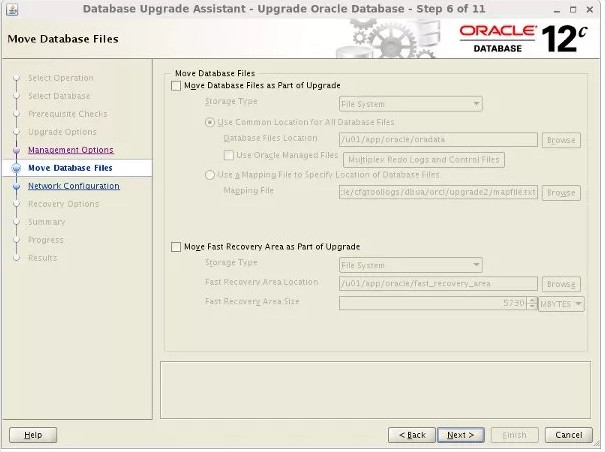
If you need to move the database files and/or the fast recovery area, check the relevant option and enter the destination. Click the "Next" button.


If this database is the only one using the 11g listener, accept the defaults, so the listener will be upgraded. If you prefer to manually define a new listener, so do now. Click the "Next" button.


Select the recovery options for use in the event of an upgrade failure, then click the "Next" button.


If you are happy with the summary information, click the "Finish" button.


Wait while the upgrade takes place. When the upgrade is complete, click the "Upgrade Results" button.


Check the upgrade results, then click the "Close" button to leave the DBUA.


-bash-4.1$ pwd
/ora/app/oracle/product/12.1.0/dbhome_1/bin


-bash-4.1$ ./sqlplus /nolog

SQL*Plus: Release 12.1.0.2.0 Production on Jan 18 19:00:20 2011

Copyright (c) 1982, 2014, Oracle.  All rights reserved.

SQL> conn / as sysdba
Connected.


SQL> select * from v$version;

BANNER
--------------------------------------------------------------------------------
    CON_ID
----------
Oracle Database 12c Enterprise Edition Release 12.1.0.2.0 - 64bit Production
         0

PL/SQL Release 12.1.0.2.0 - Production
         0

CORE    12.1.0.2.0      Production
         0


BANNER
--------------------------------------------------------------------------------
    CON_ID
----------
TNS for Solaris: Version 12.1.0.2.0 - Production
         0

NLSRTL Version 12.1.0.2.0 - Production
         0


SQL>


Wednesday, May 11, 2016

Oracle 12c MML oracle_link with Library (This version of Oracle is not supported in this script)

-bash-4.1$ ./oracle_link


Wednesday, May 21, 2015 05:38:44 PM AST
All Oracle instances should be shutdown before running this script.

Please log into the Unix system as the Oracle owner for running this script

Do you want to continue? (y/n) [n] y


LIBOBK path: /usr/openv/netbackup/bin
ORACLE_HOME: /ora/app/oracle/product/12.1.0/dbhome_1
Oracle version: 12.1.0.2.0
Platform type: sparc

This version of Oracle is not supported in this script

Please check the trace file located in /tmp/make_trace.4023
to make sure the linking process was successful.


-bash-4.1$ cat /tmp/make_trace.4072

Wednesday, May 21, 2015 505:55:39 PM AST
All Oracle instances should be shutdown before running this script.
Please log into the Unix system as the Oracle owner for running this script
Do you want to continue? (y/n) [n] y
LIBOBK path: /usr/openv/netbackup/bin
ORACLE_HOME: /ora/app/oracle/product/12.1.0/dbhome_1
Oracle version: 12.1.0.2.0
Platform type: sparc

This version of Oracle is not supported in this script


Solution:

Install netbackup client 7.7 on solaris 11.3

root@afi-ssaerp:~/netbackup7/net7/NetBackup_7.7_CLIENTS1# ./install


Symantec Installation Script
Copyright 1993 - 2015 Symantec Corporation, All Rights Reserved.


        Installing NetBackup Client Software


Please review the SYMANTEC SOFTWARE LICENSE AGREEMENT located on
the installation media before proceeding.  The agreement includes
details on the NetBackup Product Improvement Program.

For NetBackup installation and upgrade information specific to your
platform and to find out if your installed EEBs or hot fixes are
contained in this release, check out the Symantec Operations Readiness
Tools (SORT) Installation and Upgrade Checklist and Hot fix and EEB
Release Auditor, respectively, at https://sort.symantec.com/netbackup.

Do you wish to continue? [y,n] (y) y


Checking for required system conditions...

ok be_nb_same_host: inapplicable on solaris: skipping

Checking for recommended system conditions...

ok nb_77_hotfix_auditor: No potential for regression of hotfixes or EEBs was det
ected.

Do you want to install the NetBackup client software for this client? [y,n] (y)

This package will install Solaris/Solaris10 client.

NetBackup client is currently at release level 7.5.

This package will install NetBackup client 7.7.

Client binaries are located in /root/netbackup7/net7/NetBackup_7.7_CLIENTS1/NBCl
ients/anb/Clients/usr/openv/netbackup/client/Solaris/Solaris10.

Starting NetBackup Deduplication installer
testing: /tmp/pdde_pkg_dir_8519
Checking for SYMCpddea package...
   Package SYMCpddea found.

NetBackup Deduplication software is installed.

NetBackup Deduplication is not yet configured.
NetBackup Deduplication preinstall check passed

Terminating NetBackup and/or Media Manager processes.

Saving pack history as /usr/openv/pack.7.5

Saving client binaries for Solaris/Solaris10.

Installing PBX...
Please wait while installation is in progress...
Installation completed Successfully
Installation log located here: /var/tmp/installpbx-8778-051316180521.log


Unpacking SYMCnbclt package.
Checking for pre-existing SYMCnbclt package.
Removing pre-existing SYMCnbclt package.
May 13 18:07:38 afi-ssaerp sendmail[9412]: [ID 702911 mail.alert] unable to qual
ify my own domain name (afi-ssaerp) -- using short name
Installing SYMCnbclt package.
May 13 18:08:44 afi-ssaerp sendmail[9452]: [ID 702911 mail.alert] unable to qual
ify my own domain name (afi-ssaerp) -- using short name
Installation of SYMCnbclt was successful.
More details regarding SYMCnbclt can be found in file
/tmp/install_cltpkg_trace.8507 on afi-ssaerp.

Terminating NetBackup and/or Media Manager processes.

Installing NB-Java.

Unpacking SYMCnbjava package.
Checking for pre-existing SYMCnbjava package.
Removing pre-existing SYMCnbjava package.
May 13 18:10:01 afi-ssaerp sendmail[10154]: [ID 702911 mail.alert] unable to qua
lify my own domain name (afi-ssaerp) -- using short name
Installing SYMCnbjava package.
May 13 18:11:03 afi-ssaerp sendmail[10171]: [ID 702911 mail.alert] unable to qua
lify my own domain name (afi-ssaerp) -- using short name
Installation of SYMCnbjava was successful.
More details regarding SYMCnbjava can be found in file
/tmp/install_javapkg_trace.10086 on afi-ssaerp.

Unpacking SYMCnbjre package.
Checking for pre-existing SYMCnbjre package.
Removing pre-existing SYMCnbjre package.
May 13 18:12:10 afi-ssaerp sendmail[10231]: [ID 702911 mail.alert] unable to qua
lify my own domain name (afi-ssaerp) -- using short name
Installing SYMCnbjre package.
May 13 18:13:11 afi-ssaerp sendmail[10250]: [ID 702911 mail.alert] unable to qua
lify my own domain name (afi-ssaerp) -- using short name
Installation of SYMCnbjre was successful.
More details regarding SYMCnbjre can be found in file
/tmp/install_jrepkg_trace.10086 on afi-ssaerp.
+ /bin/cp ./nbj.conf /usr/openv/java

WARNING: Copying /usr/openv/netbackup/nblog.conf to
         /usr/openv/netbackup/nblog.conf.05-13-16.18:04:29
         for future reference.  Any local modifications to
         /usr/openv/netbackup/nblog.conf should be re-evaluated.


Migrating log files in /usr/openv/logs
Migration of log files complete.

Send a SIGHUP to (x)inetd so the (x)inetd.conf file will be reread.
Starting NetBackup Deduplication installer
testing: /tmp/pdde_pkg_dir_10575
Checking for SYMCpddea package...
   Package SYMCpddea found.

NetBackup Deduplication software is installed.

NetBackup Deduplication is not yet configured.
Checking for SYMCpddea package...
   Package SYMCpddea found.
Removing SYMCpddea package...
May 13 18:14:12 afi-ssaerp sendmail[10618]: [ID 702911 mail.alert] unable to qua
lify my own domain name (afi-ssaerp) -- using short name
   Package SYMCpddea removed.
Installing NetBackup Deduplication agent package (/root/netbackup7/net7/NetBacku
p_7.7_CLIENTS1/NBClients/anb/Clients/usr/openv/netbackup/client/Solaris/Solaris1
0/pddeagent.tar.gz)...
Extracting package SYMCpddea in /tmp/pdde_pkg_dir_10575.
   Package SYMCpddea extracted to /tmp/pdde_pkg_dir_10575.
Installing package SYMCpddea.
May 13 18:15:16 afi-ssaerp sendmail[10672]: [ID 702911 mail.alert] unable to qua
lify my own domain name (afi-ssaerp) -- using short name
   Package SYMCpddea installed.
Running NetBackup Deduplication upgrade script (agent mode)...
NetBackup Deduplication install finished successfully.
Version now installed: 9.0000.0015.0619
Full NetBackup Deduplication installation log saved to: /var/log/puredisk/2016-0
5-13_18:13-pdde-install.log


WARNING: Copying /etc/init.d/netbackup to
         /usr/openv/netbackup/bin/goodies/netbackup.05-13-16.18:04:29
         for future reference.  Any local modifications to
         /etc/init.d/netbackup should be re-evaluated.


The following automatic startup and shutdown scripts (respectively)
have been installed.  They will cause the NetBackup daemons to be
automatically shut down and restarted each time the system boots.

/etc/rc2.d/S77netbackup
/etc/rc0.d/K01netbackup
/etc/rc1.d/K01netbackup


Processed 15 files out of 15.

Successfully updated the session cache parameters.
Starting vnetd...
Starting bpcd...
Starting nbftclnt...
Starting nbdisco...
Starting bmrbd...

Installation of Java LiveUpdate agent succeeded.  Refer to file
/tmp/JLU-Log/JavaLiveUpdate-Install.log on afi-ssaerp
for installation details.


Checking LiveUpdate registration for the following products: CLT
This may take a few minutes.

Product CLT is installed and will be registered.

Updating LiveUpdate registration now...this may take some time.


File /usr/openv/tmp/install_trace.8382 contains a trace of this install.
That file can be deleted after you are sure the install was successful.
You have new mail in /var/mail/root
root@afi-ssaerp:~/netbackup7/net7/NetBackup_7.7_CLIENTS1#


-bash-4.1$ ./oracle_link


Friday, May 21, 2015 06:24:52 PM AST
All Oracle instances should be shutdown before running this script.

Please log into the Unix system as the Oracle owner for running this script

Do you want to continue? (y/n) [n] y


LIBOBK path: /usr/openv/netbackup/bin
ORACLE_HOME: /ora/app/oracle/product/12.1.0/dbhome_1
Oracle version: 12.1.0.2.0
Platform type: sparc
Linking LIBOBK:
ln -s /usr/openv/netbackup/bin/libobk.so64.1 /ora/app/oracle/product/12.1.0/dbhome_1/lib/libobk.so
Done

Please check the trace file located in /tmp/make_trace.11165
to make sure the linking process was successful.