Visit Counter

Tuesday, April 3, 2018

Oracle E-Business Suite 12.2 Installation Error


This Issue because of, Rapidwiz is expecting a 32-bit version of the JDK, and the error occurs because the only version available is 64-bit.


Fix: 


Please follow below steps to fix the issue

Copy a 64-bit version of the JDK from any 12c Oracle Home. 
To resolve the issue test the following steps in a dev instance and then migrate accordingly:

1. Backup the existing JDK located in startCD/Disk1/rapidwiz/jre/Linux_x64/


2. Copy a 64 bit version of the JDK to a zip file from any 12c Oracle Database or Grid Home located in $ORACLE_HOME/ via the following command:
   $ zip -ryT 1.6.0.zip jdk


3. Move the zip file 1.6.0.zip (via scp or other) into startCD/Disk1/rapidwiz/jre/Linux_x64 


4. Unzip file 1.6.0.zip in directory startCD/Disk1/rapidwiz/jre/Linux_x64


5. Rename existing 1.6.0 to 1.6.0_old 


6. Retest Rapidwiz and confirm the error is resolved.


Thursday, February 22, 2018

Oracle Database 18c Release Info (Where is Database 13 to 17)

Where is Database 13 to 17?


If you are wondering where is Database version 13, 14, 15, 16 or 17 after 12c R2, then worth looking at My Oracle Support Note 2285040.1 Release Update Introduction and FAQ and Mike Dietrich’s Blog


Here is excerpt from 2285040.1 Beginning in 2018, a new numbering schema for the database software is implemented. Instead of a legacy nomenclature such as 12.2.0.2, a three (3) field format consisting of: Year.Update.Revision is used, such as 18.1.0. This allows clear indication of:
  • The feature release designation of the database software (the first field)
  • The quarterly Update (the second field)
  • The quarterly Revision (the third field)
If you are like me who wants to read documentation and learn concepts then you’ll enjoy

Future of Oracle DBA with Cloud & Autonomous Database

Another good blog that you as an Oracle DBA must follow is Tim Hall and if you are among DBAs/Apps DBAs worried about future of DBA/Apps DBA or worried about Autonomous so let me re-iterate what Tim rightly said Oracle Database 18c is not Autonomous and  here , there is nothing to worry about as DBA/Apps DBAs future (but Yes it will evolve and you as DBA will do more interesting stuff and learn new stuff)
Note: Autonomous Database as a cloud service will be based on Oracle Database 18c, is different then Oracle Database 18c is an Autonomous Database (I hope this clarifies some confusion)


Where Is Database 18c Available?

Oracle Database can be deployed at following places
1. On-Premise Commodity Servers with O.S. like Linux, Solaris, HP-Unix, Windows, IBM-AIX etc.
2. On-Premise Engineered Systems: Exadata, Oracle Database Appliance (ODA), Super Cluster and Mini Cluster
3. Oracle Public Cloud: DBaaS on DBCS, Exadata Cloud Service, Exadata Express Cloud Service
4. Oracle Cloud at Customer 

  •  If you refer to My Oracle Support (MOS) Note ID 742060.1 Release Schedule of Current Database Releases then as of Feb 2018, 18c Database is available only on On-Premise Exadata
  • Next for ODA, DBaaS/DBCS and Exadata Cloud Service, it will be released in Q1 of 2018
Note: As per Oracle Database Blog , 18c is available on Oracle Public Cloud too but I couldn’t find this on our Cloud Account nor this information on any other place.


Sunday, January 28, 2018

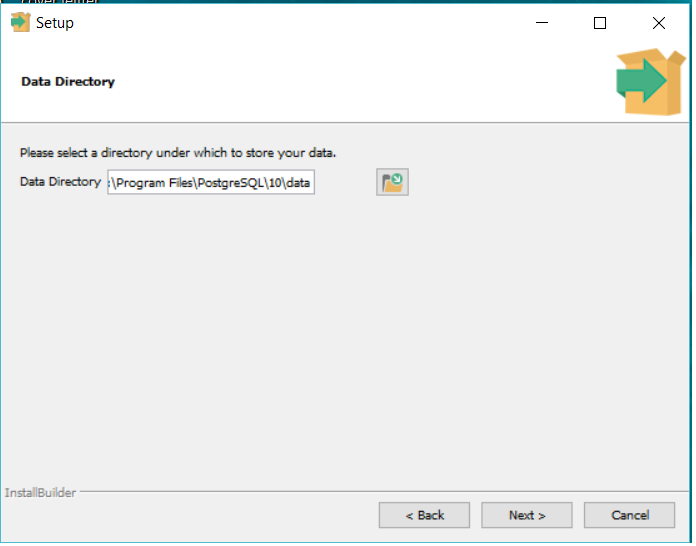
PostgreSQL installation on Windows 10


Installing POSTGRESQL DB on Windows 10

---------------------------------------------------

Download software from below link.

https://www.postgresql.org/download/


Wednesday, November 8, 2017

Oracle 12c Grid Installation Failed (SCAN name "rac01-scan" failed to resolve)


While installing Oracle 12c GI software...getting error


$ cat /ora/oracle/app/oraInventory/logs/installActions2014-11-08_08-36AM.log


NFO: ERROR:
INFO: PRVG-1101 : SCAN name "rac01-scan" failed to resolve
INFO: ERROR:
INFO: PRVF-4657 : Name resolution setup check for "rac01-scan" (IP address: 172.10.13.46) failed
INFO: ERROR:
INFO: PRVF-4657 : Name resolution setup check for "rac01-scan" (IP address: 172.10.13.47) failed
INFO: ERROR:
INFO: PRVF-4657 : Name resolution setup check for "rac01-scan" (IP address: 172.10.13.45) failed
INFO: ERROR:
INFO: PRVF-4664 : Found inconsistent name resolution entries for SCAN name "rac01-scan"


Skip above failure...just select next....finish


Verify that the cluster services are started properly on both nodes.

bash-4.1$ ./srvctl status nodeapps
VIP rac01-vip.localhost is enabled
VIP rac01-vip.localhost is running on node: rac01
VIP rac02-vip.localhost is enabled
VIP rac02-vip.localhost is running on node: rac02
Network is enabled
Network is running on node: rac01
Network is running on node: rac02
ONS is enabled
ONS daemon is running on node: rac01
ONS daemon is running on node: rac02
bash-4.1$


This concludes the 12c Grid infrastructure installation. Next step is an installation of database software and creating RAC database.


Tuesday, November 7, 2017

Oracleasm deletedisk diskname failed

[root@rac01 init.d]# oracleasm deletedisk ASMD1
Clearing disk header: failed
Unable to clear disk "ASMD1"
[root@rac01 init.d]# oracleasm deletedisk ASMD2
Clearing disk header: failed
Unable to clear disk "ASMD2"
[root@rac01 init.d]# oracleasm deletedisk ASMD2
Clearing disk header: failed
Unable to clear disk "ASMD2"


Solution Description
The issue is the disk header cannot be overwritten by the oracleasm command which is written by the previous commands. For this, you have to manually overwrite the header information by the OSdd command.


Step 1: find out the device information using blkid command.
[

[root@rac01 init.d]#
[root@rac01 init.d]# blkid | grep oracleasm
/dev/sdb1: LABEL="ASMD1" TYPE="oracleasm"
/dev/sdc1: LABEL="ASMD2" TYPE="oracleasm"
/dev/sdd1: LABEL="ASMD3" TYPE="oracleasm"
[root@rac01 init.d]#


Step 2: overwrite the header with null value using dd command. Or we can say clear the device header manually
[root@rac01 init.d]# dd if=dev/zero of=/dev/sdc1 bs=1024 count=100

100+0 records in
100+0 records out
102400 bytes (102 kB) copied, 0.0161951 s, 6.3 MB/s

[root@rac01 init.d]# dd if=dev/zero of=/dev/sdd1 bs=1024 count=100

[root@rac01 init.d]# dd if=dev/zero of=/dev/sdb1 bs=1024 count=100


Step 3: Sync the disk and delete the disk using oracleasm command
[dev]# /sbin/partprobe /dev/sdb1
[dev]# oracleasm deletedisk OCR_VOTE                           Disk "OCR_VOTE" defines an unmarked device


[root@rac01 init.d]# 


[root@rac01 init.d]# /etc/init.d/oracleasm deletedisk ASMD1
[root@rac01 init.d]# /etc/init.d/oracleasm deletedisk ASMD2
[root@rac01 init.d]# /etc/init.d/oracleasm deletedisk ASMD3


I checked the asm log

# cat /var/log/oracleasm

Unable to open device "/dev/sdb1": Device ot resource busy....

But when I create new ASM disk getting an error....so I restarted the virtual machine then ASM creation issue was resolved.


[root@localhost Desktop]# /etc/init.d/oracleasm createdisk Disk1 /dev/sda6

Marking disk "VOL1" as an ASM disk: [FAILED]


Sunday, November 5, 2017

Java VM: Java HotSpot(TM) 64-Bit Server VM (20.12-b01 mixed mode linux-amd64 compressed


While installing Oracle12c Grid software getting below error.


# A fatal error has been detected by the Java Runtime Environment:
#
#  SIGSEGV (0xb) at pc=0x0000003bb7c14d70, pid=10336, tid=140026722985744
#
# JRE version: 6.0_37-b06
# Java VM: Java HotSpot(TM) 64-Bit Server VM (20.12-b01 mixed mode linux-amd64 compressed oops)
# Problematic frame:
# C  [ld-linux-x86-64.so.2+0x14d70]
#
# An error report file with more information is saved as:
# /tmp/hs_err_pid10336.log
#
# If you would like to submit a bug report, please visit:
#   http://java.sun.com/webapps/bugreport/crash.jsp
# The crash happened outside the Java Virtual Machine in native code.
# See problematic frame for where to report the bug.
#
2017/11/05 16:06:31 CLSRSC-184: Configuration of ASM failed

2017/11/05 16:06:32 CLSRSC-258: Failed to configure and start ASM

Died at /ora/oracle/app/grid/crs/install/crsinstall.pm line 1976.
The command '/ora/oracle/app/grid/perl/bin/perl -I/ora/oracle/app/grid/perl/lib -I/ora/oracle/app/grid/crs/install /ora/oracle/app/grid/crs/install/rootcrs.pl ' execution failed
[root@rac01 grid]#


Solution:

# export LD_BIND_NOW=1

Then I run root.sh script in each node...It was successfully done.


Thursday, November 2, 2017

The avahi-Daemon service must be disabled.


While installing  Oracle 12c Grid Software Geeting error.


Checking daemon "avahi-daemon" is not configured and running daemon not configured check
failed for process "avahi-daemon"
check failed on nodes: rac01,rac02


Stop on both cluster nodes.

rac01

[root@rac01]# service avahi-daemon status
avahi-daemon (pid 1132) is running....
[root@rac01]#service avahi-daemon stop
shutting down Avahi Daemon:                       [OK]
[root@rac01]#
[root@rac01]#/sbin/chkconfig avahi-daemon off
[root@rac01]#

rac02


[root@rac02]# service avahi-daemon status
avahi-daemon (pid 1144) is running....
[root@rac02]#service avahi-daemon stop
shutting down Avahi Daemon:                       [OK]
[root@rac02]#
[root@rac02]#/sbin/chkconfig avahi-daemon off
[root@rac02]#