Visit Counter

Wednesday, July 27, 2016

Creating EM repository on Cluster Server


-bash-4.1$ ./emca -config dbcontrol db -repos recreate


STARTED EMCA at Jul 27, 2016 1:55:15 PM
EM Configuration Assistant, Version 11.2.0.3.0 Production
Copyright (c) 2003, 2011, Oracle.  All rights reserved.

Enter the following information:
Database SID: ssaerp
Listener port number: 1521
Listener ORACLE_HOME [ /ora/app/oracle/product/11.2.0/dbhome_1 ]:
Password for SYS user:
Password for DBSNMP user:
Password for SYSMAN user:
Email address for notifications (optional):
Outgoing Mail (SMTP) server for notifications (optional):
-----------------------------------------------------------------

You have specified the following settings

Database ORACLE_HOME ................ /ora/app/oracle/product/11.2.0/dbhome_1

Local hostname ................ afi-ssaerp2n
Listener ORACLE_HOME ................ /ora/app/oracle/product/11.2.0/dbhome_1
Listener port number ................ 1521
Database SID ................ ssaerp
Email address for notifications ...............
Outgoing Mail (SMTP) server for notifications ...............

-----------------------------------------------------------------
----------------------------------------------------------------------
WARNING : While repository is dropped the database will be put in quiesce mode.
----------------------------------------------------------------------
Do you wish to continue? [yes(Y)/no(N)]: Y
Jul 27, 2016 1:55:36 PM oracle.sysman.emcp.EMConfig perform
INFO: This operation is being logged at /ora/app/oracle/cfgtoollogs/emca/ssaerp/emca_2016_07_27_13_55_15.log                                                            .
Jul 27, 2016 1:55:36 PM oracle.sysman.emcp.ParamsManager checkListenerStatusForDBControl
WARNING: ORA-12541: TNS:no listener

Jul 27, 2016 1:55:36 PM oracle.sysman.emcp.EMConfig perform
SEVERE:

Database connection through listener failed. Fix the error and run EM Configuration Assistant again.

Some of the possible reasons may be:

1) Listener port 1521 provided is incorrect. Provide the correct port.
2) Listener is not up. Start the Listener.
3) Database service ssaerp is not registered with listener. Register the database service.
4) Listener is up on physical host and ORACLE_HOSTNAME environment variable is set to virtual host. Unset OR                                                            ACLE_HOSTNAME environment variable.


5) Listener is up on virtual host. Set environment variable ORACLE_HOSTNAME=<virtual host>.


6) /etc/hosts does not have correct entry for hostname.

Refer to the log file at /ora/app/oracle/cfgtoollogs/emca/ssaerp/emca_2016_07_27_13_55_15.log for more detai                                                            ls.
Could not complete the configuration. Refer to the log file at ora/app/oracle/cfgtoollogs/emca/ssaerp/emca_                                               2016_07_27_13_55_15.log for more details.


Define Virtual name of host


-bash-4.1$ ORACLE_HOSTNAME=lh-ora-rs
-bash-4.1$ export ORACLE_HOSTNAME


-bash-4.1$ ./emca -config dbcontrol db -repos recreate


STARTED EMCA at Jul 27, 2016 1:56:15 PM
EM Configuration Assistant, Version 11.2.0.3.0 Production
Copyright (c) 2003, 2011, Oracle.  All rights reserved.

Enter the following information:
Database SID: ssaerp
Listener port number: 1521
Listener ORACLE_HOME [ /ora/app/oracle/product/11.2.0/dbhome_1 ]:
Password for SYS user:
Password for DBSNMP user:
Password for SYSMAN user:
Email address for notifications (optional):
Outgoing Mail (SMTP) server for notifications (optional):
-----------------------------------------------------------------

You have specified the following settings

Database ORACLE_HOME ................ /ora/app/oracle/product/11.2.0/dbhome_1

Local hostname ................ lh-ora-rs
Listener ORACLE_HOME ................ /ora/app/oracle/product/11.2.0/dbhome_1
Listener port number ................ 1521
Database SID ................ ssaerp
Email address for notifications ...............
Outgoing Mail (SMTP) server for notifications ...............

-----------------------------------------------------------------
----------------------------------------------------------------------
WARNING : While repository is dropped the database will be put in quiesce mode.
----------------------------------------------------------------------
Do you wish to continue? [yes(Y)/no(N)]: Y
Jul 27, 2016 1:56:34 PM oracle.sysman.emcp.EMConfig perform
INFO: This operation is being logged at /ora/app/oracle/cfgtoollogs/emca/ssaerp/emca_2016_07_27_13_56_15.log                                                            .
Jul 27, 2016 1:56:35 PM oracle.sysman.emcp.EMReposConfig invoke
INFO: Dropping the EM repository (this may take a while) ...
Jul 27, 2016 1:59:08 PM oracle.sysman.emcp.EMReposConfig invoke
INFO: Repository successfully dropped
Jul 27, 2016 1:59:08 PM oracle.sysman.emcp.EMReposConfig createRepository
INFO: Creating the EM repository (this may take a while) ...
Jul 27, 2016 2:05:00 PM oracle.sysman.emcp.EMReposConfig invoke
INFO: Repository successfully created
Jul 27, 2016 2:05:03 PM oracle.sysman.emcp.EMReposConfig uploadConfigDataToRepository
INFO: Uploading configuration data to EM repository (this may take a while) ...
Jul 27, 2016 2:06:11 PM oracle.sysman.emcp.EMReposConfig invoke
INFO: Uploaded configuration data successfully
Jul 27, 2016 2:06:13 PM oracle.sysman.emcp.util.DBControlUtil secureDBConsole
INFO: Securing Database Control (this may take a while) ...
Jul 27, 2016 2:06:18 PM oracle.sysman.emcp.util.DBControlUtil secureDBConsole
INFO: Database Control secured successfully.
Jul 27, 2016 2:06:18 PM oracle.sysman.emcp.util.DBControlUtil startOMS
INFO: Starting Database Control (this may take a while) ...
Jul 27, 2016 2:06:34 PM oracle.sysman.emcp.EMDBPostConfig performConfiguration
INFO: Database Control started successfully
Jul 27, 2016 2:06:34 PM oracle.sysman.emcp.EMDBPostConfig performConfiguration
INFO: >>>>>>>>>>> The Database Control URL is https://lh-ora-rs:1158/em <<<<<<<<<<<
Jul 27, 2016 2:06:36 PM oracle.sysman.emcp.EMDBPostConfig invoke
WARNING:
************************  WARNING  ************************

Management Repository has been placed in secure mode wherein Enterprise Manager data will be encrypted.  The encryption key has been placed in the                       file: /ora/app/oracle/product/11.2.0/dbhome_1/lh-ora-rs_ssaerp/sysman/config/emkey.ora. Ensure this file is backed up as the encrypted data will                       become unusable if this file is lost.

***********************************************************
Enterprise Manager configuration completed successfully
FINISHED EMCA at Jul 27, 2016 2:06:36 PM
-bash-4.1$

Dbcontrol Repository already exists. Fix the error(s) and run EM Config


-bash-4.1$ ./emca -config dbcontrol db -repos create

STARTED EMCA at Jul 27, 2016 2:27:47 PM
EM Configuration Assistant, Version 11.2.0.3.0 Production
Copyright (c) 2003, 2011, Oracle.  All rights reserved.

Enter the following information:
Database SID: ssaerp
Listener port number: 1521
Listener ORACLE_HOME [ /ora/app/oracle/product/11.2.0/dbhome1104 ]:
Password for SYS user:
Password for DBSNMP user:
Jul 27, 2016 2:34:12 PM oracle.sysman.emcp.util.GeneralUtil initSQLEngineLoacly
WARNING: ORA-01017: invalid username/password; logon denied

Jul 27, 2016 2:34:20 PM oracle.sysman.emcp.util.GeneralUtil initSQLEngineLoacly

Jul 27, 2016 2:41:14 PM oracle.sysman.emcp.util.GeneralUtil initSQLEngineLoacly
WARNING: ORA-01017: invalid username/password; logon denied

Invalid username/password.
Password for DBSNMP user:
Password for SYSMAN user:
Email address for notifications (optional):
Outgoing Mail (SMTP) server for notifications (optional):
-----------------------------------------------------------------

You have specified the following settings

Database ORACLE_HOME ................ /ora/app/oracle/product/11.2.0/dbhome1104

Local hostname ................ afi-ssaerp
Listener ORACLE_HOME ................ /ora/app/oracle/product/11.2.0/dbhome1104
Listener port number ................ 1521
Database SID ................ ssaerp
Email address for notifications ...............
Outgoing Mail (SMTP) server for notifications ...............

-----------------------------------------------------------------
Do you wish to continue? [yes(Y)/no(N)]: Y
Jul 27, 2016 2:42:50 PM oracle.sysman.emcp.EMConfig perform
INFO: This operation is being logged at /ora/app/1104/oracle/cfgtoollogs/emca/ss                                                                                        aerp/emca_2016_07_27_14_27_46.log.
Jul 27, 2016 2:42:51 PM oracle.sysman.emcp.DatabaseChecks performReposChecks
SEVERE: Dbcontrol Repository already exists.  Fix the error(s) and run EM Config                             Duration Assistant again in standalone mode.


Solution


-bash-4.1$ ./emca -config dbcontrol db -repos recreate

STARTED EMCA at Jul 27, 2016 2:51:34 PM
EM Configuration Assistant, Version 11.2.0.3.0 Production
Copyright (c) 2003, 2011, Oracle.  All rights reserved.

Enter the following information:
Database SID: ssaerp
Listener port number: 1521
Listener ORACLE_HOME [ /ora/app/oracle/product/11.2.0/dbhome1104 ]:
Password for SYS user:
Password for DBSNMP user:
Password for SYSMAN user:
Email address for notifications (optional):
Outgoing Mail (SMTP) server for notifications (optional):
-----------------------------------------------------------------

You have specified the following settings

Database ORACLE_HOME ................ /ora/app/oracle/product/11.2.0/dbhome1104

Local hostname ................ afi-ssaerp
Listener ORACLE_HOME ................ /ora/app/oracle/product/11.2.0/dbhome1104
Listener port number ................ 1521
Database SID ................ ssaerp
Email address for notifications ...............
Outgoing Mail (SMTP) server for notifications ...............

-----------------------------------------------------------------
----------------------------------------------------------------------
WARNING : While repository is dropped the database will be put in quiesce mode.
----------------------------------------------------------------------
Do you wish to continue? [yes(Y)/no(N)]: Y
Jul 27, 2016 2:51:59 PM oracle.sysman.emcp.EMConfig perform
INFO: This operation is being logged at /ora/app/1104/oracle/cfgtoollogs/emca/ssaerp/emca_2016_07_27_14_51_33.log.
Jul 27, 2016 2:52:00 PM oracle.sysman.emcp.EMReposConfig invoke
INFO: Dropping the EM repository (this may take a while) ...
Jul 27, 2016 2:53:55 PM oracle.sysman.emcp.EMReposConfig invoke
INFO: Repository successfully dropped
Jul 27, 2016 2:53:56 PM oracle.sysman.emcp.EMReposConfig createRepository
INFO: Creating the EM repository (this may take a while) ...
Jul 27, 2016 2:58:38 PM oracle.sysman.emcp.EMReposConfig invoke
INFO: Repository successfully created
Jul 27, 2016 2:58:41 PM oracle.sysman.emcp.EMReposConfig uploadConfigDataToRepository
INFO: Uploading configuration data to EM repository (this may take a while) ...
Jul 27, 2016 3:00:12 PM oracle.sysman.emcp.EMReposConfig invoke
INFO: Uploaded configuration data successfully
Jul 27, 2016 3:00:13 PM oracle.sysman.emcp.ParamsManager getLocalListener
WARNING: Error retrieving listener for afi-ssaerp
Jul 27, 2016 3:00:14 PM oracle.sysman.emcp.util.DBControlUtil secureDBConsole
INFO: Securing Database Control (this may take a while) ...
Jul 27, 2016 3:00:24 PM oracle.sysman.emcp.util.DBControlUtil secureDBConsole
INFO: Database Control secured successfully.
Jul 27, 2016 3:00:24 PM oracle.sysman.emcp.util.DBControlUtil startOMS
INFO: Starting Database Control (this may take a while) ...
Jul 27, 2016 3:00:53 PM oracle.sysman.emcp.EMDBPostConfig performConfiguration
INFO: Database Control started successfully
Jul 27, 2016 3:00:54 PM oracle.sysman.emcp.EMDBPostConfig performConfiguration
INFO: >>>>>>>>>>> The Database Control URL is https://afi-ssaerp:1158/em <<<<<<<<<<<
Jul 27, 2016 3:00:56 PM oracle.sysman.emcp.EMDBPostConfig invoke
WARNING:
************************  WARNING  ************************

Management Repository has been placed in secure mode wherein Enterprise Manager data will be encrypted.  The encryption key has been placed in the file: /ora/app/oracle/product/11.2.0/dbhome1104/afi-ssaerp_ssaerp/sysman/config/emkey.ora. Ensure this file is backed up as the encrypted data will become unusable if this file is lost.

***********************************************************
Enterprise Manager configuration completed successfully
FINISHED EMCA at Jul 27, 2016 3:00:56 PM


-bash-4.1$


Oracle Enterprise Manager failed to start, OC4J Configuration issue. Configure Enterprise Manager Database Control Manually with Enterprise Manager Configuration Assistant

You can drop the EM Repository

--------------------------------

[oracle@localhost ~]$ emca -deconfig dbcontrol db -repos drop
STARTED EMCA at Aug 5, 2013 7:54:35 PM
EM Configuration Assistant, Version 11.2.0.0.2 Production
Copyright (c) 2003, 2005, Oracle.  All rights reserved.

Enter the following information:
Database SID: fmw
Listener port number: 1521
Password for SYS user:
Password for SYSMAN user:

Do you wish to continue? [yes(Y)/no(N)]: Y
Aug 5, 2013 7:54:54 PM oracle.sysman.emcp.EMConfig perform
INFO: This operation is being logged at /u01/app/oracle/cfgtoollogs/emca/fmw/emca_2013_08_05_19_54_34.log.
Aug 5, 2013 7:54:55 PM oracle.sysman.emcp.EMDBPreConfig performDeconfiguration
WARNING: EM is not configured for this database. No EM-specific actions can be performed.
Aug 5, 2013 7:54:55 PM oracle.sysman.emcp.EMReposConfig invoke
INFO: Dropping the EM repository (this may take a while) ...
Aug 5, 2013 7:57:04 PM oracle.sysman.emcp.EMReposConfig invoke
INFO: Repository successfully dropped
Enterprise Manager configuration completed successfully
FINISHED EMCA at Aug 5, 2013 7:57:04 PM

Now, let's configure it again


Create new for EM repository
---------------------------------------

[oracle@localhost ~]$ emca -config dbcontrol db -repos create
STARTED EMCA at Aug 5, 2013 7:58:22 PM
EM Configuration Assistant, Version 11.2.0.0.2 Production
Copyright (c) 2003, 2005, Oracle.  All rights reserved.

Enter the following information:
Database SID: fmw
Listener port number: 1521
Listener ORACLE_HOME [ /u01/app/oracle/product/11.2.0/dbhome_1 ]:
Password for SYS user:
Password for DBSNMP user:
Password for SYSMAN user:
Email address for notifications (optional):
Outgoing Mail (SMTP) server for notifications (optional):
-----------------------------------------------------------------

You have specified the following settings
Database ORACLE_HOME ................ /u01/app/oracle/product/11.2.0/dbhome_1
Local hostname ................ localhost.localhost.com
Listener ORACLE_HOME ................ /u01/app/oracle/product/11.2.0/dbhome_1
Listener port number ................ 1521
Database SID ................ fmw
Email address for notifications ...............
Outgoing Mail (SMTP) server for notifications ...............
-----------------------------------------------------------------

Do you wish to continue? [yes(Y)/no(N)]: Y
Aug 5, 2013 7:58:53 PM oracle.sysman.emcp.EMConfig perform
INFO: This operation is being logged at /u01/app/oracle/cfgtoollogs/emca/fmw/emca_2013_08_05_19_58_21.log.
Aug 5, 2013 7:58:54 PM oracle.sysman.emcp.EMReposConfig createRepository
INFO: Creating the EM repository (this may take a while) ...
Aug 5, 2013 8:05:56 PM oracle.sysman.emcp.EMReposConfig invoke
INFO: Repository successfully created
Aug 5, 2013 8:06:02 PM oracle.sysman.emcp.EMReposConfig uploadConfigDataToRepository
INFO: Uploading configuration data to EM repository (this may take a while) ...
Aug 5, 2013 8:07:14 PM oracle.sysman.emcp.EMReposConfig invoke
INFO: Uploaded configuration data successfully
Aug 5, 2013 8:07:17 PM oracle.sysman.emcp.util.DBControlUtil configureSoftwareLib
INFO: Software library configured successfully.
Aug 5, 2013 8:07:17 PM oracle.sysman.emcp.EMDBPostConfig configureSoftwareLibrary
INFO: Deploying Provisioning archives ...
Aug 5, 2013 8:08:07 PM oracle.sysman.emcp.EMDBPostConfig configureSoftwareLibrary
INFO: Provisioning archives deployed successfully.
Aug 5, 2013 8:08:07 PM oracle.sysman.emcp.util.DBControlUtil secureDBConsole
INFO: Securing Database Control (this may take a while) ...
Aug 5, 2013 8:08:53 PM oracle.sysman.emcp.util.DBControlUtil secureDBConsole
INFO: Database Control secured successfully.
Aug 5, 2013 8:08:53 PM oracle.sysman.emcp.util.DBControlUtil startOMS
INFO: Starting Database Control (this may take a while) ...
Aug 5, 2013 8:10:16 PM oracle.sysman.emcp.EMDBPostConfig performConfiguration
INFO: Database Control started successfully
Aug 5, 2013 8:10:17 PM oracle.sysman.emcp.EMDBPostConfig performConfiguration
INFO: >>>>>>>>>>> The Database Control URL is https://localhost.localhost.com:5500/em <<<<<<<<<<<
Aug 5, 2013 8:10:28 PM oracle.sysman.emcp.EMDBPostConfig invoke
WARNING:
************************ WARNING  ************************

Management Repository has been placed in secure mode wherein Enterprise Manager data will be encrypted.  The encryption key has been placed in the file: /u01/app/oracle/product/11.2.0/dbhome_1/localhost.localhost.com_fmw/sysman/config/emkey.ora.   Please ensure this file is backed up as the encrypted data will become unusable if this file is lost.

***********************************************************
Enterprise Manager Configuration completed successfully
FINISHED EMCA at Aug 5, 2013 8:10:28 PM

[oracle@localhost ~]$

Wednesday, July 13, 2016

Error with a file name containing parentheses


Solaris 11


When I tried to change file name from abc.file(1).zip to xyz.zip
It's says syntax error I am using Solaris 11.3 Sparc


# mv abc.file(1).zip xyz.zip

bash: syntax error near unexpected token '('


Solution:


The entire file name does not need quoting () do.


# mv 'abc.file(1).zip'  xyz.zip


The file just loaded does not appear to be executable


Solaris 11 installation on Sparc T4-2 Server getting below error after (init 0) OK Prompt


OK> boot cdrom

SPARC Enterprise T4-2 Server, using Domain console
Copyright (c) 1998, 2012, Oracle and/or its affiliates. All rights reserved.
Copyright (c) 2012, Oracle and/or its affiliates and Fujitsu Limited. All rights reserved.
OpenBoot 4.24.15, 49152 MB memory installed, Serial #94022600.
Ethernet address 0:41:28:2:15:9v, Host ID: 10202155z.


Rebooting with command: boot kernel/sparcv9/unix
Boot device: /pci@0,600000/pci@0/pci@8/pci@0/scsi@1/disk@0  File and args: kernel/sparcv9/unix

Can't open kernel/sparcv9/unix
ERROR: FCode Aborted.

Warning: Fcode sequence resulted in a net stack depth change of 1
Evaluating:

Evaluating:
The file just loaded does not appear to be executable.


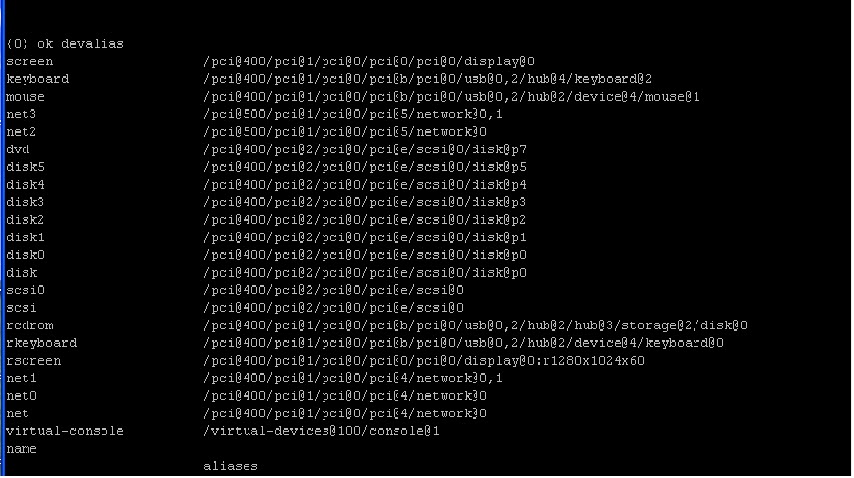
{0} ok


Solution:


OK>  devalias

Select DVD option


OK> boot dvd


Oracle Solaris Installation on Sparc T4-2 Server


Solaris 11.3 Installation on Sparc T4-2 Server


I getting error while booting from Solaris 11 CD..

# init 0  (Get OK prompt)

OK> boot cdrom

Boot device: /pci@1e,600000/ide@d/disk@0,0:a File and args: device 
can't open device 
Warning: Fcode sequence resulted in a net stack depth change of 1 Evaluating: 
Evaluating: 
the file just loaded does not appear to be executable.


Solution:


OK devalias

Select dvd option


OK> boot dvd


Please enter a number (1) 1


Create Raid 5 for data


# zpool create poolname raidz disk1 disk2 disk3

Example


# zpool create datapool raidz c0t0d0 c0t1d0 c0t2d0 c0t3d0


Create file systems

/ora_dat
/ora_idx
/ora
/ssaerp
/ora_temp


#   root@afi-drsvr:/ora_temp# zfs create datapool/backup2

#   root@afi-drsvr:/ora_temp# zfs set mountpoint=/backup2  datapool/backup2
 

  #  root@afi-drsvr:/ora_temp# zfs list

  NAME                              USED  AVAIL  REFER  MOUNTPOINT
  datapool                               467K  1.60T  46.4K  /datapool
  datapool/backup2                 44.9K  1.60T  44.9K  /backup2
  datapool/ora                         44.9K  1.60T  44.9K  /ora
  datapool/ora_dat                 44.9K  1.60T  44.9K  /ora_dat
  datapool/ora_idx                 44.9K  1.60T  44.9K  /ora_idx
  datapool/ora_temp                44.9K  1.60T  44.9K  /ora_temp
  datapool/ssaerp                   44.9K  1.60T  44.9K  /ssaerp
  rpool                                    73.0G   474G  73.5K  /rpool
  rpool/ROOT                        3.11G   474G    31K  legacy
  rpool/ROOT/solaris               3.11G   474G  2.89G  /
  rpool/ROOT/solaris/var            224M   474G   221M  /var
  rpool/VARSHARE                   2.53M   474G  2.44M  /var/share
  rpool/VARSHARE/pkg                 63K   474G    32K  /var/share/pkg
  rpool/VARSHARE/pkg/repositories    31K   474G    31K  /var/share/pkg/repo                             sitories
   35  rpool/VARSHARE/zones               31K   474G    31K  /system/zones
   36  rpool/dump                                     65.8G   476G  63.8G  -
   37  rpool/export                                    97.5K   474G    32K  /export
   38  rpool/export/home                          65.5K   474G    32K  /export/home
   39  rpool/export/home/admin              33.5K   474G  33.5K  /export/home/admin
   40  rpool/swap                                     4.13G   474G  4.00G  -
 

  root@afi-drsvr:/ora_temp#


Download from Oracle site Repository

https://www.oracle.com/solaris/solaris11/downloads/local-repository-downloads.html

Create folder....repo1


# root@afi-drsvr:/repo# ls

   COPYRIGHT                         sol-11_3-repo_1of5.zip
   install-repo.ksh                       sol-11_3-repo_2of5.zip
   NOTICES                               sol-11_3-repo_3of5.zip
   pkg5.repository                       sol-11_3-repo_4of5.zip
   README-repo-iso.txt            sol-11_3-repo_5of5.zip
   README-zipped-repo.txt      sol-11_3-repo_md5sums.txt
   readme.txt


  106  root@afi-drsvr:/repo# ls -l

  107  total 16478173
  108  -rw-r--r--   1 admin    staff       3440 Jul 13 14:52 COPYRIGHT
  109  -rw-r--r--   1 admin    staff      11612 Jul 13 14:52 install-.zip
  110  -rw-r--r--   1 admin    staff    1717187368 Jul 13 14:54 sol-11_3-repo_3of5.zip
  111  -rw-r--r--   1 admin    staff    1871913207 Jul 13 14:55 sol-11_3-repo_4of5.zip
  112  -rw-r--r--   1 admin    staff    1570373423 Jul 13 14:56 sol-11_3-repo_5of5.zip
  113  -rw-r--r--   1 admin    staff        285 Jul 13 14:56 sol-11_3-repo_md5sums.txt


Extracting Repository  of Solaris 11.3


root@afi-drsvr:/repo# ./install-repo.ksh -d /repo1/ -v

Using sol-11_3-repo download.
Uncompressing sol-11_3-repo_1of5.zip...done.
Uncompressing sol-11_3-repo_2of5.zip...done.
Uncompressing sol-11_3-repo_3of5.zip...done.
Uncompressing sol-11_3-repo_4of5.zip...done.
Uncompressing sol-11_3-repo_5of5.zip...done.
Repository can be found in /repo1/.
Initiating repository verification.
pkg://solaris/group/prerequisite/oracle/oracle-rdbms-server-12-1-preinstall 1442                                   pkg://solaris/system/domain-service-processor-protocol/sparc-enterprise 1774/548                               pkg://solaris/consolidation/instantclient/instantclient-incorporation 3066/5480                                     pkg://solaris/group/prerequisite/oracle/oracle-ebs-server-R12-preinstall 3383/54                                   pkg://solaris/system/kernel/dynamic-reconfiguration/ultra-enterprise-10000 3911/                                 pkg://solaris/group/prerequisite/oracle/oracle-rdbms-server-12cR1-preinstall 416


Publish Repository on repo1 folder

Installing Repository

# pkg install solaris-desktop


For Xmanager Configuration to access solaris 11

# vi  /etc/gdm/custom.conf

[xdmcp]
Enable=true   (By default false)


# inetadm -e xvnc-inetd

# svcadm restart svc:/application/graphical-login/gdm:default


Root Access by default in Solaris 11

# vi /etc/ssh/sshd_config

PermitRootLgin Yes


# vi /etc/default/login

CONSOLE=/dev/Console

# svcadm restart svc:/network/ssh:default


Oracle Packages for installation oracle software


 # pkg install pkg://solaris/developer/build/make


  # pkg install pkg://solaris/developer/assembler


Tuesday, July 12, 2016

ORA-27046 file size is not a multiple of logical block size


While creating pfile from spfile getting below error.


SQL> create pfile from spfile

create pfile from spfile
*
ERROR at line 1:

ORA-27046: file size is not a multiple of logical block size
Additional information 1


Solution:

As per metalink serach it seems the SPFILE has previously been manually edited when the instance was opened and the spfile has gone corrupted.


If all the parameter are same then, yes copy the pfile from production to the DR and then as the database is opened using the spfile, you need to shut it down, and open it with the new pfile. After opening the database successfully, create the spfile from it.